GoHighLevel for marketing agencies infographic showing the features and value the platform provides for agencies and the potential monthly recurring income it can help them generate.

GoHighLevel for Agencies: Step-by-Step Deployment Guide 2026

GoHighLevel provides everything marketing agencies need to manage multiple clients from one platform. Instead of managing separate tools for CRM, email marketing, funnels, and scheduling, you combine everything into a single system designed specifically for agency operations.

This guide shows you exactly how to deploy GoHighLevel in your agency, from initial setup through client onboarding and team training.

What GoHighLevel Offers Marketing Agencies
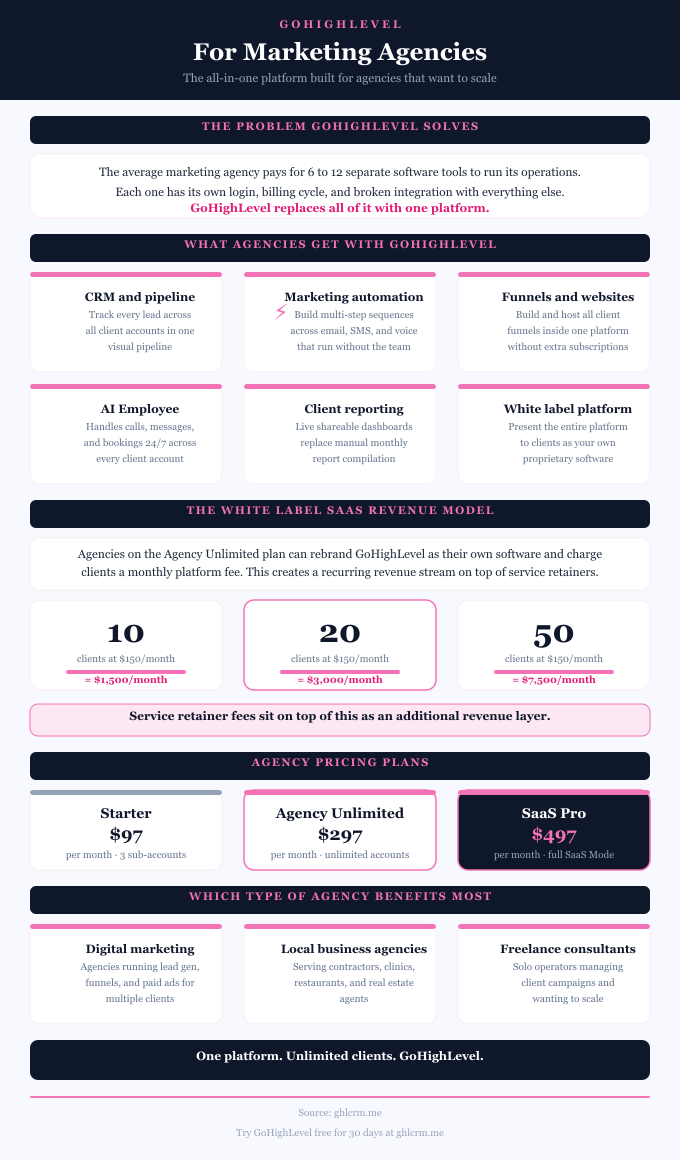
GoHighLevel for marketing agencies infographic showing the features and value the platform provides for agencies and the potential monthly recurring income it can help them generate.

How to Start a GoHighLevel Agency

Step 1: Choose Your Plan and Set Up Your Agency Account

Start by creating a GoHighLevel account and selecting the right plan for your agency size.

The Unlimited plan at $297/month works for most agencies since it includes unlimited sub-accounts. If you’re planning to resell GoHighLevel as your own software, choose Agency Pro at $497/month for SaaS Mode capabilities.

You can sign up using my affiliate link for an extended 30-day trial instead of the standard 14-day trial.

After creating your account, you’ll land in the Agency View. This is your master control panel where you manage all client sub-accounts, team members, and agency-wide settings.

Complete Your Agency Profile

Go to Settings > Company Settings and fill in your agency information, including business name, address, phone number, and website. Upload your agency logo that will appear throughout the platform.

If you’re on Unlimited or Agency Pro, configure your white-label settings here. Add your custom domain (like app.youragency.com), so clients access the platform through your branded URL instead of GoHighLevel’s domain.

Step 2: Connect Essential Integrations

Before creating client accounts, connect the core integrations you’ll use across your agency.

Payment Processor

Navigate to Settings > Integrations and connect Stripe (most recommended) or your preferred payment gateway. This enables payment collection across all client accounts. Each client can later connect their own Stripe account, or you can use your agency account to process payments on their behalf.

Calendar Systems

Connect Google Calendar and/or Outlook under Settings > Integrations. This allows appointment scheduling to sync with your team’s calendars, preventing double-bookings.

Social Media Platforms

Connect Facebook, Instagram, LinkedIn, and other social platforms you’ll use for client campaigns. These connections enable the Social Planner, ad management, and social messaging features.

Step 3: Set Up Your Team Structure

Add team members who’ll be working in client accounts.

Go to Settings > My Staff and click Add Employee. Enter their name, email, and contact information. Set their user type to “Agency” for full agency-level access or “Account” for sub-account specific access.

Configure Permissions

For each team member, toggle permissions for different platform areas. Your account managers might need full access, while your content creators only need Social Planner access. Your sales team might see pipelines but not billing settings.

This granular control ensures team members access exactly what they need without exposing sensitive client information unnecessarily.

Step 4: Create Your First Sub-Account

GoHighLevel Sub-accounts are isolated workspaces for each client. Let’s create one to understand the process.

From Agency View, click “Sub-Accounts” in the left menu, then click “Add Sub-Account” in the top right.

You’ll see two options: load from a Snapshot (template) or start blank. For your first account, choose blank so you understand the complete setup process. Later, you’ll use Snapshots to speed up onboarding.

Enter the client’s business information, including name, address, phone number, website, and timezone. This information populates throughout their account.

Click “Create Sub-Account.” Within seconds, the new client workspace appears in your sub-accounts list.

Step 5: Configure the Client Sub-Account

Click into the newly created sub-account. You’re now operating inside that client’s workspace.

Set Up Business Settings

Go to Settings > Business Profile and verify all information is correct. Add the client’s logo, business hours, and any additional details specific to their operation.

Connect Client-Specific Integrations

If the client has their own Stripe account, connect it under Settings > Integrations. Same for their Google Calendar, Facebook Business Page, or other platform-specific accounts.

This keeps their payment processing and social media management under their control rather than running through your agency accounts.

Create Custom Fields

Navigate to Settings > Custom Fields. Create fields relevant to this client’s business. For real estate, you might add fields like “Property Interest,” “Budget Range,” and “Preferred Location.” For dental practices, fields like “Insurance Provider” and “Last Visit Date” make sense.

These custom fields let you segment contacts and personalize communications based on client-specific data points.

Step 6: Build Your First Pipeline

Pipelines track where prospects are in the sales process.

Go to Opportunities > Pipelines and click Create Pipeline. Name it based on the client’s sales process (like “Real Estate Buyer Pipeline” or “New Patient Pipeline”).

Add stages that reflect how this client actually moves prospects through their funnel. Common stages include New Lead, Contacted, Qualified, Proposal Sent, Negotiation, Closed Won, and Closed Lost.

For each stage, set the expected value and probability percentage. This helps forecast revenue based on pipeline health.

Click into each stage and configure stage-specific automations. For example, when an opportunity enters “Proposal Sent,” automatically create a task to follow up in 48 hours.

Step 7: Create Lead Capture Forms

Forms are how you capture contact information and feed leads into the CRM.

Navigate to Sites > Forms and click Create Form. Use the drag-and-drop builder to add fields you need (name, email, phone, custom fields).

Configure form settings including where submissions go (which pipeline stage), what tags to apply, and which workflow to trigger upon submission.

Publish the form and grab the embed code. You can add this to the client’s website, or use the standalone form link for paid advertising campaigns.

Test the form by submitting a test entry and verifying the contact appears correctly in the CRM with proper tags and pipeline placement.

Step 8: Build Your First Funnel

Funnels are complete marketing campaigns with landing pages, forms, and follow-up sequences.

Go to Sites > Funnels and click Create Funnel. Choose a template from the library or start from scratch.

The funnel builder lets you create multiple pages (landing page, thank you page, application page, etc.) that are linked together in a conversion flow.

Use the drag-and-drop page builder to customize design, add your client’s branding, modify copy, and configure form submissions to feed into the appropriate pipeline.

Connect the funnel to a custom domain (client’s existing website or a new domain purchased for campaigns).

Test the entire funnel flow from landing page through form submission to thank you page, verifying contacts are captured correctly.

Step 9: Create Email and SMS Templates

Build reusable templates for client communications.

Email Templates

Navigate to Marketing > Templates and click Create Email Template. Design emails for common scenarios like welcome messages, appointment confirmations, follow-ups, and promotional campaigns.

Use merge tags to personalize emails with contact names, appointment times, custom field data, and other dynamic information.

SMS Templates

Go to Marketing > Templates and create SMS templates. Keep messages concise (ideally under 160 characters to avoid multi-segment charges).

Common SMS templates include appointment reminders, quick follow-ups, review requests, and confirmation messages.

Save these templates for reuse across workflows and manual sending.

Step 10: Build Automation Workflows

Workflows automate repetitive marketing and communication tasks.

Go to Automation > Workflows and click Create Workflow. Give it a descriptive name like “New Lead Follow-Up” or “Appointment Reminder Sequence.”

Set the Trigger

Choose what starts this workflow. Common triggers include form submission, tag added, opportunity stage change, appointment booked, or specific date/time.

Add Actions

After the trigger, add actions that execute automatically. Actions include sending emails, sending SMS messages, adding/removing tags, creating tasks, updating pipeline stages, and waiting specified time periods between actions.

Example New Lead Workflow:

  1. Trigger: Form submitted
  2. Action: Send welcome SMS immediately
  3. Action: Wait 2 minutes
  4. Action: Send welcome email
  5. Action: Wait 1 day
  6. Action: Send follow-up SMS asking if they have questions
  7. Action: Create task for sales team to call if no response in 2 days

Build workflows for common scenarios including new lead follow-up, appointment reminders, post-service review requests, and cold lead re-engagement.

Test each workflow thoroughly before activating for real contacts.

Step 11: Set Up the Calendar System

Calendars handle appointment scheduling and booking.

Navigate to Calendars and click Create Calendar. Name it based on its purpose (like “Discovery Calls” or “Service Appointments”).

Configure Availability

Set the days and times when appointments can be booked. Add buffer times between appointments if the client needs travel time or prep time.

Enable team scheduling if multiple people handle appointments, choosing between round-robin (distribute evenly) or collective (all team members must be available).

Set Up Notifications

Configure automated reminders sent via SMS and email. Standard setup includes 24-hour reminder, 1-hour reminder, and immediate confirmation.

Connect Payment Collection

Enable payment collection at booking to reduce no-shows. Set whether you require a deposit or full payment upfront.

Add the calendar booking link to the client’s website, email signatures, and marketing materials.

Step 12: Create Your Agency Snapshot Template

Now that you’ve built a complete client setup, save it as a Snapshot for future use.

From Agency View, go to Settings > Snapshots and click Create Snapshot.

Name your Snapshot descriptively (like “Real Estate Agent Full Setup V1”).

Select the sub-account you just configured as the source.

Choose which assets to include. For a complete template, select all funnels, workflows, forms, pipelines, calendars, templates, and settings.

Click Create. The Snapshot processes and appears in your My Snapshots library within a few minutes.

Future Client Onboarding

When you onboard your next client, instead of rebuilding everything, you simply create a new sub-account and load your Snapshot during creation. The entire setup deploys automatically in under 10 minutes.

Customize the Snapshot with client-specific branding, information, and any unique requirements, but all the structural work is already complete.

Step 13: Configure White-Label Branding (Unlimited/Pro Plans)

If you’re on Unlimited or Agency Pro, set up your white-label domain and branding.

Custom Domain Setup

Go to Settings > Domains and add your custom domain (like app.youragency.com). Follow the DNS configuration instructions to point your domain to GoHighLevel’s servers.

Once verified, set this as your default domain. All client logins now use your branded URL.

Desktop App Customization

Navigate to Settings > White Label Settings and upload your agency logo, set brand colors, and configure the login page appearance.

Clients accessing the platform see your branding throughout, never GoHighLevel’s.

Mobile App (Agency Pro Only)

Agency Pro users can create fully branded iOS and Android apps. There are setup fees and quarterly hosting charges, but clients download your app from app stores with your company name and logo.

Step 14: Set Up Your Pricing

Our White-Label SaaS Calculator for GoHighLevel agencies will help you set a reasonable price and estimate your potential ROI based on the services you intend to provide and your overhead costs.

You can sell marketing and CRM services or sell SaaS to local businesses through your GoHighLevel agency. You can even run a hybrid business model where you sell both marketing services and SaaS.

Unlimited plan users can create multiple pricing plans for their services and manually charge clients for marketing services, setup fees, and retainers. The Pro plan subscribers, on the other hand, can set up automated monthly billing and create tiered subscriptions for their SaaS offerings.

SaaS Mode: (Agency Pro Only)

If you’re reselling GoHighLevel as your own software, configure SaaS Mode.

Go to Settings > SaaS Configurator and click Enable SaaS Mode.

Create Pricing Plans

Build different subscription tiers (Basic, Professional, Premium) with different features and prices. For each plan:

  • Set the monthly price
  • Choose which features to include (calendars, funnels, workflows, AI tools, etc.)
  • Configure user limits and other restrictions

Connect Stripe for Automated Billing

Link your Stripe account to handle subscription payments. When clients sign up, Stripe automatically processes payments, creates their sub-account, provisions features, and sends login credentials.

Build Your Sales Page

Create a landing page showcasing your pricing tiers. When prospects select a plan and complete payment, everything happens automatically.

Step 15: Train Your Team

Schedule training sessions for your team covering essential workflows.

For Account Managers:

  • Navigating between sub-accounts
  • Managing client contacts and pipelines
  • Creating and sending campaigns
  • Reading reports and analytics

For Content Creators:

  • Using the Social Planner
  • Building emails and landing pages
  • Creating templates and assets

For Sales Team:

  • Managing opportunities and pipelines
  • Scheduling appointments
  • Following up with leads

Record these training sessions for future team members and create written documentation of standard operating procedures.

Step 16: Onboard Your First Client

With everything configured, onboard your first real client.

Create their sub-account by loading your Snapshot template. Customize with their specific information, branding, and business details.

Connect their integrations (Stripe, Google, Facebook, etc.).

Import their existing contacts via CSV or from their current CRM.

Set up their specific campaigns and funnels.

Provide them with login credentials if they’ll access the platform directly, or explain that you’ll manage everything on their behalf.

Train them on features they’ll use (like the conversation inbox or calendar).

Step 17: Monitor and Optimize

After activating client accounts, monitor performance regularly.

Check the Agency View dashboard weekly to see metrics across all clients including total contacts, active conversations, opportunities in pipelines, and appointment bookings.

Review individual client accounts monthly to optimize workflows, update templates, refresh campaigns, and ensure automation is performing correctly.

Use the reporting features to demonstrate ROI to clients through scheduled automated reports.

Common GoHighLevel Agency Mistakes to Avoid

Skipping Test Workflows

Always test workflows with dummy contacts before activating them for real leads. Broken workflows damage client relationships and waste leads.

Not Documenting Processes

As you build systems, document what you’re doing. Six months later when you need to troubleshoot or train someone, documentation saves massive time.

Overcomplicating Initial Setups

Start simple. Get basic lead capture, follow-up, and appointment booking working before adding advanced features. Complex systems are harder to troubleshoot and maintain.

Forgetting to Customize Snapshots

When loading Snapshots for new clients, remember to customize client-specific details like business name, contact information, and branding. Don’t deploy templates with placeholder information.

Getting Help When Stuck

Join the GoHighLevel Facebook community with over 18,000 agency owners. Search for your question before posting, as it’s likely been answered already.

Use the Help Center documentation at help.gohighlevel.com for step-by-step guides and video tutorials.

Access 24/7 chat support through the platform for technical issues or specific questions.

Consider hiring a GoHighLevel specialist for initial setup if you’re not technically inclined. They’ll configure your agency structure faster and train your team on best practices.

GoHighLevel for Agencies: Final Words

Deploying GoHighLevel for an agency requires methodical implementation. Don’t try to learn everything simultaneously. Focus on core functions first: sub-accounts, contacts, basic workflows, and calendars.

Add complexity gradually as you master fundamentals. Build your first Snapshot after successfully setting up 2-3 clients manually. Enable SaaS Mode after validating that clients will actually pay for software subscriptions.

The agencies succeeding most with GoHighLevel treat it as infrastructure worth investing time to master, not just another tool to dabble with. Commit to learning the platform thoroughly, and the operational transformation justifies the initial effort many times over.
GoHighLevel (GHL) Sub Accounts: Agency Business Model Setup Guide

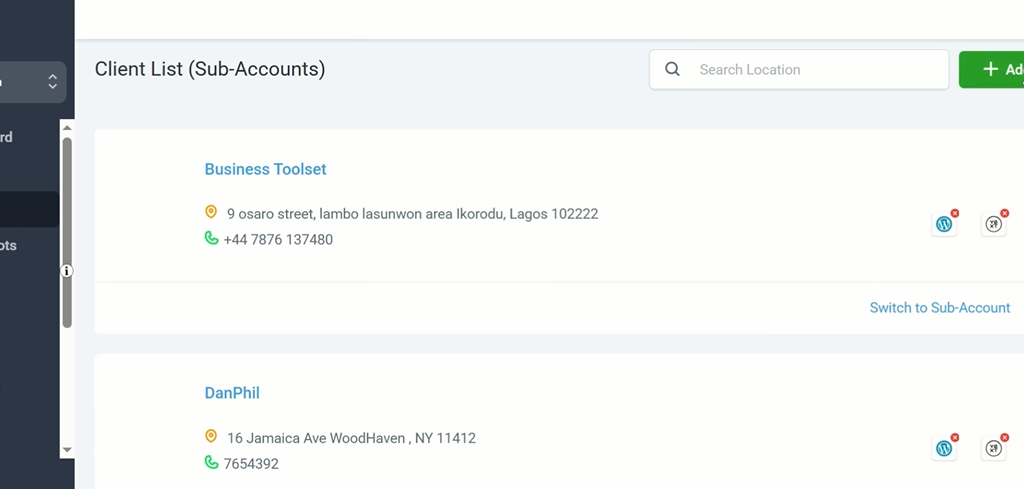
GoHighLevel sub-accounts are separate client workspaces created inside an agency account. Each one is a fully isolated environment with its own contacts, pipelines, funnels, automations, calendars, and reporting. Nothing inside one sub-account affects another.

When your dental practice client logs in, they see only their data. If your roofing contractor client logs in, they see only theirs. From your side as the agency, every sub-account is accessible from the agency dashboard with a single click.

In this guide, we will discuss the value of GHL sub-accounts for agencies, their cost, and how to create and generate revenue from them.

What Is a Sub-Account in GoHighLevel?

Your GoHighLevel agency account is the platform’s master level, where your billing, team settings, and white-label configuration are stored. Sub-accounts sit one level below and are where client work happens.

Each sub-account is a complete, standalone instance of GoHighLevel configured for one specific client or business location.

The client logs in and sees their own dashboard, their own pipeline, their own automations, and their own reports. They have no visibility into your agency account or any other client’s workspace.

GoHighLevel Sub-Account Price: How Much Does it Cost?

GoHighLevel does not charge by Sub-account. The number of sub-accounts available to agencies depends on the GHL pricing plan they subscribed to.

The Starter plan costs $97/month and limits agencies to 3 sub-accounts, while the Unlimited and Pro plans cost $297/month and $497/month, respectively, and allow unlimited sub-accounts.

Starter Plan at $97 per month

The Starter plan allows up to three sub-accounts. Your own agency account counts as one, leaving two for paying clients. This plan is for local service business owners and new agencies with a couple of clients.

For any agency with growth ambitions, it is a ceiling that quickly creates problems.

Agency Unlimited Plan at $297 per month

Agency Unlimited removes the sub account ceiling entirely. Unlimited sub-accounts are included at no additional cost per account.

This is the plan most agencies should start on. The flat pricing model means every new client increases revenue without increasing platform cost, and the margin on each additional client improves as the roster grows.

SaaS Pro Plan at $497 per month

The Pro plan also includes unlimited sub-accounts and adds SaaS Mode, which automates sub-account creation, configuration, and billing when clients sign up through the agency’s branded checkout page.

What Each Sub-Account Includes

Every sub-account gives the client full access to the core GoHighLevel feature set, regardless of the plan it’s on.

CRM and pipeline

This feature tracks every contact interaction automatically and organizes leads through a visual pipeline that updates as contacts take action.

Marketing automation

It runs entirely independently per sub-account. Workflows, triggers, and actions for one client have no connection to another client’s automations.

Funnel and website builder

Funnels and websites host each client’s landing pages and websites with independently connected custom domains.

Appointment scheduling

It manages each client’s calendar with its own availability, booking pages, confirmation messages, and reminder sequences.

Reputation management

The reputation management tool sends review requests under each client’s business name to their specific Google Business Profile or Facebook page.

AI Employee

The Voice AI and Conversation AI are trained separately for each sub-account on that client’s specific services, FAQs, tone, and booking process.

Reporting

It generates a dedicated performance dashboard for each sub-account covering pipeline movement, funnel conversions, email and SMS engagement, and appointment show rates.

How to Create a GoHighLevel Sub-Account: Step-by-Step Setup Guide

Step 1: Access Sub-Accounts

From your Agency View dashboard click Sub-Accounts in the left navigation panel. Make sure you are in the Agency View and not inside an existing sub-account before proceeding.

Step 2: Create a New Sub-Account

Click Add Sub-Account in the top right corner. This opens the sub-account creation flow.

Step 3: Choose a Snapshot or Start Blank

Before entering client details GoHighLevel asks whether to apply a Snapshot or start with a blank account.

A Snapshot is a pre-built configuration containing funnels, automation workflows, email sequences, SMS campaigns, and pipeline stages for a specific industry.

GoHighLevel provides Snapshots for common niches including dental, real estate, gyms, home services, and restaurants. Applying a relevant Snapshot deploys a working campaign infrastructure to the new sub-account instantly rather than building everything from scratch.

Agencies serving a specific niche consistently should build custom Snapshots from their best-performing client setups and save them for deployment to every new client in that niche. A well-built custom Snapshot reduces onboarding time from several days to under an hour.

Step 4: Enter the Client’s Business Details

Fill in the client’s business name, address, phone number, website, and timezone. Use the client’s actual business information. Incorrect details here cause inaccuracies in automated messages and calendar settings that require time to identify and fix later.

Step 5: Create the Sub-Account

Click Create Sub-Account. The account is immediately active and accessible from the agency dashboard.

Step 6: Complete the Technical Configuration

Before building campaigns or activating automations, work through the following setup steps inside the new sub-account.

Phone number: Purchase a local number through the LC Phone system if the client will be using SMS, calls, Voice AI, or Conversation AI. This is required for those features to function.

Email deliverability: Verify the client’s sending domain through Email Services settings by adding SPF, DKIM, and DMARC records to the client’s DNS. Skipping this step causes automated emails to land in spam.

Calendar: Configure the client’s availability, appointment duration, buffer times, and booking page settings. Set up confirmation and reminder sequences.

Payment processing: Connect Stripe or the preferred payment processor if the client will collect payments through the platform.

AI Employee: If Voice AI or Conversation AI will be active, configure the AI with the client’s services, pricing, FAQs, operating hours, and booking process. Thorough training information produces accurate responses. Minimal training information produces poor results that reflect badly on the agency.

Step 7: Customize the Snapshot or Build the Campaign

If a Snapshot was applied, replace all placeholder content with the client’s actual business information. Update funnel copy, email sequences, and SMS messages. Test every automation before activating on live traffic.

If starting from a blank account, build the pipelines, funnels, and workflows based on the client’s requirements.

Step 8: Set Up Client User Access

Create a user account for the client inside the sub-account settings. Configure the permission level based on what the client needs to see and do.

A client who wants to monitor their pipeline and review dashboard needs a different access level than one who wants the agency to manage everything. The client receives login credentials that take them directly into their sub-account and nothing else.

How Agencies Make Money With GoHighLevel Sub Accounts

You can generate monthly recurring revenue from GoHighLevel sub-accounts by reselling each at an affordable monthly fee to local businesses that don’t have the budget for the platform’s $97/month lowest plan. Agencies can subscribe for the Unlimited plan at $297/month and sell each sub-account to clients at $50/month.

Rather than merely selling sub-account access, agencies can generate higher monthly recurring income by white-labeling GoHighLevel with their branding and using the platform’s tools to help local service businesses automate their marketing, sales, and customer relationship management.

On the Agency Unlimited plan, package sub-account access as branded software plus marketing services and bill clients manually. Two clients paying $297 per month each covers the entire GoHighLevel bill. Every client beyond that is margin.

On the SaaS Pro plan, SaaS Mode automates the entire process. Clients sign up through a branded pricing page, pay through Stripe, and land inside a configured sub-account without any manual work from the agency.

As the client base grows the operational overhead stays flat.

GoHighLevel (GHL) Database Reactivation: Automate Campaigns that Revive Leads

GoHighLevel database reactivation is the process of sending automated outreach to inactive contacts, past clients, or cold leads within the GoHighLevel platform to revive those relationships and convert dormant contacts into booked appointments or paying customers.

Every business accumulates a contact database over time that contains significantly more revenue potential than it actively extracts. Leads that enquired and went cold.

Past clients who stopped buying. Prospects who showed interest, received a quote, and never responded. A database reactivation campaign targets that existing asset and attempts to generate revenue from it without spending a cent on new lead generation.

Why GoHighLevel Database Reactivation Campaigns Work

GoHighLevel makes database reactivation practical at scale by automatically handling every step of the outreach process for contacts in a cold database who already know your business. Messages go out to the right people without manual sending.

The trust barrier that makes cold outreach difficult is already lower, and the likelihood of a response to a well-timed, relevant message is significantly higher than outreach to a genuinely cold audience.

What Types of Contacts Benefit From Reactivation

Not every contact in a database is an equally good candidate for a reactivation campaign. The contacts that consistently produce the best results fall into clearly defined segments.

Enquired but never converted

These are contacts who showed clear purchase intent at some point, submitted a form, sent a message, or called the business, but were never properly followed up or did not convert at the time for reasons that may no longer apply.

Past clients who stopped buying

They have already experienced the business and made a positive purchase decision at least once. They are among the most valuable reactivation targets because the trust established during the previous relationship still exists even if the communication has lapsed.

Quote or estimate recipients who did not proceed

They are leads that were far enough through the sales process to receive a formal proposal but did not commit. Circumstances change.

A quote that was too expensive six months ago may be very affordable now. A project that was deprioritized may have moved back to the top of the list.

Lapsed members or subscribers

These are gyms, subscription businesses, or membership organizations that stopped their recurring relationship with the business at some point. Many lapsed for practical reasons unrelated to satisfaction and are potential returnees with the right prompt.

How to Set up a GoHighLevel Database Reactivation Campaign: Step by Step

Step 1: Clean and Segment the Contact List

Before building the campaign, the contact database needs to be properly prepared. In the GoHighLevel Contacts section, filter the database to identify the specific segment to be reactivated. Apply tags to those contacts to create a clearly defined reactivation audience.

Remove contacts who have previously unsubscribed from communications, have invalid or incomplete contact information, or are clearly unsuitable for the campaign.

A clean, well-segmented list consistently produces better results than a large unfiltered one. Quality of targeting matters more than volume of contacts.

Step 2: Create a New Workflow

Navigate to Automation then Workflows and click Add Workflow. Select Start from Scratch. Name the workflow clearly so it is easy to identify.

Step 3: Set the Trigger

For a database reactivation campaign the most reliable trigger is Contact Tag Added. Configure the trigger to fire when the reactivation tag applied in Step 1 is added to a contact.

This gives full control over exactly when each contact enters the campaign and allows the outreach to be staggered across batches if preferred.

Step 4: Write the Opening Message

The first message in a reactivation campaign is the most important and the one that most directly determines the campaign’s overall response rate.

It needs to feel personal rather than broadcast, reference something specific to the contact’s previous interaction with the business where possible, and include a clear and low-friction call to action.

Avoid generic broadcast language. A message that reads like it was sent to a mass list generates mass list response rates. A message that feels like it was sent specifically to that person generates meaningfully higher engagement.

Step 5: Add a Wait Step and Conditional Branch

After the opening SMS, add a Wait step of 24 to 48 hours before the next action fires. Follow the wait step with a conditional branch that checks whether the contact has replied to the initial message.

Contacts who replied branch into the positive response sequence. Contacts who did not reply continue to the follow-up sequence. This branching logic ensures that responsive contacts receive appropriate next steps rather than continuing to receive the same outreach as non-responsive ones.

Step 6: Build the Follow-Up Sequence

For contacts who did not respond to the opening SMS, the follow-up sequence extends the outreach across additional channels and time intervals. An email follow-up 48 hours after the opening SMS provides more context about the offer and includes a direct link.

A second SMS three to four days after the initial message gives a final prompt before the sequence concludes.

The total number of follow-up touches in a reactivation campaign is typically two to four. More than four touches without a response is unlikely to produce a conversion and risks generating complaints or spam reports that damage sender reputation.

The goal is to give every genuinely interested contact a reasonable number of opportunities to respond, not to exhaust the list through excessive contact.

Step 7: Build the Positive Response Sequence

Contacts who respond positively need to be moved into a conversion sequence immediately while their interest is active. This sequence should deliver the next step in the purchase or booking process as quickly and frictionlessly as possible.

For appointment-based local businesses, the positive response sequence sends a direct calendar booking link and a confirmation of the specific offer mentioned in the opening message.

For product or service businesses, it initiates a sales conversation or delivers a proposal directly. The pipeline stage for responsive contacts should update automatically so the team has clear visibility of warm leads without manual tracking.

Step 8: Tag Non-Responders and Close the Campaign

After the full sequence has run for contacts who did not respond, apply a non-responsive tag to remove them from further outreach in the same campaign. This tag prevents the same contacts from receiving the same campaign repeatedly and allows future campaigns to be built with updated messaging for audiences that did not respond to the initial approach.

Contacts who opted out are handled automatically by GoHighLevel. Any contact who replies STOP to an SMS or clicks an unsubscribe link in an email is removed from the sequence immediately and their opt-out status is recorded in the CRM.

Step 9: Activate and Monitor

Switch the workflow from Draft to Published. Tag the first batch of reactivation contacts to trigger the campaign. Monitor the performance from the GoHighLevel reporting dashboard tracking delivery rates, response rates, booking rates, and pipeline movement.

For large contact databases it is worth staggering the campaign across batches of 50 to 100 contacts per day rather than sending to the entire list simultaneously.

Staggering the send allows the team to manage incoming responses without being overwhelmed and allows the campaign messaging to be refined based on early response data before the full list has been contacted.

What to Offer in a GoHighLevel Reactivation Campaign

The most effective GoHighLevel reactivation campaign offers are specific, time-limited, and directly relevant to the contact segment being targeted.

A prospect who received a quote that was not accepted at the time responds better to an updated pricing offer with a clear validity window than a general check-in message.

Specificity and urgency consistently outperform generic and open-ended in reactivation campaign offers regardless of the industry or the contact segment being targeted.

Final Thoughts

GoHighLevel database reactivation campaigns generate revenue from an asset every business already owns. The contacts are there and a relationship history exists.

The trust barrier is lower than it is with cold audiences. What most businesses lack is the system to reach those contacts at scale, follow up consistently, and convert responses into booked appointments or purchases without manual effort.

GoHighLevel provides that system. Build the campaign once, set it up properly, and the platform does the rest.

GoHighLevel for Gyms: Fitness Facilities Automation System

GoHighLevel turns gyms into fitness facilities that consistently acquire new members and reduce churn among existing members for just $97/month.

Gyms often face the challenge of consistently converting inquiries year-round, retaining members through the inevitable motivation dips that follow initial sign-up enthusiasm, and building a review profile strong enough to generate inbound inquiries without relying entirely on paid advertising.

GoHighLevel automates all of those processes from a single platform.

GoHighLevel Features for Gyms

Conversation AI: Respond to Every Enquiry Immediately

GoHighLevel ensures that a prospective gym member who messages to ask about personal training add-ons receives an immediate, accurate response that covers the available options, pricing, and an offer to book a free tour or trial session.

Conversation AI is trained on the gym’s membership options, class schedule, facilities, pricing, and frequently asked questions so every response is accurate and relevant without a team member being involved.

Free Trial and New Member Funnels

GoHighLevel helps you create a dedicated free trial funnel that converts significantly better than a general gym website.

A landing page offering a free seven-day trial, a complimentary introductory session, or a guest pass captures the prospective member’s details and immediately triggers an automated follow-up sequence.

For gyms running Facebook or Instagram ads targeting specific demographics, a dedicated funnel matched to the campaign audience consistently generates more qualified trial bookings than sending ad traffic to a general website.

Member Onboarding Automation

The first two to four weeks of a new gym membership are the most critical period for long-term retention.

A new member who feels welcomed, guided, and connected to the gym in the first month is significantly more likely to remain a member six months later than one who signed up but was never contacted again.

GoHighLevel automates the entire new member onboarding sequence. A welcome message fires immediately after sign-up. A check-in message is sent after the first visit to ask how it went.

A class recommendation message fires mid-week, suggesting sessions that match the member’s stated fitness goals. A one-month check-in reviews their progress and introduces the next stage of their fitness journey.

Membership Renewal and Retention Sequences

Members who stop attending before canceling are the most predictable churn risk in any gym’s membership base. A member who has not scanned in for fourteen days is significantly more likely to cancel than one who attended last week.

GoHighLevel’s workflow automation detects attendance gaps and automatically triggers re-engagement sequences. A member who has not visited for 10 days receives a check-in message asking whether everything is okay.

A member who has not attended in three weeks receives a targeted outreach with a class recommendation or a personal trainer consultation offer. A member who is approaching their renewal date receives an automated renewal sequence that makes staying the path of least resistance.

These sequences run without any team member identifying at-risk members manually. The automation monitors attendance patterns and responds to them systematically.

Class Booking and Session Reminders

GoHighLevel’s scheduling tool helps gyms handle class bookings through an embedded calendar on their website or member portal. Confirmation messages fire immediately after every booking.

For gyms running structured class timetables, automated class booking and session reminders reduce no-shows, improve class planning accuracy, and create a more professional member experience.

Automated Review Generation

A gym’s Google review profile is one of the primary factors that determines how many new membership enquiries it generates from local search.

GoHighLevel automates the review request process. After a member reaches their first-month milestone, completes an initial fitness assessment, or achieves a defined goal, the platform sends a review request via SMS, directing them to the Google Business Profile with a one-tap link.

The timing of the request at a moment of positive experience maximises the likelihood of a detailed, enthusiastic response.

Review AI automatically responds to every incoming review keeping the gym’s profile active and engaged without anyone on the team managing it.

Referral Campaign Automation

Word of mouth is the highest-quality lead source for gym memberships. A friend’s recommendation removes the trust barrier that makes gym switching decisions feel risky. Most gyms rely on referrals happening spontaneously without any systematic approach to encouraging them.

GoHighLevel automates the referral request process. Members who have been attending for sixty days and showing consistent engagement receive an automated message thanking them for their commitment and asking if they know anyone who would benefit from a gym membership.

A referral offer such as a discounted month for both the existing member and the new member they refer makes the referral conversation easy and mutually beneficial.

Database Reactivation for Lapsed Members

Every gym has a database of past members who cancelled at some point but whose circumstances may have changed. A former member who stopped attending due to a work schedule change, an injury, or a financial constraint may be ready to rejoin twelve months later.

GoHighLevel reactivation campaigns send targeted outreach to that lapsed member segment with a relevant offer designed to remove the barrier to rejoining.

A win-back campaign offering a discounted first month, a waived joining fee, or a complimentary personal training session generates memberships from a contact base the gym already has a relationship with.

Setting Up GoHighLevel for a Gym: Step by Step

Step 1: Build the Free Trial Funnel

Create a dedicated landing page with a free trial or guest pass offer. Connect to the CRM and configure the automated follow-up sequence to fire within sixty seconds of a form submission.

Step 2: Configure Conversation AI

Train on membership options, class schedule, facilities, pricing, and FAQs. Connect to every active messaging channel. Test before activating on live channels.

Step 3: Set Up Member Onboarding Automation

Build a new member welcome workflow covering the first four weeks of membership with check-in messages, class recommendations, and progress reviews at configured intervals.

Step 4: Build the Retention Workflow

Create an attendance monitoring workflow that triggers re-engagement sequences when a member has not visited within defined timeframes. Configure renewal outreach for members approaching their renewal date.

Step 5: Activate Review Generation

Build a workflow triggered by the one-month membership milestone that sends a review request SMS. Direct members to the Google Business Profile with a one-tap link.

Step 6: Set Up Referral Automation

Build a workflow triggered by the sixty-day membership milestone that sends a referral request with a clear referral offer and a sharing link.

Step 7: Build the Lapsed Member Reactivation Campaign

Segment the past member database. Build a reactivation sequence with a relevant win-back offer for members who cancelled more than three months ago.

Final Thoughts

GoHighLevel for gyms works because it automates the member communication processes that determine acquisition, retention, and referral rates.

New enquiries get followed up instantly. New members get onboarded properly. At-risk members get re-engaged before they cancel. Satisfied members generate reviews and referrals automatically.

The gym team focuses on delivering a great fitness experience. GoHighLevel handles everything else.

GoHighLevel for Personal Trainers: Solution for Fitness Experts

GoHighLevel helps personal trainers build a consistent client base, follow up on every inquiry, retain clients, and generate a steady stream of new referrals without a dedicated marketing team or separate software tools.

The platform handles all of that automatically so the trainer can focus on what they do best.

GoHighLevel Features for Personal Trainers

Conversation AI: Respond to Every Enquiry Instantly

Personal training enquiries arrive through Instagram DMs, Facebook Messenger, website web chat, SMS, and Google Business Messages at all hours, often when the trainer is in the middle of a session with an existing client. Responding to a new enquiry while coaching a paying client is not possible.

Leaving an enquiry unanswered for two hours while finishing a training block means losing that prospect to a competitor who responded immediately.

Conversation AI handles every inbound message across every channel simultaneously, responding instantly to every enquiry regardless of when it arrives.

Voice AI: Handle Calls During Training Sessions

GoHighLevel helps personal trainers running a local service business answer calls during training sessions. Voice AI answers every inbound call immediately, handles questions about services, pricing, availability, and the initial consultation process, and books discovery calls or assessment appointments directly into the trainer’s calendar.

For personal trainers who receive enquiry calls from Google My Business, local search results, or referrals, Voice AI ensures every caller gets an immediate, professional response regardless of what the trainer is doing at that moment.

New Client Acquisition Funnels

You can use the platform to create a funnel that offers a free fitness assessment, a complimentary first session, or a free transformation consultation, capturing the prospective client’s details and immediately triggering an automated follow-up sequence.

Client Onboarding Automation

The experience a new client has in the first week of starting personal training has a significant impact on how long they stay and how likely they are to refer friends and family.

GoHighLevel automates the entire new client onboarding process, delivering the right information and communication at the right moment without the trainer having to manage it manually for each new client.

Session Reminders and No-Show Reduction

Missed personal training sessions are a direct revenue loss and a scheduling disruption.

GoHighLevel’s automated reminder sequence sends a confirmation message immediately after every session is booked, a reminder 24 hours before the session, and a final reminder 1 hour before the session.

Clients who cannot attend can reschedule through the reminder message, which updates the calendar automatically and allows the trainer to fill the slot with another client or recover the time productively.

For trainers running group sessions or bootcamp formats, automated reminders sent to every participant simultaneously reduce the cumulative no-show rate that affects group session viability.

Client Retention and Re-Engagement Sequences

Client retention is the most cost-effective growth lever available to any personal trainer. A client who stays for 12 months generates 12 times the revenue of a client who attends for 1 month and then stops.

GoHighLevel automates the communication that keeps clients engaged, motivated, and less likely to cancel during the inevitable periods when motivation dips.

A client who misses a session without explanation receives an automated check-in message asking if everything is okay and including a direct rebooking link.

A client who has not rebooked after their most recent session receives a follow-up sequence over the following week. A client who has not trained in thirty days receives a reactivation message with a specific offer or a progress reminder.

For personal trainers with a database of past clients who stopped training at some point, a GoHighLevel reactivation campaign sends targeted outreach to that segment with a relevant offer or a check-in message designed to restart the training relationship.

Many lapsed clients stopped not because they wanted to stop but because life got in the way and nobody reached out to bring them back.

Package and Programme Sales Automation

Personal trainers who sell multi-session packages or structured fitness programmes benefit significantly from GoHighLevel’s payment and invoicing infrastructure combined with automated sales sequences.

A prospect who has been through the discovery call process but has not yet purchased a package receives an automated follow-up sequence that addresses common objections, shares client testimonials, and presents the package options with direct payment links.

For trainers selling online programmes, GoHighLevel’s membership platform hosts the programme content while the automation engine handles enrolment, onboarding, progress check-ins, and upsell sequences to higher-tier coaching packages.

Automated Review Generation

A personal trainer’s online reputation is built primarily through Google reviews and social media testimonials.

Prospective clients searching for a personal trainer in the local area or researching trainers they have been referred to will look at reviews before making contact.

GoHighLevel automates the review request process. After every completed session block, programme completion, or significant client milestone, the platform sends a review request via SMS directing the client to the Google Business Profile with a one-tap link.

CRM and Client Pipeline Management

Every enquiry from every source is captured automatically in the GoHighLevel CRM with a complete contact record and interaction history. Social media messages, website form submissions, phone calls, and referrals all create contact records without manual data entry.

The visual pipeline tracks every prospective client from initial enquiry through discovery call booked, assessment completed, package purchased, active client, and completed programme.

Pipeline stages update automatically as clients take action. An enquiry that books a discovery call moves to the correct stage without manual input. A prospect who goes quiet after receiving a package proposal triggers a follow-up sequence automatically.

How to Set up GoHighLevel for Personal Training Service: Step by Step

Step 1: Configure Conversation AI

Train Conversation AI on the training services offered, pricing packages, training methodology, target client profile, and frequently asked questions.

Connect to every active messaging channel including Instagram DMs, Facebook Messenger, SMS, web chat, and Google Business Messages. Test responses against common prospective client enquiry scenarios before activating on live channels.

Step 2: Build the New Client Funnel

Create a dedicated landing page with a free consultation, assessment, or first session offer. Connect the page to the CRM and configure the automated follow-up sequence to fire within sixty seconds of a form submission.

Connect paid social media advertising traffic to the funnel for maximum conversion efficiency.

Step 3: Set Up Session Reminders

Configure the GoHighLevel calendar with session availability, duration, and location settings. Build an automated reminder sequence that sends a confirmation immediately after booking, a reminder 24 hours before, and a final reminder one hour before each session.

Step 4: Build the Onboarding Sequence

Create a new client welcome workflow that fires automatically when a client is tagged as new client. Configure the welcome message, pre-session preparation information, post-first-session check-in, and first-month progress review messages to send at the appropriate intervals.

Step 5: Activate the Review Generation Campaign

Build a workflow triggered by a session block completed tag or a programme milestone tag that sends a review request SMS at the moment of highest client satisfaction. Direct clients to the Google Business Profile with a one-tap link.

Step 6: Build the Retention and Reactivation Workflows

Create a missed session workflow that sends a check-in message when a client misses a session without explanation. Build a lapsed client reactivation sequence for clients who have not trained in thirty days.

Configure a past client database reactivation campaign for clients who stopped training more than three months ago.

Step 7: Set Up Package Renewal Automation

Build a workflow triggered when a client’s session count reaches a defined threshold before the package runs out. Configure an automated renewal outreach sequence that presents the next package option with a direct payment link.

Final Thoughts

GoHighLevel works for personal trainers because it replaces the inconsistent, manually dependent approach that most fitness professionals use to manage the business side of their practice with an automated system.

The software captures every inquiry, follows up without fail, retains clients through inevitable dips in motivation, and builds an online reputation that consistently generates new inquiries.

The trainers who implement these systems stop losing clients to competitors who respond faster, stop losing revenue to no-shows and lapsed clients, and stop relying on referrals and warm weather to keep the schedule full. GoHighLevel handles the business. The trainer handles the training.

GoHighLevel for Restaurants: Automate your Food Service Business

GoHighLevel helps restaurants solve the customer retention problem that most food service businesses underestimate until they look at the numbers. Acquiring a new restaurant customer costs significantly more than bringing back an existing one.

A diner who had a great experience last month and never heard from the restaurant again is not a loyal customer. They are a missed opportunity.

GoHighLevel builds the automated communication systems that turn first-time diners into regulars, regulars into advocates, and a dormant customer database into a consistent source of booked tables and increased revenue.

What GoHighLevel Does for Restaurant Businesses

GoHighLevel helps restaurants achieve maximum online visibility in their local market, generate 5-star reviews that build trust, and consistently stay in front of their existing customer base between visits.

Restaurants operate in one of the most competitive local market environments of any business type, yet most have no systematic way to communicate with past diners.

There is no follow-up after a booking. No outreach when the restaurant adds a new menu. No reminder when a customer hasn’t visited for 2 months. No automated system asking for a Google review after a positive experience.

GoHighLevel changes all of that.

GoHighLevel Features That Matter Most for Restaurants

SMS Marketing Campaigns

SMS is the highest-performing marketing channel available to restaurant businesses for direct customer outreach. Open rates for SMS messages consistently exceed 90 percent, significantly outperforming email for time-sensitive promotions and offers.

GoHighLevel’s SMS marketing capability allows restaurants to send targeted campaigns to their customer database instantly.

A slow Tuesday evening becomes a full dining room when a well-timed SMS goes out to the customer database at 4pm offering a table for two with a complimentary dessert.

A new seasonal menu launch drives bookings when existing customers receive an SMS invitation to be the first to try it.

The campaigns are built inside GoHighLevel’s workflow automation engine and can be scheduled in advance, triggered by specific dates or events, or sent manually when a promotional opportunity arises.

Every response to an SMS campaign is captured in the CRM and logged against the customer’s contact record.

Reservation and Booking Automation

GoHighLevel’s appointment scheduling tool creates a seamless online booking experience for restaurant customers. A booking widget embedded on the restaurant website or linked from social media profiles allows customers to reserve a table directly without calling the restaurant during service hours.

Confirmation messages go out immediately after every booking. Reminder messages fire at 24 hours and again two hours before the reservation time.

For restaurants with high no-show rates on advance bookings, a properly configured reminder sequence produces a measurable reduction in missed reservations without any manual intervention from the front of house team.

Customers who need to cancel can do so via the reminder message link, which automatically updates the calendar and makes the table available for another booking. The lost reservation becomes a recovered slot rather than a gap in the evening’s service.

Automated Review Generation

In the restaurant industry, Google reviews and ratings directly determine how many new customers a restaurant attracts from local search.

A restaurant with four hundred recent reviews and a four-point-seven rating appears above a competitor with forty reviews regardless of the quality of the food. Most potential diners make their decision before they ever visit by reading what previous customers have written.

GoHighLevel automates the review request process. After every completed dining experience, whether it was a reservation booking or a walk-in captured through the loyalty system, the platform sends a review request via SMS directing the satisfied diner to the Google Business Profile or TripAdvisor page with a one-tap link.

The timing of the review request is as important as the request itself. Sending it thirty minutes after the customer has left the restaurant, when the experience is still fresh and the satisfaction is at its peak, consistently produces higher response rates than requests sent the following day.

Review AI automatically responds to incoming reviews with contextually appropriate replies. A five-star review praising the pasta receives a warm, specific response that acknowledges the dish mentioned.

A three-star review noting a long wait receives a professional, measured reply that addresses the concern and invites the customer back. Every review gets a response without anyone on the team spending time on it.

Customer Loyalty and Retention Sequences

Bringing a past customer back is significantly easier and cheaper than acquiring a new one. GoHighLevel automates the customer retention process through targeted follow-up sequences that keep the restaurant top of mind with its existing customer base between visits.

A customer who dined three weeks ago and has not returned receives a re-engagement message with a relevant offer. A customer who visited for a birthday last year receives an outreach message as the same time approaches this year.

A customer who has not visited in 60 days receives a win-back campaign that offers a reason to return.

These sequences run automatically in the background without anyone on the restaurant team managing them. The customer receives a timely, personal-feeling message. The restaurant generates a booking from a customer it already has a relationship with.

Special Event and Promotion Campaigns

GoHighLevel makes it straightforward to run targeted promotional campaigns for specific events, dates, and occasions that drive bookings and increase average spend.

A Valentine’s Day dinner campaign is sent to the customer database in early February, featuring a special set-menu offer and a direct booking link.

A Father’s Day promotion targets the right customer segment a week in advance. A new chef’s table experience is announced first to the most loyal customer segment as an exclusive early-access offer.

Every campaign is built inside the workflow automation engine, scheduled at the appropriate time, and sent to the configured audience segment automatically.

The response data from each campaign feeds back into the CRM, showing which customers engaged, which booked, and which did not respond, informing future campaign targeting.

Conversation AI: Handle Enquiries Without Tying Up the Front Desk

Restaurant enquiries come in through web chat, Facebook Messenger, Instagram DMs, and Google Business Messages at all hours.

During service a front of house team member handling tables cannot simultaneously respond to social media messages about group bookings, private dining enquiries, and dietary requirement questions.

GoHighLevel Conversation AI handles every inbound message channel simultaneously, responding instantly around the clock with accurate information about the menu, availability, group booking options, dietary accommodations, and reservation process.

Database Reactivation

A GoHighLevel database reactivation campaign sends targeted outreach to a restaurant’s past customers who visited once or twice and then stopped coming without a clear reason. It gives them a specific reason to return.

Reactivation campaigns consistently generate bookings from a customer asset the restaurant already owns. The return on investment is significantly higher than spending the same budget on new customer acquisition through paid advertising.

CRM and Customer Data Management

GoHighLevel CRM helps restaurants capture reservation bookings, SMS responses, web chat conversations, social media messages, and review requests, all of which are logged against individual customer records without manual data entry.

Over time, those records build into a detailed picture of each customer’s visit frequency, preferred dining occasions, responsiveness to specific offers, and communication preferences.

Setting Up GoHighLevel for a Restaurant: Step by Step

Step 1: Build the Customer Database

Import existing customer contact data from reservation systems, loyalty programs, and any existing email lists into the GoHighLevel CRM. Tag contacts by visit frequency, last visit date, and any other relevant segmentation that will inform how campaigns are targeted.

This database is the foundation every automation and campaign will be built on.

Step 2: Set up the Booking System

Set up the GoHighLevel calendar with table availability, service times, and party size configurations. Embed the booking widget on the restaurant website and link it from social media profiles.

Configure confirmation and reminder sequences to fire automatically at the appropriate intervals after each booking.

Step 3: Activate the Review Generation Campaign

Build a workflow that sends a review request SMS thirty minutes after a customer’s reservation end time. Direct customers to the Google Business Profile with a one-tap link. Activate Review AI to respond automatically to every incoming review across Google and any other connected review platform.

Step 4: Build the Retention Sequences

Create automated follow-up workflows for customers who have not returned within defined timeframes. A 30-day re-engagement sequence.

A 60-day win-back campaign. An annual birthday or anniversary outreach for customers whose special occasion data is captured during bookings. Configure each sequence with relevant offers and direct booking links.

Step 5: Configure Conversation AI

Train Conversation AI on the restaurant’s full menu, dietary options, group-booking process, private-dining availability, opening hours, and frequently asked questions.

Connect it to every active messaging channel. Test responses against common customer enquiry scenarios before activating on live channels.

Step 6: Build the SMS Campaign Infrastructure

Create audience segments in the CRM for targeted SMS campaigns. Regular diners. Lapsed customers. Event enquirers.

Special occasion bookers. Build campaign templates for key promotional dates throughout the year and schedule them in advance so the campaigns go out at the right time without manual intervention during service periods.

GoHighLevel for Restaurants: Final Thoughts

GoHighLevel for restaurants works because it automates the customer communication processes that drive repeat visits, positive reviews, and consistent bookings without requiring a dedicated marketing team or a complex technology setup.

The restaurant focuses on the food and the experience. GoHighLevel handles everything that happens before the customer arrives and after they leave.

GoHighLevel for Chiropractors: All-in-One Growth System Guide

GoHighLevel helps chiropractors address the patient acquisition and retention challenges that prevent them from reaching their full revenue potential.

They can use it to respond to new patient inquiries, effectively follow up with patients who drop off between treatments, and systematically generate the Google reviews that influence which practice a prospective patient chooses when searching for chiropractic care in the local area.

GoHighLevel Features That Deliver the Most Impact for Chiropractic Practices

Voice AI: Answer Every Call During Treatment Sessions

A chiropractor conducting a treatment session cannot answer the phone. A reception team handling check-ins, insurance queries, and treatment coordination simultaneously cannot always answer immediately either.

Calls go to voicemail. New patient enquiries that reach voicemail convert at a fraction of the rate of enquiries that reach a human or an AI that responds immediately.

Voice AI answers every inbound call in a natural, conversational tone, handles questions about treatments, conditions treated, session pricing, and appointment availability, captures the caller’s contact details, and books appointments directly into the practice calendar without human involvement.

A prospective patient calling during a busy morning clinic gets an immediate, professional response. Their question gets answered. Their appointment gets booked. The practice captures a new patient it would previously have lost to voicemail.

Conversation AI: Respond Instantly to Every Enquiry

New patient enquiries arrive through multiple channels beyond the phone.

Website web chat, SMS, Facebook Messenger, Instagram DMs, and Google Business Messages all generate inbound messages from prospective patients researching chiropractic care, asking about specific conditions, or enquiring about appointment availability.

Conversation AI responds instantly to every message across every channel around the clock. A prospective patient who sends a web chat message at 10pm asking whether the practice treats sciatica receives an immediate, accurate response confirming the treatment, explaining the process, and offering to book an initial consultation.

The appointment is in the calendar before the practice opens the following morning.

For chiropractic practices running social media campaigns targeting specific conditions such as back pain, neck pain, or sports injuries, Conversation AI handles the volume of enquiries those campaigns generate without adding to the reception team’s workload.

New Patient Acquisition Funnels

A dedicated new patient funnel converts significantly better than sending all enquiry traffic to a general practice website. A landing page offering a new patient consultation, a free initial assessment, or a discounted first treatment connects directly to the GoHighLevel CRM and booking calendar.

When a prospective patient submits the enquiry form, an automated sequence fires immediately. An SMS confirmation is sent within 60 seconds.

A follow-up email arrives within two hours with more information about the practice, the practitioners, and the initial consultation process. A booking link is included in both messages. If the patient has not booked within 24 hours, a second SMS follows with a gentle prompt.

For practices running Google ads or Facebook campaigns targeting specific conditions or demographics, a dedicated funnel matched to each campaign theme consistently outperforms sending traffic to a general practice website.

Appointment Reminders and No-Show Reduction

Chiropractic no-shows are one of the most direct causes of lost revenue in any practice. A missed appointment represents an empty treatment room, a clinician’s time wasted, and a patient whose condition goes unaddressed.

For practices running back-to-back appointment schedules throughout the day, even a small reduction in no-show rates produces a meaningful improvement in monthly revenue.

GoHighLevel’s automated reminder sequence sends a confirmation message immediately after booking, a reminder SMS 48 hours before the appointment, and a final reminder one hour before. Patients who cannot attend can reschedule directly via the reminder message, which automatically updates the calendar and makes the slot available to another patient.

Treatment Plan Follow-Up and Reactivation

GoHighLevel automates chiropratic treatment plan follow-up process. When a patient misses a scheduled appointment or reaches a defined milestone in their treatment plan without rebooking, an automated outreach sequence is sent out.

A check-in SMS asking how they are feeling. A reminder of the treatment plan recommendation. A direct booking link to schedule the next appointment.

For patients who have not attended for more than 60 days, a reactivation sequence sends targeted outreach with a relevant offer or a health check-in message designed to bring them back to the practice before their condition deteriorates.

Recovering lapsed patients who have already been through the initial consultation and treatment onboarding process is significantly more cost-effective than acquiring new patients from scratch.

Automated Review Generation

GoHighLevel helps chiropractors automate their review request process. After every completed treatment session or at the end of a treatment course, the platform sends a review request via SMS directing the patient to the Google Business Profile with a one-tap link.

The request goes out at the moment when the patient’s satisfaction is highest, and the likelihood of a review is greatest.

Referral Automation

Chiropractic practices grow significantly through patient referrals. A patient who has completed a successful treatment course and is satisfied with the outcome is one of the most valuable referral sources available.

Most practices rely on patients referring spontaneously without any systematic approach to encouraging or facilitating those referrals.

GoHighLevel automates the referral request process. After a patient completes a treatment course or reaches a milestone in their care, an automated message goes out thanking them for choosing the practice and asking if they know anyone who might benefit from chiropractic care.

The message includes a simple referral link or a referral offer that makes it easy for the patient to share the practice with their network.

CRM and Patient Pipeline Management

GoHighLevel helps chiropractors capture website inquiries, web chat conversations, phone calls, social media messages, and referrals, all of which are converted into contact records without manual data entry by the reception team.

Pipeline stages update automatically as patients take action. An enquiry that books a consultation moves to the correct stage without manual input. A patient who misses an appointment automatically triggers a re-engagement sequence.

For practice owners monitoring the health of their patient pipeline, the pipeline view provides a real-time picture of where each opportunity stands and what action is needed next, without requiring anyone to maintain a manual tracking system.

Setting Up GoHighLevel for a Chiropractic Practice: Step by Step

Step 1: Connect the Phone System and Configure Voice AI

Purchase a dedicated local number through the LC Phone system in GoHighLevel. Set up Voice AI with the practice’s treatments, conditions treated, pricing structure, practitioner information, and booking process. Test against common patient inquiry scenarios before going live to ensure accuracy and professional tone.

Step 2: Build the New Patient Funnel

Create a dedicated landing page for new-patient searches in the local area, featuring a clear consultation offer and an embedded booking calendar.

Connect the page to the CRM and configure the automated follow-up sequence to fire within sixty seconds of a form submission. Build separate funnels for specific conditions such as back pain, neck pain, sports injuries, and headaches where relevant to the practice’s focus.

Step 3: Configure Conversation AI

Train Conversation AI on the practice’s full range of treatments, conditions treated, practitioner profiles, pricing structure, and frequently asked questions. Connect it to every active messaging channel. Test responses against common patient enquiry scenarios before activating on live channels.

Step 4: Set Up Appointment Reminders

Set up the GoHighLevel calendar with the practice’s availability, appointment duration settings, and buffer times between sessions. Build an automated reminder sequence that sends a confirmation immediately after booking, a reminder 48 hours before each appointment, and a final reminder 1 hour before each appointment.

Step 5: Build the Treatment Plan Follow-Up Workflow

Create a workflow triggered by a missed appointment tag or a defined point in the treatment timeline that sends a check-in message and a direct rebooking link. Configure a 60-day lapsed patient reactivation sequence for patients who have not attended within that timeframe.

Step 6: Activate the Review Generation Campaign

Build a workflow triggered by a treatment session completed tag that sends a review request SMS within two hours of the patient leaving the practice. Direct patients to the Google Business Profile with a one-tap link. Activate Review AI to respond automatically to incoming reviews.

Step 7: Set Up Referral Automation

Build a workflow triggered by a treatment course completed tag that sends a referral request message to the patient within a week of their final session. Include a referral link or offer that makes it straightforward to share the practice with friends and family.

Final Thoughts

GoHighLevel for chiropractors works because it automates the patient communication processes. New patient follow-up, appointment reminders, treatment plan reactivation, review generation, and referral requests all run automatically once the platform is properly set up.

GoHighLevel for Landscaping and Lawn Care Service Businesses

Using GoHighLevel for a landscaping business solves the two problems that prevent most lawn care and landscaping contractors from building the consistent, profitable operation their work quality deserves: unreliable lead follow-up and the seasonal revenue gaps that leave crews underutilized for months at a time.

This guide covers everything landscaping businesses need to know about GoHighLevel and how it has become a platform of choice for local service businesses in the landscaping niche.

GoHighLevel Features for Landscaping & Lawn Care Businesses

Voice AI: Capture Every Lead When the Crew Is on a Job

GoHigLevel Voice AI helps landscaping businesses answer every inbound call immediately, handle questions about services, pricing, availability, and coverage area, capture the caller’s contact details, and book consultation or quote appointments directly into the calendar without human involvement.

A landscaping crew working on a large garden project is not in a position to answer inquiry calls throughout the day.

A homeowner who calls to enquire about a new lawn installation while the team is installing a patio at another property gets an immediate professional response.

Their contact details are captured, their preferred appointment time is confirmed, and the booking is in the calendar before the crew has finished the current job. No leads are lost to unanswered calls.

Conversation AI: Respond to Every Enquiry Across Every Channel

Landscaping and lawn care enquiries arrive through multiple channels simultaneously. Website web chat, SMS, Facebook Messenger, Instagram DMs, and Google Business Messages all generate inbound messages from homeowners researching garden services, requesting quotes, or asking about availability for specific projects.

Conversation AI handles every channel from a single configuration, responding instantly to every inbound message around the clock. A homeowner who sends an Instagram message at 9 pm asking about artificial lawn installation receives an immediate response that covers the service, the process, the typical timeframe, and an offer to book a site visit for a free quote.

The appointment is booked and in the calendar before the business opens the following morning.

For landscaping businesses running social media marketing campaigns or seasonal Google ads, Conversation AI handles the volume of inbound enquiries those campaigns generate without adding to the team’s workload.

Lead Capture Funnels for High-Value Services

Every lead captured through a dedicated GoHighLevel funnel for landscaping is automatically logged in the CRM, assigned to the correct pipeline stage.

The homeowner receives an immediate confirmation, a follow-up email with more information about the service, and a booking link for the consultation or site visit.

Automated Quote Follow-Up

Landscaping quotes for larger projects, such as full garden redesigns, patio installations, and artificial lawn installations, represent significant revenue that is frequently left uncaptured due to inadequate follow-up.

A homeowner who receives a detailed quote and does not respond immediately is not necessarily going with a competitor. They may be comparing options, discussing with a partner, or waiting for the right moment to commit.

GoHighLevel automates the entire quote follow-up process. When a quote is sent and tagged in the system, an automated sequence fires at configured intervals. A follow-up SMS two days after the quote asking if the homeowner has any questions.

A follow-up email three days later with a case study or before and after photos of a similar completed project. A second SMS the following week with a gentle prompt. A final outreach message at the end of the follow-up window.

Landscaping contractors who implement automated quote follow-up consistently recover projects that would previously have been lost to silence. The homeowner had not made a decision. They simply needed a prompt and a reminder of why this contractor was the right choice.

Seasonal Campaign Automation

Seasonal campaigns are the most reliable source of consistent year-round revenue for landscaping businesses and one of the areas where GoHighLevel delivers its most commercially significant operational value.

Each campaign fires automatically on the configured schedule every year. The audience segments are predefined. The messaging sequences are built once and run indefinitely. The bookings come in without the business owner having to manually orchestrate the campaign every season.

For recurring maintenance businesses, the automation layer in GoHighLevel ensures customer communication runs professionally and consistently without a dedicated administrative resource managing it.

Recurring Maintenance Customer Communication

For landscaping businesses with a recurring maintenance customer base that provides weekly, fortnightly, or monthly lawn care and garden maintenance services, GoHighLevel automatically manages communication with that customer base.

Service reminder messages go out before each visit. Seasonal service additions are communicated by SMS or email at the appropriate time.

Annual contract renewal outreach fires automatically at the end of each contract period. Upsell opportunities for additional services, such as fertilization treatments, hedge trimming, or seasonal planting, are communicated to the appropriate customer segments at the most opportune times.

Automated Review Generation

GoHighLevel helps landscaping and lawn care businesses build a strong online reputation by automating their review request process.

After every completed project, whether it is a one-off garden redesign or a recurring maintenance visit, the platform sends a review request via SMS directing the customer to the Google Business Profile with a one-tap link.

The request goes out at the moment of highest satisfaction, immediately after the work is completed and the customer has seen the result.

Review AI automatically responds to incoming reviews with contextually appropriate replies, keeping the business’s profile active and engaged without anyone on the team having to handle it manually.

Database Reactivation for Dormant Customers

Every landscaping business has a segment of past customers who used the service once or twice and then stopped without any clear reason.

A customer who had their lawn laid three years ago and was never contacted about maintenance. A homeowner who received a quote for a patio two years ago and chose another contractor. A past maintenance customer who stopped the service without explanation.

GoHighLevel reactivation campaigns send targeted outreach to that dormant segment with a relevant seasonal offer, a maintenance reminder, or a garden upgrade opportunity. A past customer who had their garden designed five years ago receives outreach about a refresh project or a new planting scheme. A customer whose lawn was laid three years ago receives an offer for spring lawn care service.

Reactivation campaigns generate booked projects from a customer database the business already owns, without any new lead-generation spend.

CRM and Pipeline Management

GoHighLevel CRM and pipeline management tool help landscaping businesses record and track every opportunity from initial inquiry through site visit booked, quote sent, quote accepted, project scheduled, and project completed.

Pipeline stages update automatically as contacts take action.

A quote that is accepted moves to project scheduled without anyone updating a spreadsheet. A completed project automatically triggers the review generation workflow and the post-project follow-up sequence.

How to Set Up GoHighLevel for a Landscaping Business: Step by Step

Step 1: Connect the Phone System and Configure Voice AI

Purchase a dedicated local number through the LC Phone system in GoHighLevel. Configure Voice AI with the business’s services, coverage area, seasonal availability, pricing structure, and booking process. Test against common caller enquiry scenarios before going live to ensure every response is accurate and professional.

Step 2: Build Service-Specific Lead Capture Funnels

Create dedicated landing pages for the highest-value service categories. A garden design consultation page. A lawn care maintenance assessment page. A hard landscaping quote request page.

Connect each page to the CRM and configure the automated follow-up sequence to fire within sixty seconds of a form submission. Connect paid and organic traffic sources to the relevant funnel for each campaign.

Step 3: Configure Conversation AI

Train Conversation AI on the full range of services, coverage area, typical project timelines, pricing structure, and frequently asked questions. Connect to every active messaging channel including SMS, web chat, Facebook Messenger, Instagram DMs, and Google Business Messages.

Test responses against common inquiry types before activating on live channels.

Step 4: Build Seasonal Campaign Workflows

Create automated seasonal outreach workflows for spring, summer, autumn, and winter campaigns. Configure the target audience segments from the existing customer database, the messaging sequence, the offer details, and the timing for each campaign.

Schedule campaigns to fire at the appropriate times each year automatically, without manual intervention in subsequent seasons.

Step 5: Set Up Quote Follow-Up Automation

Build a workflow that triggers when a contact is tagged as “quote sent”. Configure follow-up messages at 2, 5, and 10 days after the quote is issued via SMS and email.

Include social proof, such as project photos or customer testimonials, in follow-up messages. Add a final outreach message before the follow-up window closes.

Step 6: Activate the Review Generation Campaign

Build a workflow triggered by a project completed tag that sends a review request SMS within two to four hours of project completion. Direct the customer to the Google Business Profile with a one-tap link. Activate Review AI to respond automatically to incoming reviews across Google and Facebook.

Step 7: Configure Appointment Reminders

Set up automated confirmation messages that fire immediately after every consultation or site visit booking. Configure reminder messages at 48 hours and one hour before each appointment. Include a reschedule option in the reminder message for customers who cannot attend.

Step 8: Build the Reactivation Campaign

Segment the customer database to identify past customers who have not been contacted or have not used the service in more than twelve months.

Build a reactivation workflow that sends targeted outreach to that segment with a seasonal offer or a relevant project opportunity. Move respondents into the active pipeline automatically.

Final Thoughts

GoHighLevel works well with landscaping businesses because it replaces the inconsistent, manually dependent approach most garden and lawn care businesses use with a systematic, automated operation. This helps generate inquiries, follow up consistently, keep past customers engaged, and build Google visibility through automated review generation, regardless of the season.

The landscaping businesses that implement these systems stop relying on word of mouth and warm weather to fill their schedules and start operating a predictable, consistent revenue machine that systematically grows their customer base throughout the year.

GoHighLevel for HVAC: Setup & Automation Guide 2026

GoHighLevel helps HVAC businesses solve the revenue inconsistency most heating and cooling contractors face every year. Summer and winter bring more calls than the team can handle. Spring and autumn bring gaps in the schedule that eat into annual revenue.

The businesses that smooth out that seasonal curve and build consistent year-round revenue are the ones with the best follow-up systems, the most Google reviews, and the most consistent communication with their existing customer base. GoHighLevel builds those systems and runs them automatically.

The HVAC Revenue Problem GoHighLevel Fixes

Using GoHighLevel for HVAC businesses helps contractors generate more revenue by increasing their online visibility and avoiding operating reactively. Maintenance campaigns run automatically. Estimate follow-ups are sent without manual effort.

Seasonal outreach reaches the right customers at the right time, without the business owner spending a day on the phone. The HVAC business stops operating reactively and starts operating on a system that generates work regardless of the weather.

Most HVAC businesses are not proactive. The phone rings when a system breaks down or when the temperature hits an extreme. Between those peaks, the schedule thins out, and the technicians either sit idle or scramble for maintenance work to fill the gaps.

GoHighLevel Features That Matter Most for HVAC Businesses

Voice AI: Never Miss an Emergency Call

HVAC emergency calls are high-value, time-sensitive, and completely unpredictable. A homeowner whose heating system fails on the coldest night of the year is not going to leave a voicemail and wait for a callback. They are going to keep calling until someone answers.

Voice AI answers every inbound call immediately in a natural conversational tone, handles questions about emergency call-out availability, pricing, and response times, captures the caller’s details, and books emergency appointments directly into the calendar.

For HVAC businesses that receive emergency calls during active jobs, when the entire team is on-site, Voice AI ensures every caller receives an immediate response, and every emergency job opportunity is captured.

Voice AI is trained on the specific business, including services offered, coverage area, emergency call-out rates, and booking process, so every conversation is accurate and relevant.

Conversation AI: Handle Enquiries Across Every Channel

HVAC enquiries arrive through multiple channels simultaneously. A homeowner might send a web chat message about a boiler service while another is sending a Facebook message about an air conditioning installation. GHL Conversation AI handles every channel simultaneously from a single configuration, responding instantly to every inbound message around the clock.

For HVAC businesses running summer air conditioning campaigns or winter heating promotions, Conversation AI handles the surge in inbound enquiries those campaigns generate without adding to the team’s workload. Every prospect gets an immediate, accurate response. Every opportunity to book a job gets captured.

Seasonal Maintenance Campaigns

Seasonal maintenance is the most reliable source of consistent year-round revenue for HVAC businesses and the area where GoHighLevel delivers some of its most significant operational value.

A properly configured seasonal campaign sends targeted outreach to the existing customer database at the right time each year. A spring air conditioning service campaign goes out to every customer who had their system serviced or installed in the previous two years, offering a discounted pre-summer check-up before the peak season hits.

An autumn heating campaign goes out to every customer due for a boiler service or heating system check before winter.

The campaign fires automatically on the configured date every year. No one has to remember to send it. No one has to manually compile the customer list. The outreach goes out, the bookings come in, and the schedule fills without the business owner doing anything after the initial setup.

Estimate and Quote Follow-Up

HVAC estimates for larger jobs, new system installations, or commercial contracts are potential revenue that most contractors leave on the table through inadequate follow-up. A customer who receives an estimate and does not respond immediately is not necessarily going with a competitor.

They may be getting multiple quotes, waiting for approval from a partner or landlord, or simply busy.

GoHighLevel automates the estimate follow-up process entirely. When an estimate is sent and tagged in the system, an automated sequence fires at configured intervals. A follow-up SMS two days after the estimate.

A follow-up email three days later with a note addressing common objections or offering to answer questions. A second SMS the following week. A final outreach message at the end of the follow-up window with a time-limited offer or a simple check-in.

Service Reminder and Maintenance Contract Automation

For HVAC businesses with a maintenance contract or service plan offering, GoHighLevel automates the entire renewal and reminder process.

Customers who are coming up to their annual service date receive an automated reminder with a direct booking link. Customers whose maintenance contract is due for renewal receive a timely outreach sequence that makes renewal straightforward.

Building a base of customers on annual maintenance plans creates predictable recurring revenue that smooths out the seasonal revenue curve. GoHighLevel makes managing and communicating with that maintenance base automatic rather than a manual administrative task.

Automated Review Generation

GoHighLevel completely automates the review request process for HVAC businesses. After every completed job, whether it is an emergency repair, a system installation, or a routine service, the platform sends a review request via SMS directing the customer to the Google Business Profile with a one-tap link.

In HVAC, the quality of a business’s Google review profile directly determines how many inbound calls it receives from homeowners searching for heating and cooling services in the local area. A business with 200 recent five-star reviews consistently outranks competitors with fewer reviews, regardless of how long each has been trading.

The request goes out at the moment of highest satisfaction immediately after the job is completed and the customer has seen the result.

For HVAC businesses that have never systematically asked for reviews, the compounding effect of consistent automated review generation over twelve months produces a fundamentally different search presence.

More reviews mean higher local search rankings. Higher rankings mean more inbound calls. More inbound calls mean more jobs and more opportunities to generate more reviews.

Review AI automatically responds to incoming reviews with contextually appropriate replies keeping the practice profile active and engaged without anyone on the team spending time on it.

Customer Reactivation Campaigns

Every HVAC business has a segment of past customers who have not been contacted in over a year. Some had their system serviced once and were never followed up. Some received an estimate that never converted. Some are past customers who simply fell out of the communication cycle.

GoHighLevel database reactivation campaigns send targeted outreach to that dormant segment with a relevant seasonal offer, a maintenance reminder, or a system upgrade opportunity.

A customer whose air conditioning system is five years old receives outreach about a pre-summer service check and an efficiency upgrade offer. A customer who received a new boiler installation estimate two years ago but did not proceed receives an updated quote offer.

Reactivation campaigns generate booked jobs from a customer database the business already owns without any new lead generation spend. For HVAC businesses looking to fill schedule gaps during quiet periods, a well-configured reactivation campaign is one of the most cost-effective ways to generate work from existing assets.

CRM and Pipeline Management

The CRM and visual pipeline in GoHighLevel help HVAC businesses automatically capture leads and track every opportunity through stages. From initial inquiry through estimate sent, estimate follow-up, job booked, job complete, and review requested.

Pipeline stages update automatically as contacts take action. An accepted estimate moves to job booked without manual input. A completed job triggers the review generation workflow automatically.

Appointment Reminders and Scheduling

A missed HVAC appointment, particularly for a planned installation or a maintenance visit, is a wasted journey, a gap in the schedule, and lost revenue.

GoHighLevel’s automated reminder sequences send confirmation messages immediately after booking, reminder messages at 48 hours and again at one hour before the appointment, and allow customers to reschedule directly through the reminder message if they cannot attend.

For HVAC businesses running planned maintenance schedules where multiple technicians are dispatched to multiple locations every day, the reduction in missed appointments that a properly configured reminder sequence produces has a direct and measurable impact on daily revenue.

How to Set Up GoHighLevel for an HVAC Business: Step by Step

Step 1: Connect the Phone System and Configure Voice AI

Purchase a dedicated local number through the LC Phone system in GoHighLevel. Configure Voice AI with the business’s services, emergency availability, coverage area, pricing structure, and booking process.

Pay particular attention to the emergency call handling configuration as this is where Voice AI delivers the highest immediate commercial value for HVAC businesses. Test against common caller scenarios before going live.

Step 2: Build the Lead Capture Funnel

Create dedicated landing pages for the highest-value service categories. An emergency heating repair page for winter traffic. An air conditioning installation page for summer campaigns. A boiler service page for autumn maintenance outreach. Connect each page to the CRM and configure the automated follow-up sequence to fire within sixty seconds of a form submission.

Step 3: Configure Conversation AI

Train Conversation AI on the business’s full service range, coverage area, pricing structure, emergency availability, and frequently asked questions. Connect it to every active messaging channel. Test against common enquiry types before activating on live channels.

Step 4: Build Seasonal Campaign Workflows

Create automated seasonal campaign workflows for spring air conditioning and autumn heating outreach. Configure the audience segments, the messaging sequence, and the timing for each campaign. Schedule the campaigns to fire at the appropriate time each year automatically without manual intervention.

Step 5: Set Up Estimate Follow-Up Automation

Build a workflow that triggers when a contact is tagged as “estimate sent”. Configure follow-up messages at 2, 5, and 10 days after the estimate is issued, delivered via SMS and email. Include a final outreach message before the follow-up window closes.

Step 6: Activate the Review Generation Campaign

Build a workflow triggered by a job completed tag that sends a review request SMS within two to four hours of job completion. Direct the customer to the Google Business Profile with a one-tap link. Activate Review AI to respond automatically to incoming reviews.

Step 7: Configure Appointment Reminders

Set up automated confirmation messages that fire immediately after every booking. Configure reminder messages at 48 hours and one hour before each appointment. Include a reschedule option in the reminder for customers who cannot attend.

Step 8: Build the Reactivation Campaign

Segment the customer database to identify contacts who have not been serviced or contacted in more than twelve months. Build a reactivation workflow that sends targeted outreach to that segment, including a seasonal offer or a maintenance reminder. Move respondents into the active job pipeline automatically.

GoHighLevel for HVAC: Final Thoughts

GoHighLevel helps HVAC businesses replace the reactive, manual approach most contractors use with a systematic, automated operation that consistently generates work, regardless of the season. Emergency calls get answered. Estimates get followed up. Seasonal campaigns go out at the right time. Reviews accumulate automatically. Past customers get reactivated.

The HVAC businesses that implement these systems stop chasing work and start managing it.

GoHighLevel for Real Estate: Agents & Brokers System Guide

GoHighLevel for real estate helps agents and brokers earn more commission by improving their online reputation and ensuring consistent follow-up across their contact database. This contains far more revenue potential than most real estate professionals ever extract.

A buyer who enquired six months ago and went quiet is not necessarily lost. A seller who requested a valuation but chose another agent is not necessarily gone forever.

A past client who bought three years ago is statistically one of the highest-probability sources of referral business available. GoHighLevel builds the systems that keep every one of those relationships active without requiring the agent to manage each one manually.

Why Real Estate Professionals Need GoHighLevel

GoHighLevel for local service businesses in the real estate industry helps solve the problem of warm leads getting cold and commission losses due to inconsistent follow-up campaigns.

Real estate operates on longer sales cycles, higher transaction values, and more complex relationship than most other local service industries.

A buyer might spend six to eighteen months searching before making a purchase. A seller might research agents for weeks before making a decision. A landlord might need property management services years before they need to sell.

Most real estate professionals handle all of that relationship management manually. A CRM with contacts updated when there is time, follow-up emails sent when they are remembered, and past clients contacted occasionally when business is slow.

The result is a database full of warm relationships that cool to room temperature through neglect and a prospecting process that starts from scratch every time the pipeline runs dry.

GoHighLevel Features That Deliver the Most Value in Real Estate

CRM and Pipeline Management for Complex Sales Cycles

Real estate pipelines are more complex than most. A single agent might be managing buyer leads at different stages of their search, seller leads at different stages of their decision, active listings, pending transactions, and past clients simultaneously.

Each contact type requires different communication, different follow-up cadence, and different content.

GoHighLevel’s CRM handles that complexity by running multiple pipelines simultaneously. A buyer pipeline tracks leads from initial inquiry through property search, offer submitted, offer accepted, and transaction complete.

Lead Capture Funnels for Buyers and Sellers

A dedicated lead capture funnel for each type of real estate prospect converts significantly better than sending all traffic to a general agency website.

You can create a funnel where you offer a free property search guide or a first-time buyer checklist in exchange for contact details. A seller funnel might offer a free instant property valuation or a market report for the local area.

Every lead captured through a GoHighLevel funnel is automatically logged in the CRM, assigned to the correct pipeline, and triggers the configured follow-up sequence without manual input.

A seller who requests a free valuation receives an immediate SMS confirming the request, a follow-up email within two hours with more information about the valuation process, and a booking link for a property appraisal appointment.

Automated Lead Nurture for Long Sales Cycles

The most significant commercial opportunity GoHighLevel offers real estate professionals is the ability to nurture leads over months-long sales cycles without the agent having to manually track and manage each relationship.

GoHighLevel builds a nurture sequence once and runs it automatically. Monthly market updates delivered by email. Occasional SMS check-ins that feel personal rather than automated. New listing alerts when a property matches the buyer’s stated criteria. Every touchpoint is configured once and runs indefinitely without the agent’s involvement.

A seller who is not ready to list for six months but has provided their details receives a sequence of relevant content about the local market, recent sales prices on their street, and preparation tips to maximize their property’s value. When they are ready to list, the agency is the only one they have consistently heard from.

Conversation AI: Instant Response to Every Enquiry

Real estate enquiries come in at all hours through property portals, website contact forms, social media messages, and web chat widgets. A prospective buyer who sends a message at 10pm asking about a listing they saw on social media is not going to wait until the next morning for a response.

Conversation AI responds instantly across SMS, web chat, Facebook Messenger, Instagram DMs, and Google Business Messages regardless of when the message arrives.

The AI is trained on the agency’s listings, services, local market knowledge, and booking process so the responses it generates are accurate and relevant. A buyer enquiring about a specific property receives accurate information about the listing, viewing availability, and a booking link for a viewing appointment. The appointment is in the diary before the agent starts work the next morning.

Voice AI: Answer Every Call During Busy Periods

Real estate agents spend significant time on viewings, valuations, and client meetings, during which answering the phone is not possible.

Voice AI answers every call that would otherwise go to voicemail, handles common questions about listings, services, and the buying or selling process, and books appointments directly into the agent’s calendar.

For property enquiries that come in during a busy viewing or a listing presentation, Voice AI ensures no opportunity is missed because the agent was unavailable at that specific moment.

Automated Valuation Request Follow-Up

A seller who requests a property valuation is one of the warmest leads a real estate agent can receive. They are actively considering selling. The agency that responds fastest and follows up most consistently is the one most likely to win the listing.

GoHighLevel automates the entire valuation follow-up process.

For agents who currently respond to valuation requests manually when they remember, the difference in speed and consistency that automated follow-up creates is often the difference between winning and losing the listing.

Past Client and Referral Automation

Past clients are the highest-quality source of referral business available to any real estate agent. A client who had a positive buying or selling experience three years ago and has received regular, relevant communication since is significantly more likely to use the same agent again and to recommend them to friends and family.

GoHighLevel automates past client communication with anniversary messages on the date of purchase, annual market updates on the value of the property, relevant local market information, and occasional check-in messages that keep the relationship warm without being intrusive.

When a past client is ready to sell, upgrade, or refer a family member, the agent who has maintained consistent communication is the one who gets the call. GoHighLevel makes that consistent communication happen automatically.

Review Generation and Reputation Management

In real estate, agent reviews on Google, Trustpilot, and agency websites directly influence which agent a prospective seller or buyer chooses when comparing options.

An agent with fifty detailed five-star reviews from past clients is a significantly more compelling choice than one with five generic reviews from two years ago.

GoHighLevel automates the review request process. After every completed transaction, the platform sends a review request via SMS directing the past client to the agent’s Google Business Profile with a one-tap link.

The request goes out at the moment of highest satisfaction, immediately after completion, when the client is most likely to invest a few minutes in leaving a detailed review.

Review AI automatically responds to incoming reviews with contextually appropriate replies, keeping the agent’s profile active and engaged without anyone on the team managing it manually.

Database Reactivation for Cold Leads

Every real estate agent’s CRM contains a segment of cold leads that enquired at some point, were never properly followed up, and have since been forgotten. A buyer who enquired eighteen months ago and was never contacted after the first week. A seller who requested a valuation but chose another agent at the time. A landlord who attended an investment seminar but never converted.

GoHighLevel database reactivation campaigns send targeted outreach to that dormant segment with a relevant market update, a new listing that matches their previously stated criteria, or a direct re-engagement message offering something of value.

A meaningful percentage of those cold contacts will respond to a well-timed reactivation campaign, generating booked appointments from a database asset the agency already owns.

Setting Up GoHighLevel for Real Estate: Step by Step

Step 1: Build Your Pipeline Structure

Create separate pipelines for buyers, sellers, landlords, and past clients. Configure the stages for each pipeline to reflect the real sales process for that contact type. Set up automated stage progression triggers for common actions such as viewing bookings, valuation appointments, and offer submissions.

Step 2: Create Lead Capture Funnels

Build dedicated landing pages for each prospect type. A free property valuation page for sellers. A first-time buyer guide download page for buyers. A rental yield calculator page for landlords. Connect each page to the relevant pipeline and configure the automated follow-up sequence to fire within sixty seconds of a form submission.

Step 3: Configure Voice AI and Conversation AI

Purchase a dedicated local number through the LC Phone system. Configure Voice AI with the agency’s listings, services, coverage area, and booking process. Train Conversation AI on the same information and connect it to every active messaging channel. Test both against common enquiry scenarios before activating on live channels.

Step 4: Build the Lead Nurture Sequences

Create long-form nurture workflows for buyers and sellers at different stages of their decision-making journey. Configure monthly market update emails, occasional SMS check-ins, and listing alert sequences for buyers with defined property criteria. Build a six-month nurture sequence for sellers who are not ready to list immediately.

Step 5: Set Up Past Client Communication

Build automated past client workflows that trigger annually on the purchase anniversary date. Configure market update communications at defined intervals. Set up a referral request sequence that activates after a defined period following transaction completion.

Step 6: Activate Review Generation

Build a workflow triggered by a transaction completed tag that sends a review request SMS within 24 hours of completion. Direct the client to the Google Business Profile or preferred review platform with a direct link. Activate Review AI to respond automatically to incoming reviews.

Step 7: Configure the Reactivation Campaign

Segment the database to identify cold leads who have not been contacted in more than six months. Build a reactivation workflow that sends targeted outreach to that segment with a relevant market update or a re-engagement offer. Move respondents into the appropriate active pipeline automatically.

GoHighLevel Pricing for Real Estate Professionals

Individual agents and small agencies managing their own marketing will find the Starter plan at $97 per month covers everything needed.

Larger brokerages or marketing agencies managing GoHighLevel on behalf of multiple real estate clients should operate on the Agency Unlimited plan at $297 per month to access unlimited sub-accounts and full white-label capabilities.

GoHighLevel for Real Estate: Final Thoughts

GoHighLevel works for real estate because it solves the relationship-management problem that impedes agents and brokers from getting referrals and growing their revenue.

Consistent follow-up, automated nurturing across long sales cycles, past-client communication that generates referrals, and a review profile that builds visibility over time are essential to growing a real estate business. GoHighLevel makes them happen automatically, so the agent can focus on the relationships that need a human touch while letting the platform handle everything else.