GoHighLevel sub-accounts are separate client workspaces created inside an agency account. Each one is a fully isolated environment with its own contacts, pipelines, funnels, automations, calendars, and reporting. Nothing inside one sub-account affects another.
When your dental practice client logs in, they see only their data. If your roofing contractor client logs in, they see only theirs. From your side as the agency, every sub-account is accessible from the agency dashboard with a single click.
In this guide, we will discuss the value of GHL sub-accounts for agencies, their cost, and how to create and generate revenue from them.
What Is a Sub-Account in GoHighLevel?
Your GoHighLevel agency account is the platform’s master level, where your billing, team settings, and white-label configuration are stored. Sub-accounts sit one level below and are where client work happens.
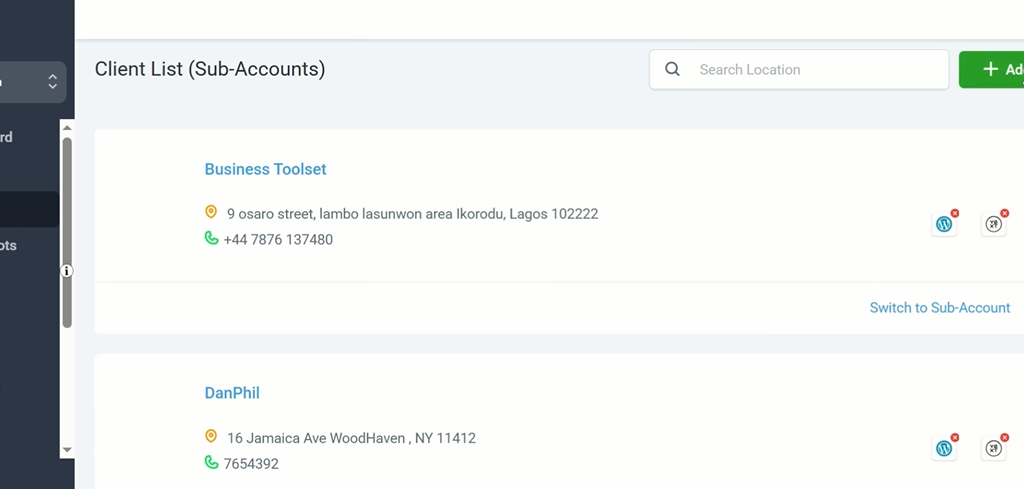
Each sub-account is a complete, standalone instance of GoHighLevel configured for one specific client or business location.
The client logs in and sees their own dashboard, their own pipeline, their own automations, and their own reports. They have no visibility into your agency account or any other client’s workspace.
GoHighLevel Sub-Account Price: How Much Does it Cost?
GoHighLevel does not charge by Sub-account. The number of sub-accounts available to agencies depends on the GHL pricing plan they subscribed to.
The Starter plan costs $97/month and limits agencies to 3 sub-accounts, while the Unlimited and Pro plans cost $297/month and $497/month, respectively, and allow unlimited sub-accounts.
Starter Plan at $97 per month
The Starter plan allows up to three sub-accounts. Your own agency account counts as one, leaving two for paying clients. This plan is for local service business owners and new agencies with a couple of clients.
For any agency with growth ambitions, it is a ceiling that quickly creates problems.
Agency Unlimited Plan at $297 per month
Agency Unlimited removes the sub account ceiling entirely. Unlimited sub-accounts are included at no additional cost per account.
This is the plan most agencies should start on. The flat pricing model means every new client increases revenue without increasing platform cost, and the margin on each additional client improves as the roster grows.
SaaS Pro Plan at $497 per month
The Pro plan also includes unlimited sub-accounts and adds SaaS Mode, which automates sub-account creation, configuration, and billing when clients sign up through the agency’s branded checkout page.
What Each Sub-Account Includes
Every sub-account gives the client full access to the core GoHighLevel feature set, regardless of the plan it’s on.
CRM and pipeline
This feature tracks every contact interaction automatically and organizes leads through a visual pipeline that updates as contacts take action.
Marketing automation
It runs entirely independently per sub-account. Workflows, triggers, and actions for one client have no connection to another client’s automations.
Funnel and website builder
Funnels and websites host each client’s landing pages and websites with independently connected custom domains.
Appointment scheduling
It manages each client’s calendar with its own availability, booking pages, confirmation messages, and reminder sequences.
Reputation management
The reputation management tool sends review requests under each client’s business name to their specific Google Business Profile or Facebook page.
AI Employee
The Voice AI and Conversation AI are trained separately for each sub-account on that client’s specific services, FAQs, tone, and booking process.
Reporting
It generates a dedicated performance dashboard for each sub-account covering pipeline movement, funnel conversions, email and SMS engagement, and appointment show rates.
How to Create a GoHighLevel Sub-Account: Step-by-Step Setup Guide
Step 1: Access Sub-Accounts
From your Agency View dashboard click Sub-Accounts in the left navigation panel. Make sure you are in the Agency View and not inside an existing sub-account before proceeding.
Step 2: Create a New Sub-Account
Click Add Sub-Account in the top right corner. This opens the sub-account creation flow.
Step 3: Choose a Snapshot or Start Blank
Before entering client details GoHighLevel asks whether to apply a Snapshot or start with a blank account.
A Snapshot is a pre-built configuration containing funnels, automation workflows, email sequences, SMS campaigns, and pipeline stages for a specific industry.
GoHighLevel provides Snapshots for common niches including dental, real estate, gyms, home services, and restaurants. Applying a relevant Snapshot deploys a working campaign infrastructure to the new sub-account instantly rather than building everything from scratch.
Agencies serving a specific niche consistently should build custom Snapshots from their best-performing client setups and save them for deployment to every new client in that niche. A well-built custom Snapshot reduces onboarding time from several days to under an hour.
Step 4: Enter the Client’s Business Details
Fill in the client’s business name, address, phone number, website, and timezone. Use the client’s actual business information. Incorrect details here cause inaccuracies in automated messages and calendar settings that require time to identify and fix later.
Step 5: Create the Sub-Account
Click Create Sub-Account. The account is immediately active and accessible from the agency dashboard.
Step 6: Complete the Technical Configuration
Before building campaigns or activating automations, work through the following setup steps inside the new sub-account.
Phone number: Purchase a local number through the LC Phone system if the client will be using SMS, calls, Voice AI, or Conversation AI. This is required for those features to function.
Email deliverability: Verify the client’s sending domain through Email Services settings by adding SPF, DKIM, and DMARC records to the client’s DNS. Skipping this step causes automated emails to land in spam.
Calendar: Configure the client’s availability, appointment duration, buffer times, and booking page settings. Set up confirmation and reminder sequences.
Payment processing: Connect Stripe or the preferred payment processor if the client will collect payments through the platform.
AI Employee: If Voice AI or Conversation AI will be active, configure the AI with the client’s services, pricing, FAQs, operating hours, and booking process. Thorough training information produces accurate responses. Minimal training information produces poor results that reflect badly on the agency.
Step 7: Customize the Snapshot or Build the Campaign
If a Snapshot was applied, replace all placeholder content with the client’s actual business information. Update funnel copy, email sequences, and SMS messages. Test every automation before activating on live traffic.
If starting from a blank account, build the pipelines, funnels, and workflows based on the client’s requirements.
Step 8: Set Up Client User Access
Create a user account for the client inside the sub-account settings. Configure the permission level based on what the client needs to see and do.
A client who wants to monitor their pipeline and review dashboard needs a different access level than one who wants the agency to manage everything. The client receives login credentials that take them directly into their sub-account and nothing else.
How Agencies Make Money With GoHighLevel Sub Accounts
You can generate monthly recurring revenue from GoHighLevel sub-accounts by reselling each at an affordable monthly fee to local businesses that don’t have the budget for the platform’s $97/month lowest plan. Agencies can subscribe for the Unlimited plan at $297/month and sell each sub-account to clients at $50/month.
Rather than merely selling sub-account access, agencies can generate higher monthly recurring income by white-labeling GoHighLevel with their branding and using the platform’s tools to help local service businesses automate their marketing, sales, and customer relationship management.
On the Agency Unlimited plan, package sub-account access as branded software plus marketing services and bill clients manually. Two clients paying $297 per month each covers the entire GoHighLevel bill. Every client beyond that is margin.
On the SaaS Pro plan, SaaS Mode automates the entire process. Clients sign up through a branded pricing page, pay through Stripe, and land inside a configured sub-account without any manual work from the agency.
As the client base grows the operational overhead stays flat.