GoHighLevel Agency Plan: $297 Unlimited Tier Explained 2026

The GoHighLevel Agency plan costs $297/month and is designed for growing agencies that want to manage multiple clients without worrying about sub-account limitations. This plan offers you unlimited sub-accounts, white-label desktop branding, and SaaS features that transform how agencies operate.

It eliminates the constant math of per-client costs, letting you focus on growth rather than budgets.

What Makes the GoHighLevel Agency Plan Different

GoHighLevel agency plan sits between the entry-level Starter plan at $97/month and the premium SaaS Pro plan at $497/month. While Starter restricts you to just three sub-accounts, this tier removes all limitations.

Create 10, 50, or 100 client accounts without seeing your monthly fee increase by a single dollar.

This pricing structure fundamentally changes agency economics. Traditional CRM platforms charge per user, per contact, or per client account.

With Agency Unlimited, your software costs stay flat regardless of growth. Onboard your fifth client or your fiftieth, and your platform investment remains $297 monthly.

Core Features of the GoHighLevel Agency Unlimited Plan

Unlimited Sub-Accounts

This forms the foundation of GoHighLevel Agency Unlimited’s value proposition. Each client receives their own isolated sub-account with separate contacts, funnels, campaigns, and data. No cross-contamination, no shared dashboards, no confusion. You manage everything from a master agency dashboard, while clients see only their own branded portal.

White-Label Desktop Application

It lets you rebrand the entire platform with your logo, colors, and custom domain. When clients log into app.youragency.com, they see your branding throughout their experience. GoHighLevel remains completely invisible, positioning you as the software provider rather than a reseller.

Complete CRM Suite

It includes pipeline management with unlimited custom pipelines, contact tracking with 360-degree customer views, opportunity stages with drag-and-drop deal management, task automation and assignment, and custom fields for any data point. Every sub-account receives full CRM capabilities without restrictions.

Marketing Automation Tools

This feature provides a workflow builder with multi-channel sequences, unlimited email marketing sends, two-way SMS campaigns, social media scheduling across major platforms, and form and survey builders. The automation depth supports complex campaigns that coordinate email, SMS, and social engagement based on behavioral triggers.

Website and Funnel Builders

It enables the creation of professional websites and conversion funnels using a drag-and-drop interface. The template library includes hundreds of pre-built designs for various industries. A/B testing capabilities help optimize conversion rates systematically.

Appointment Scheduling System

The scheduler replaces Calendly or Acuity with native calendar management. Features include automated reminders via SMS and email, team calendars with round-robin assignment, payment collection at booking, and sync with Google and Outlook calendars.

LC Phone System

It provides built-in telephony without third-party providers. Call recording for quality control, call tracking with source attribution, voicemail drops for efficient follow-up, and IVR for intelligent call routing come standard. This eliminates $50-200 monthly phone system subscriptions.

Membership and Course Platform

It allows you to host online courses with unlimited lessons, modules, and students. Drip content scheduling, quizzes and assessments, and certificates create complete learning environments. This replaces Teachable or Kajabi at $99-199 monthly.

Basic API Access

This enables custom integrations with specialized tools or proprietary systems. Build connections to industry-specific software, create custom automations, and extend platform capabilities beyond standard features.

What’s Not Included in the Agency Plan

The GoHighLevel Agency plan provides comprehensive tools but falls short of the full SaaS-mode capabilities. You cannot set custom pricing tiers for clients, automate client billing through the platform, or create white-label mobile apps. These features require upgrading to the $497 monthly SaaS Pro plan.

Additionally, communication and AI employee usage costs that can be manually rebilled in the respective clients’ accounts are billed separately. SMS messages cost approximately $0.0079 per segment, phone calls run $0.0085-$0.014 per minute, and email sending costs $0.675 per 1,000 emails. Phone numbers cost $1.15 each per month.

Access to Voice AI, Conversation AI, Reviews AI, Content AI, Funnel AI, and Workflow AI costs $97 monthly for unlimited usage or pay-per-use pricing starting at $0.02-0.13 per action.

Real-World Agency Economics

Understanding actual costs versus revenue potential reveals Agency Unlimited’s financial leverage.

10-Client Agency Example:

Your agency manages 10 local businesses, each paying $297 per month for CRM access and $500 per month for marketing services. Monthly revenue totals $7,970.

Your software costs include the $297 Agency Unlimited subscription and approximately $150 in communication usage, totaling $447 per month. Software gross profit reaches $7,523 monthly or $90,276 annually.

25-Client Agency Example:

Scaling to 25 clients at the same price point generates $19,925 in monthly revenue. Software costs remain essentially flat at approximately $297 base plus $350 usage, totaling $647 monthly. Gross profit expands to $19,278 monthly or $231,336 annually. Your software cost per client drops from $44.70 to just $25.88 as you scale.

50-Client Agency Example:

At 50 clients charging $297 each for software, revenue reaches $14,850 monthly from software subscriptions alone, before service fees. Platform costs might reach $297 base plus $600 usage, totaling $897 monthly. Software profit exceeds $13,953 monthly or $167,436 annually.

The mathematical reality is clear. Agency Unlimited’s flat fee means margins improve as you grow, rather than eroding as they do with traditional per-client pricing models.

Annual Billing Advantage

GoHighLevel offers approximately 16% savings through annual billing, equivalent to receiving two free months. The yearly Agency Unlimited cost is $2,970 instead of $3,564 if paid monthly, saving $594 annually. For agencies confident in their commitment, annual billing improves cash flow predictability while reducing costs.

Who Should Choose GoHighLevel Agency Unlimited

Growing Agencies managing 4-15 clients find that Agency Unlimited provides room for expansion without immediate upgrade pressure. The unlimited sub-accounts accommodate growth spurts when you sign multiple clients quickly.

Marketing Consultants transitioning from freelance work to agency models benefit from a professional infrastructure that supports client growth. The white-label branding positions you as an established software provider rather than a solo operator.

Service-based businesses managing multiple locations can use sub-accounts to separate each location while maintaining centralized oversight. Real estate teams, multi-location medical practices, and franchise operations leverage this structure effectively.

Digital Agencies that offer comprehensive services appreciate consolidating CRM, email marketing, funnel building, appointment scheduling, and phone systems onto a single platform. Tool consolidation reduces operational complexity and cuts software costs by $500-1,000 per month compared to separate subscriptions.

Migration from Starter Plan

Agencies that start on the $97 Starter plan to learn the platform often upgrade to Agency Unlimited within 30-90 days as client rosters grow. The upgrade process is seamless. Existing sub-accounts, contacts, workflows, and campaigns transfer automatically. You can immediately begin creating additional sub-accounts after upgrading.

There’s no penalty for starting small. Many successful agencies operated on Starter for their first 2 clients before scaling justified the additional $200 monthly investment. The key decision point typically arrives when signing your third client, as Starter only supports three sub-accounts (1 for your business and 2 for clients).

When to Consider SaaS Pro

If you’re building an actual software business where clients perceive they’re purchasing your proprietary platform rather than agency services, SaaS Pro at $497/month is worth considering. This tier adds SaaS Mode with custom pricing tiers, automated client billing through Stripe, white-label mobile apps for iOS and Android, and advanced rebilling controls.

The decision usually hinges on scale and business model. Agencies managing 15-20+ clients where software subscriptions generate $5,000+ monthly often upgrade to SaaS Pro. The additional $200 monthly investment unlocks capabilities that professional software companies require and significantly improves perceived value.

However, most agencies have thrived on Agency Unlimited for years. The plan supports sophisticated operations without forcing unnecessary upgrades. Only when you’re actively building a SaaS business with custom pricing tiers does the Pro plan become essential.

Setup and Onboarding Strategy

Maximizing Agency Unlimited requires systematic implementation after signing up for an account, rather than a reactive setup.

Week 1: Foundation Configuration

Connect your custom domain for white-label access. Upload your agency logo and configure brand colors throughout the interface. Integrate your Stripe account for payment processing.

Set up LC Phone with dedicated numbers for your agency and initial clients. Configure agency email settings to ensure system communications originate from your domain.

Week 2: Template Development

Create industry-specific snapshots containing pre-built funnels, email sequences, SMS campaigns, automation workflows, pipeline stages, and forms. These snapshots deploy instantly to new client sub-accounts, providing immediate value rather than requiring a new start each time.

Week 3: Client Migration

If transitioning existing clients from other platforms, begin systematic migrations. Export contact data from previous CRMs, import contacts into GoHighLevel sub-accounts, rebuild essential email templates and automations, recreate landing pages and funnels, and train clients on new interfaces.

Week 4: Optimization and Documentation

Document standard operating procedures for everyday tasks, create video tutorials for client training, establish support workflows for handling client questions, and refine your snapshot templates based on initial client feedback.

Most agencies complete foundation setup in 10-15 hours of focused work. Client migrations initially add 2-3 hours per client, though this accelerates as you develop efficient processes and reusable snapshots.

Support and Training Resources

Agency Unlimited includes access to GoHighLevel’s extensive support ecosystem. The knowledge base contains hundreds of articles covering setup, troubleshooting, and optimization.

Video tutorials walk you through complex features step by step. The Facebook community exceeds 50,000 members who share strategies, templates, and solutions.

Email and chat support respond to technical questions, though response times vary based on complexity. The GoHighLevel Academy provides structured training on platform mastery, covering everything from basic setup through advanced automation strategies.

GoHighLevel Bootcamp offers intensive training covering agency setup, client onboarding, snapshot creation, and revenue optimization. While requiring separate enrollment, many agencies credit the Bootcamp with dramatically shortening their learning curve.

GoHighLevel Unlimited Plan: Final Verdict

GoHighLevel Agency Unlimited is of immense value to agencies managing multiple clients who need professional white label infrastructure without SaaS-level complexity. The unlimited sub-accounts, comprehensive feature set, and flat-rate pricing create agency economics that improve as you grow rather than deteriorate.

For $297 monthly, you receive enterprise-level marketing automation, CRM, communication tools, and client management capabilities that would typically require $1,500-3,000 monthly across multiple platforms.

The 30-70x potential return on investment through client software subscriptions transforms Agency Unlimited from an expense to a profit center.

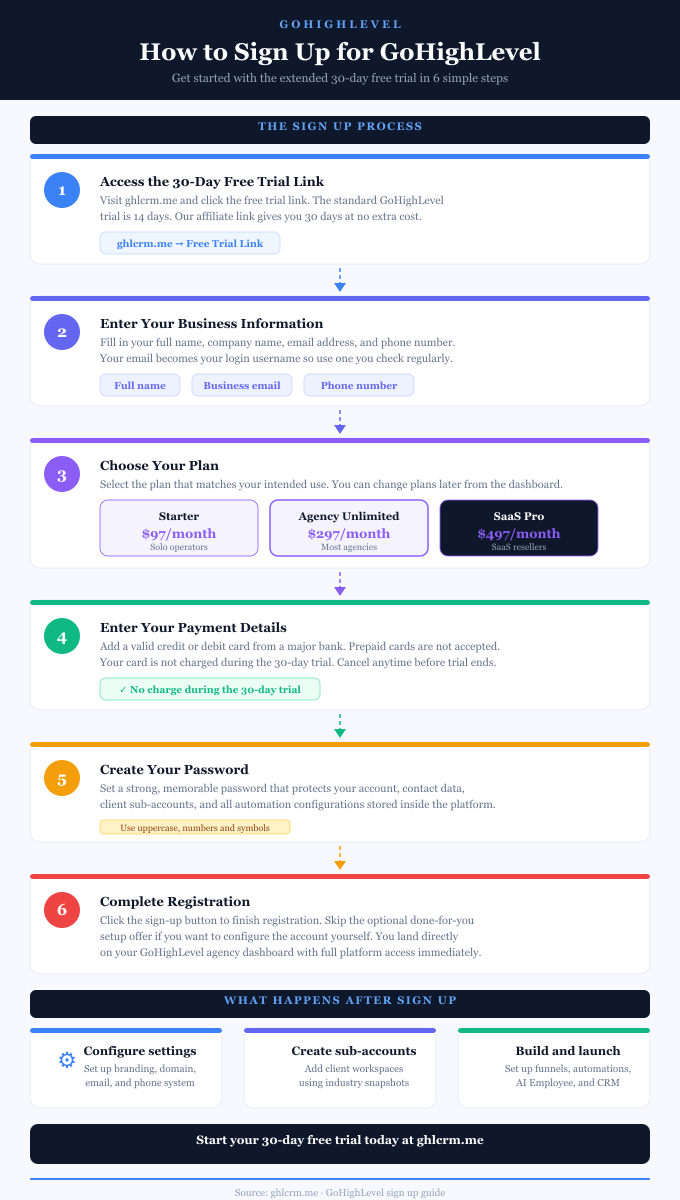
GoHighLevel sign up infographic showing the step-by-step account creation process.

GoHighLevel Sign Up: Easy Account Setup Guide 2026

The GoHighLevel sign up process is easier than you think. I remember when I first looked at the platform, thinking it would take days to get everything configured.

Turns out, creating an account on the platform took me less than ten minutes, and I was already exploring features within the hour.

If you’re wondering how to sign up for GoHighLevel and adequately set up your account after creating it, this guide walks you through everything step by step.

How to Sign Up for GoHighLevel

The GoHighLevel account sign-up process is straightforward. Here’s exactly how to create your account using an exclusive 30-day free trial:

Step 1: Access the 30-Day Free Trial Link

Use this extended 30-day free trial link. The standard trial from GoHighLevel’s main website is only 14 days, but I’ve secured an exclusive partner link that gives you 30 days instead. This extra time is crucial for properly testing the platform and building real campaigns.

Step 2: Enter Your Basic Information

You’ll see a signup form asking for your name, company name, email address, and phone number. Your email becomes your login username, so use one you check regularly. Fill everything out accurately.

Step 3: Select Your Plan

Choose which pricing plan you want to trial. Most people pick either the Starter plan ($97/month) or the Unlimited plan ($297/month).

If you want to sign up for the SaaS pricing plan, you can start with Agency Unlimited and upgrade to the Pro plan from your dashboard. Don’t worry too much about this choice because you can change plans later. During the trial, you get full access to whichever plan you selected.

Step 4: Add Payment Details

Enter your credit or debit card information. You won’t be charged during the 30-day trial period. Billing starts only after your trial ends, and you can cancel at any time before then. Use a regular credit card from a major bank because GoHighLevel doesn’t accept prepaid cards.

Step 5: Create Your Password

Set a strong password for your GoHighLevel account. Make it secure yet memorable to protect all your client data.

Step 6: Complete Registration

Click the final button to finish your account setup. You might see an optional offer for done-for-you setup services, but this costs extra and isn’t required. You can skip it.

That’s it. You now have a GoHighLevel account and should be taken directly to your dashboard.

GoHighLevel sign up infographic showing the step-by-step account creation process.

GoHighLevel Agency Account Setup

Once your account is created, you land in your Agency View dashboard. This is your master control center for managing everything.

Here’s exactly what to do next to properly configure your GoHighLevel agency account.

Step 1: Complete the LaunchPad Onboarding

After logging in, you’ll see the LaunchPad feature with guided onboarding steps. This presents short video tutorials for essential setup steps.

Click on each action relevant to your needs, watch the tutorial, and complete the setup. The LaunchPad tracks your progress automatically as you finish each task.

Step 2: Configure Your Agency Company Settings

Click the Settings gear icon at the bottom-left of your navigation panel and select Company Settings. Here you’ll set up three critical areas:

In the Basic Details tab, enter your agency name, business address, contact email, phone number, and website.

This information appears in client-facing areas like login portals and email templates. Select your timezone to ensure automated messages are sent at the correct times.

In the Whitelabel tab, upload your agency logo that will appear on the login portal and dashboard. Add your custom domain so clients can access the platform through your branded URL instead of the default GoHighLevel domain.

This tab also lets you add custom CSS code to match your brand colors and styling. The Advanced Settings tab controls security preferences like session timeouts and other technical configurations you can adjust based on your needs.

Step 3: Connect Your Payment Gateway

Go to Settings, then Payments. Click “Connect Stripe” or your preferred payment processor. You’ll need this connected to collect client payments, process booking fees, and handle subscription billing if you’re using SaaS Mode.

Follow the prompts to authorize the connection between GoHighLevel and your Stripe account.

Step 4: Set Up Email Services

Navigate to Settings and find Email Services. Connect your SMTP provider like Mailgun or SendGrid for optimal email deliverability. If you don’t have one yet, you can sign up for Mailgun directly through GoHighLevel.

This ensures your automated emails actually reach clients’ inboxes instead of spam folders. Configure your sending domain and verify it following the provided instructions.

Step 5: Configure Your Phone System

If you plan to use calls, SMS, or voicemail features, go to Settings and select Phone Numbers. Purchase a dedicated number for your agency through the LC Phone System integrated into GoHighLevel.

This number handles all your voice and text communications within the platform. Set up your voicemail greeting and configure call forwarding options.

Step 6: Add Team Members

Go to Settings, then Team or My Staff. Click “Add Employee” to create accounts for your team members. Enter their name, email, and personal information. Set their user type to either Agency (for full access) or Account (for sub-account specific access).

Configure permissions by toggling access to different platform areas based on their role. Assign them a phone number if they’ll be handling calls. Set their time zone and work schedule to reflect calendar availability.

Step 7: Create Your First Sub-Account

Sub-accounts are separate workspaces for each client you manage. From your Agency View, click “Sub-Accounts” in the left navigation menu. Click the blue “Add Sub-Account” or “Create Sub-Account” button in the top-right corner.

You’ll see an option to select a Snapshot template. Snapshots are prebuilt setups that include funnels, workflows, email sequences, and pipelines for specific industries such as real estate, gyms, dental practices, and agencies. Select one that matches your client’s industry, or choose “Blank” to start from scratch.

Enter your client’s business information, including name, address, phone number, website, and timezone. Click “Create Sub-Account” to finish. You can now click into this sub-account and start building campaigns, importing contacts, and configuring their specific setup.

Step 8: Customize Your Dashboard

Back in your Agency View, take a moment to arrange your dashboard widgets to show the metrics that matter most to you. You can track total contacts, active conversations, appointment bookings, and pipeline values across all your sub-accounts from this main view.

Step 9: Explore the Snapshot Library

Click on the Snapshots section to browse pre-built templates. Even if you already loaded one for your first sub-account, exploring others gives you ideas for different industries and campaign structures. You can also create custom snapshots once you’ve built campaigns you want to reuse across multiple clients.

Understanding Your Trial Period

Your 30-day trial gives you full access to test everything. During this time, explore the core features:

The CRM stores all your contacts and tracks every interaction. The Conversations inbox unifies all your text messages, emails, and social media messages in one place. The Calendar handles appointment bookings with automated reminders.

Marketing tools let you build funnels and landing pages. Automation workflows run your follow-up sequences on autopilot.

Focus on learning one feature at a time instead of trying to master everything immediately. Pick what solves your biggest problem first.

Creating Sub-Accounts for Clients

If you’re on the Unlimited plan or higher, you can create sub-accounts for each client or business location you manage.

In your Agency View, click “Sub-Accounts,” then “Add Sub-Account.” Enter the business name, address, and timezone. Each sub-account is completely separate, so client data never mixes together.

This structure is perfect for agencies managing multiple clients. You switch between client workspaces instantly while keeping everything organized.

What to Focus On During Your Trial

Use your 30 days wisely:

Week 1: Explore the interface and watch tutorial videos. Get comfortable with where things are located.

Week 2: Build something real using a Snapshot template. Customize it for your actual business needs.

Week 3: Test your setup with real traffic and leads. See how the automation actually performs.

Week 4: Decide if GoHighLevel fits your business before the trial ends.

Getting Support

If you get stuck, GoHighLevel offers several help options:

The in-app chat support is available 24/7. Click the chat icon in your dashboard to ask questions directly.

The Help Center has written guides and video tutorials for most features.

The GoHighLevel Facebook community has over 18,000 members who answer questions quickly.

YouTube has countless third-party tutorials showing real-world implementations.

GoHighLevel Account Creation: Final Words

If you’ve been hesitant to set up a GoHighLevel account, you now know the process is simple. The actual signup takes less than ten minutes. The real learning happens afterward as you explore features and build your systems.

Grab that 30-day trial and see what the platform can do for you.

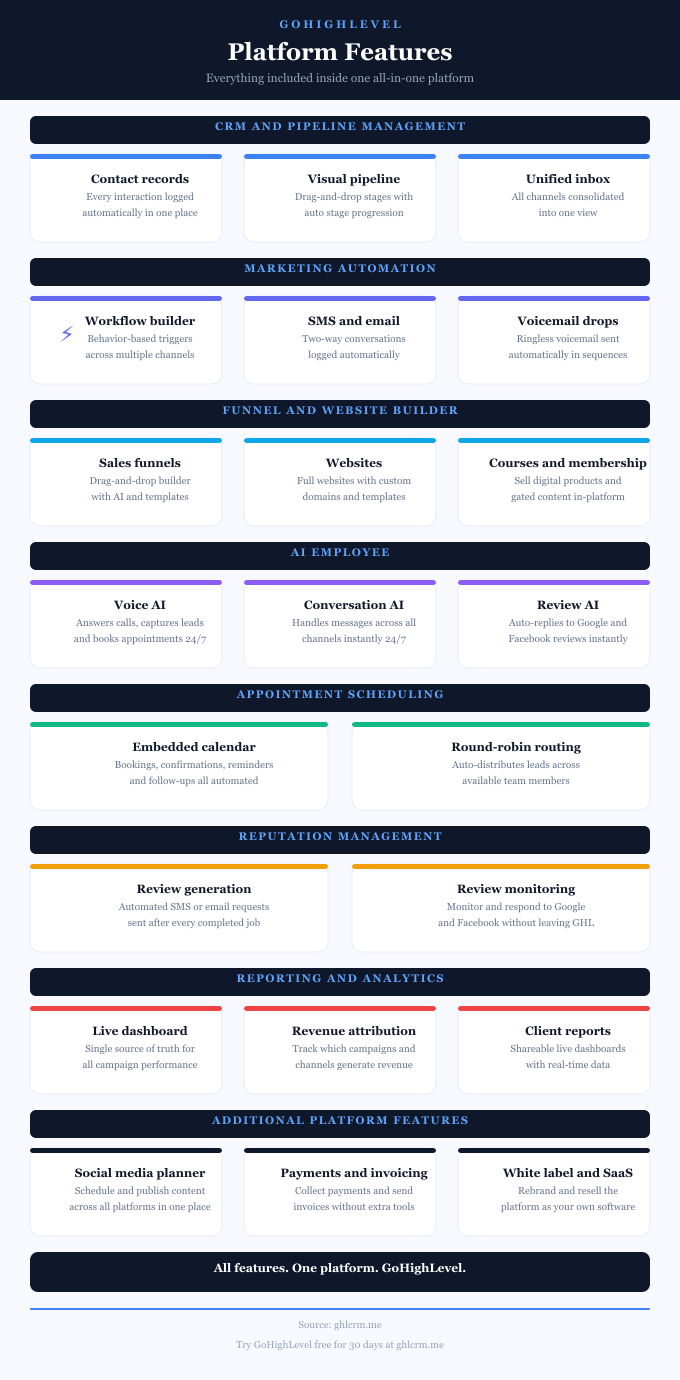
GoHighLevel features infographic showing the all-in-one platform's list of tools, and the value they provide for agencies, and local businesses.

13 Top GoHighLevel Features to Transform Your Marketing

GoHighLevel features transform how agencies and businesses manage customer relationships by consolidating 10-15 separate tools into a single unified platform.

From advanced pipeline management and multi-channel communication to AI-powered automation and white-label capabilities, the system delivers enterprise functionality at a fraction of the cost of traditional solutions.

Let’s explore the features that make this platform the #1 marketing automation software powering over 529,000 websites worldwide.

Top GoHighLevel (GHL) Features

GoHighLevel features infographic showing the all-in-one platform's list of tools, and the value they provide for agencies, and local businesses.

1. Complete Contact Management System

This GHL feature is a robust contact database that tracks every customer interaction across all communication channels, creating comprehensive behavioral profiles rather than just basic contact storage.

360-Degree Contact Records provide complete visibility into each lead’s journey. When someone enters your system, whether through a Facebook ad, website form, or referral, the CRM captures their source, tracks every email opened, SMS received, page visited, and call made.

This eliminates the frustration of asking “which list are they on?” or “did we already send them this?” You have one definitive source of truth.

Unlimited Contacts on All Plans removes growth anxiety. Unlike HubSpot, Salesforce, or ActiveCampaign, which charge based on contact count, Go High Level includes unlimited contacts even on the $97/month Starter plan.

Your database can grow from 1,000 to 100,000 contacts without affecting your monthly bill.

Smart Lists change how you segment contacts by automating the whole thing. These dynamic lists update themselves in real time based on tags, custom fields, how people engage with you, or where they are in your sales pipeline.

You can create lists like “opened an email in the last 30 days but never booked an appointment” or “bought something in the last 90 days and tagged as VIP.” No manual updating required.

Smart Lists can kick off workflows automatically, so you can deliver personalized engagement at scale without lifting a finger.

Custom Fields let you track whatever data matters to your business. Real estate agents can capture property budgets. Medical practices can save treatment preferences. Gyms can track what equipment people use. These fields work throughout the whole platform.

Use them to personalize emails, trigger workflows, organize your pipeline stages, and pull reports.

Bulk Actions speed up contact management like crazy. Update tags for hundreds of people at once. Change opportunity stages for entire groups.

Move whole segments through your pipeline with a single click, instead of updating each record individually.

2. Pipeline Management and Sales Tracking

GHL includes fully customizable sales pipelines that visualize lead progression through each stage of your sales process, providing clarity that spreadsheets and basic CRMs cannot match.

Visual Pipeline Builder lets you create unlimited pipelines customized to different business processes. A marketing agency might maintain separate pipelines for website design projects, SEO retainers, and paid advertising campaigns.

Each pipeline contains custom stages reflecting your actual workflow, from initial inquiry through proposal, contract, onboarding, and fulfillment.

Drag-and-Drop Functionality makes pipeline management intuitive. Move opportunities between stages by dragging cards across the board.

This visual approach instantly reveals bottlenecks. If 40 deals sit in the “Proposal Sent” stage, you know follow-up needs improvement.

Opportunity Tracking captures deal value, close probability, and expected close dates. The dashboard displays total pipeline value, weighted forecast based on probability percentages, and monthly revenue projections.

This forecasting capability helps agencies predict cash flow and make informed hiring decisions.

Automated Stage Actions trigger workflows when opportunities move between stages. When a deal moves to “Contract Signed,” automatically send onboarding emails, create project tasks, schedule kickoff calls, and notify team members.

Pipeline Analytics reveal conversion rates between stages, average time in each stage, and win/loss reasons. These insights identify where leads drop off, which sources convert best, and which sales tactics work.

3. Multi-Channel Communication Hub

Go High Level CRM’s communication capabilities extend far beyond basic email, providing true omnichannel engagement that meets customers wherever they prefer to interact.

Unified Inbox integrates messages from email, SMS, Facebook Messenger, Instagram DMs, WhatsApp, Google Business Messages, and website chat into one interface.

No more toggling between Gmail, Facebook, and SMS apps; all conversations appear in a single, organized dashboard with full context about each contact.

Two-Way SMS Conversations enable genuine text-based dialogue, not just broadcast messaging. The platform supports text conversations with appointment booking, payment collection, and multimedia messaging.

For local service businesses where 73% of customers prefer text communication, this proves invaluable for confirmations, reminders, and customer service.

Built-In Phone System (LC Phone) eliminates the need for separate telephony providers. Features include call recording for quality control, call tracking with source attribution, voicemail drops for efficient follow-up, IVR (Interactive Voice Response) for intelligent call routing, and click-to-call functionality directly from contact records.

This replaces CallRail, RingCentral, or similar services at $50-200/month.

Email Marketing includes a professional email builder with drag-and-drop editing, pre-built templates, A/B testing, advanced personalization with custom fields, and detailed deliverability tracking.

The system supports unlimited email sending on all plans, with usage-based pricing around $0.675 per 1,000 emails sent.

Missed Call Text Back automatically sends SMS messages when calls go unanswered, preventing lead loss during off-hours or high-volume periods. This feature ensures instant engagement even when you’re unavailable.

4. Workflow Automation and Campaign Builder

The visual workflow builder represents Go High Level CRM’s automation backbone, enabling sophisticated multi-channel campaigns that run on autopilot.

Drag-and-Drop Workflow Designer provides an intuitive interface for building complex sequences by dragging triggers and actions onto a canvas. Triggers include form submissions, appointment bookings, tag applications, opportunity stage changes, email opens, link clicks, and dozens more behavioral signals.

Multi-Channel Actions within single workflows coordinate email, SMS, voicemail drops, Facebook messages, task assignments, and webhook calls.

A lead nurture sequence might send an initial email, wait 2 days, send an SMS if the email wasn’t opened, wait 3 more days, then send a voicemail drop all automatically based on engagement.

Conditional Logic creates branching paths based on contact attributes or behaviors. If a contact opens an email and clicks a specific link, send them down one path. If they don’t open within 3 days, send them another. This dynamic routing personalizes experiences at scale.

AI-Powered Workflows now include GPT-4 integration for intelligent automation. Workflow AI can analyze message sentiment, generate personalized responses, score lead quality, summarize conversations, and make dynamic decisions without manual rules.

This transforms static if-then automation into intelligent, adaptive systems.

Template Library provides pre-built workflows for common scenarios, such as appointment reminders, abandoned cart recovery, welcome sequences, review requests, and re-engagement campaigns. Import templates and customize them rather than building from scratch.

5. Website and Funnel Builder

Go High Level includes comprehensive website and funnel creation tools, eliminating the need for WordPress, ClickFunnels, or Leadpages.

Drag-and-Drop Page Builder lets you create professional websites, landing pages, and sales funnels without coding. The interface provides intuitive controls for adding text, images, videos, forms, countdown timers, testimonials, and custom HTML elements.

Mobile-Responsive Templates ensure pages display perfectly across devices. The template library includes hundreds of designs for various industries and purposes, including lead-generation pages, webinar-registration funnels, product-sales pages, appointment-booking pages, and complete websites.

A/B Testing enables split testing between variations to optimize conversion rates. Test headlines, images, calls-to-action, or entire page layouts. The system tracks performance metrics and identifies statistical winners.

Custom Domains allow you to host pages on your own branded domains. Connect multiple domains for different campaigns or clients, all managed within the platform.

SEO Optimization Tools include editing meta titles and descriptions, image alt text, URL customization, structured data markup, and sitemap generation. Pages load quickly and follow SEO best practices out of the box.

Form and Survey Builder captures lead information through embedded forms or pop-ups. Forms integrate directly with the CRM, automatically creating contacts, applying tags, and triggering workflows based on submissions.

6. Appointment Scheduling and Calendar Management

The integrated calendar system in GoHighLevel eliminates the need for Calendly, Acuity Scheduling, or similar third-party tools while providing superior functionality.

Customizable Booking Pages let prospects schedule appointments directly through branded pages. Configure available times, buffer periods between appointments, appointment types (15-minute consultation, 60-minute strategy session), and booking rules.

Team Calendar supports round-robin assignment, distributing appointments evenly across team members. This proves essential for sales teams, support departments, or agencies with multiple service providers.

Automated Reminders reduce no-shows through SMS and email confirmations sent automatically at booking, plus reminder messages at 24 hours, 1 hour, or custom intervals before appointments.

Payment Collection at booking enables deposits or full payment to be collected before appointments. Integrate Stripe to charge consultation fees, secure event tickets, or collect retainers, reducing no-shows while capturing revenue upfront.

Google and Outlook Calendar Sync prevent double-booking by checking external calendars. When appointments are booked in GoHighLevel, they automatically appear in connected calendars.

Group Appointments accommodate workshops, webinars, or classes with multiple attendees. Set maximum capacity, track registrations, and manage waitlists seamlessly.

7. Reputation Management and Reviews

Online reviews directly impact customer decisions and local search rankings. Go High Level CRM automates reputation management that typically requires dedicated tools at $50-150/month.

Automated Review Requests send review solicitation messages via SMS or email after completed appointments or purchases. Timing automation ensures requests arrive when customer satisfaction peaks.

Multi-Platform Monitoring tracks reviews from Google My Business and Facebook and combines them into a central dashboard. See all feedback in one place without checking multiple platforms.

Reviews AI automatically responds to reviews based on sentiment analysis. Positive reviews receive thank-you messages, neutral reviews get engagement responses, and negative reviews trigger appropriate damage control, all customized to maintain brand voice. This AI capability is available for $97/month (unlimited) or approximately $0.08 per review on a pay-per-use basis.

Review Funnel directs happy customers to public review platforms while routing dissatisfied customers to private feedback forms. This strategy increases positive public reviews while addressing negative feedback privately.

8. Social Media Management

The Social Media Planner in GoHighLevel centralizes social marketing, eliminating the need for Buffer, Hootsuite, or Later at $20-80/month per platform.

Multi-Platform Scheduling publishes content to Facebook, Instagram, Google My Business, LinkedIn, and TikTok from one interface. Schedule posts days or weeks in advance to maintain a consistent social presence without daily manual posting.

Content Calendar View displays scheduled posts across all platforms in a unified calendar format, revealing gaps, clustering, and strategic timing at a glance.

Bulk Upload enables agencies managing multiple clients to upload months of content at once via CSV files, dramatically accelerating content scheduling.

Post Templates save commonly used post formats, hashtag sets, or messaging frameworks for quick reuse across similar posts or clients.

Comment Management allows users to view and respond to comments directly within the platform (introduced in 2025), eliminating the need to switch between social media accounts for engagement.

9. Membership Sites and Course Platform

Go High Level CRM includes a complete learning management system (LMS), replacing Teachable, Kajabi, or Thinkific at $99-199/month.

Unlimited Courses can be created for your business or clients, each with unlimited lessons, modules, and video hosting, with no per-student or storage limits.

Drip Content Scheduling releases lessons on predetermined schedules to maintain engagement while preventing overwhelm. Set lessons to unlock based on signup date, previous lesson completion, or specific dates.

Quizzes and Assessments test comprehension and provide completion certificates. Track student progress, identify struggling learners, and gather feedback through integrated surveys.

Community Features enable discussion forums, member directories, and peer interaction within course platforms, building engaged communities around your content.

Flexible Pricing supports free courses, one-time purchases, subscription models, payment plans, and bundle pricing, all processed through integrated Stripe payments.

10. AI Employee Suite

The AI Employee suite represents Go High Level’s most significant advancement, providing six AI-powered tools that function as virtual team members.

Conversation AI

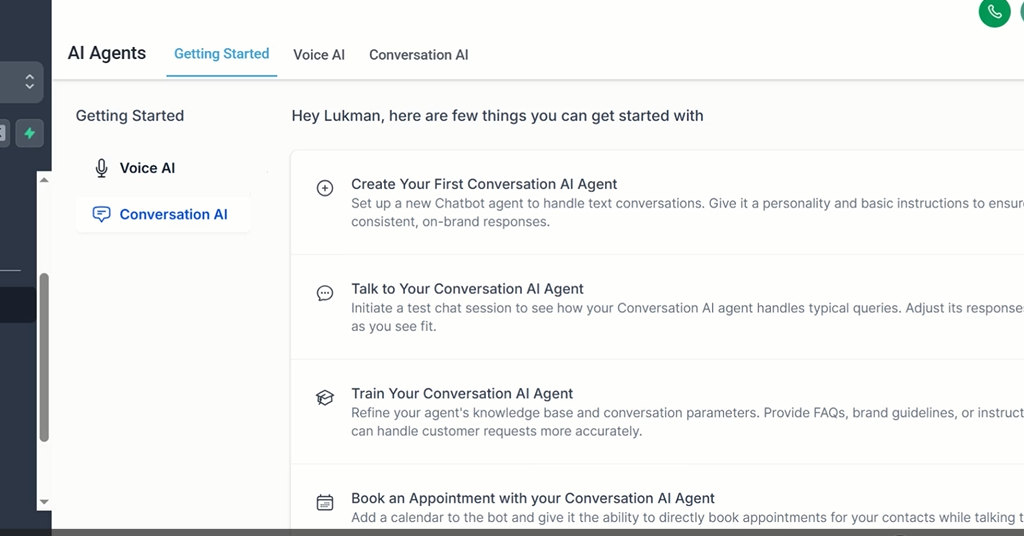
GoHighLevel conversation AI powers 24/7 chatbots across SMS, Facebook Messenger, Instagram DMs, WhatsApp, and website chat. The AI learns from your business information, FAQs, and past conversations to provide contextually appropriate responses.

It qualifies leads, answers common questions, schedules appointments, and escalates complex issues to humans, all while maintaining your brand voice.

Voice AI

GHL voice AI acts as a virtual receptionist, answering calls when you’re unavailable. Using natural language processing, it conducts human-like conversations, qualifies leads by asking predetermined questions, schedules appointments by checking calendar availability, updates CRM records in real-time, and provides information about services or products.

Reviews AI

HighLevel reviews AI monitors and automatically responds to Google and Facebook reviews. The sentiment analysis determines whether reviews are positive, neutral, or negative, and then generates appropriate responses that match your brand tone.

This ensures no review goes unanswered while maintaining consistent reputation management.

Content AI

The content AI tool generates marketing copy, social media posts, blog articles, email campaigns, and product descriptions. It also creates custom-branded images for social media, advertisements, and website content, eliminating the need for separate design tools.

Funnel AI

GHL AI funnel builder creates complete sales funnels from text descriptions. Describe your desired funnel (“three-page funnel for a dentist with before-and-after gallery and appointment booking”), and Funnel AI generates the structure, sections, and placeholder content.

It can also import designs from URLs or screenshots, replicating successful funnels from competitors or other sources of inspiration.

Workflow AI

The High Level workflow AI assists in building automation sequences by suggesting triggers, actions, and logic based on described goals. I use it to troubleshoot existing workflows and identify errors.

The AI Employee suite is available for $97/month with unlimited usage, or on a pay-per-use basis, making enterprise-level AI accessible to small businesses and agencies.

11. Reporting and Analytics

Go High Level CRM provides customizable dashboards and detailed reporting across all platform features.

Customizable Dashboards display KPIs most relevant to your business, including leads generated, revenue by source, appointment booking rates, email open rates, SMS delivery rates, pipeline conversion rates, and more. Create different dashboards for different roles (sales team, marketing team, executives).

Attribution Tracking reveals which marketing sources generate revenue, not just leads. Track customer journeys from initial touchpoint through purchase, calculating ROI for Facebook ads, Google ads, SEO, referrals, or any other channel.

Funnel Analytics shows conversion rates at each funnel step, identifying where prospects drop off.

Email and SMS Analytics track open rates, click rates, reply rates, unsubscribe rates, and conversion rates, providing insights to optimize messages.

Call Analytics (with LC Phone) captures call duration, call outcomes, recording playback, and call source attribution, which is valuable for businesses where phone communication drives revenue.

12. Integration Ecosystem

While GoHighLevel aims to be all-in-one, it recognizes that businesses sometimes use specialized tools. The platform offers 800+ native integrations plus Zapier support.

Payment Processors: Stripe, PayPal, Authorize.net, NMI, Square

Email Services: Gmail, Outlook, Mailgun, SendGrid

Calendars: Google Calendar, Outlook Calendar, iCloud

Social Media: Facebook, Instagram, LinkedIn, TikTok

Webinar Platforms: Zoom, WebinarJam, EverWebinar

E-commerce: Shopify, WooCommerce

Analytics: Google Analytics, Facebook Pixel, Google Tag Manager

API Access (available on Unlimited and SaaS Pro plans) enables custom integrations with proprietary systems or specialized software not in the integration library.

13. White-Label and Agency Features

Go High Level CRM’s white-label SaaS feature distinguishes it from competitors, transforming agencies from service providers into software companies.

Custom Branding

The custom branding on Unlimited ($297/month) and SaaS Pro ($497/month) plans replaces all GoHighLevel branding with your logos, colors, and domains. Clients log into “your” platform at app.youragency.com, seeing only your brand throughout their experience.

White-Label Mobile App (SaaS Pro plan)

It enables publishing iOS and Android apps under your brand in Apple App Store and Google Play Store. Clients download “your” app rather than GoHighLevel’s, significantly increasing perceived value.

Unlimited Sub-Accounts

GoHighLevel Sub accounts are separate workspaces under a GHL agency account. On the Unlimited and SaaS Pro plans, agencies can create separate, branded accounts for each client, all managed from a master agency dashboard. Each client receives isolated data, customized features, and individual billing.

SaaS Mode (SaaS Pro plan)

It enables you to resell the platform as your own software. Define custom pricing plans, package features per tier, automate client billing through Stripe, and create recurring revenue streams independent of service delivery.

GoHighLevel Features: Enterprise Power, Small Business Price

Go High Level features deliver comprehensive business management typically requiring $500-1,500/month in separate subscriptions for just $97-497/month, a cost structure that fundamentally changes small business and agency economics.

The platform’s strength lies not in individual features (many competitors offer email marketing or funnel builders) but in its depth of integration. Every feature connects to the unified contact record, creating seamless workflows impossible with disconnected tools.

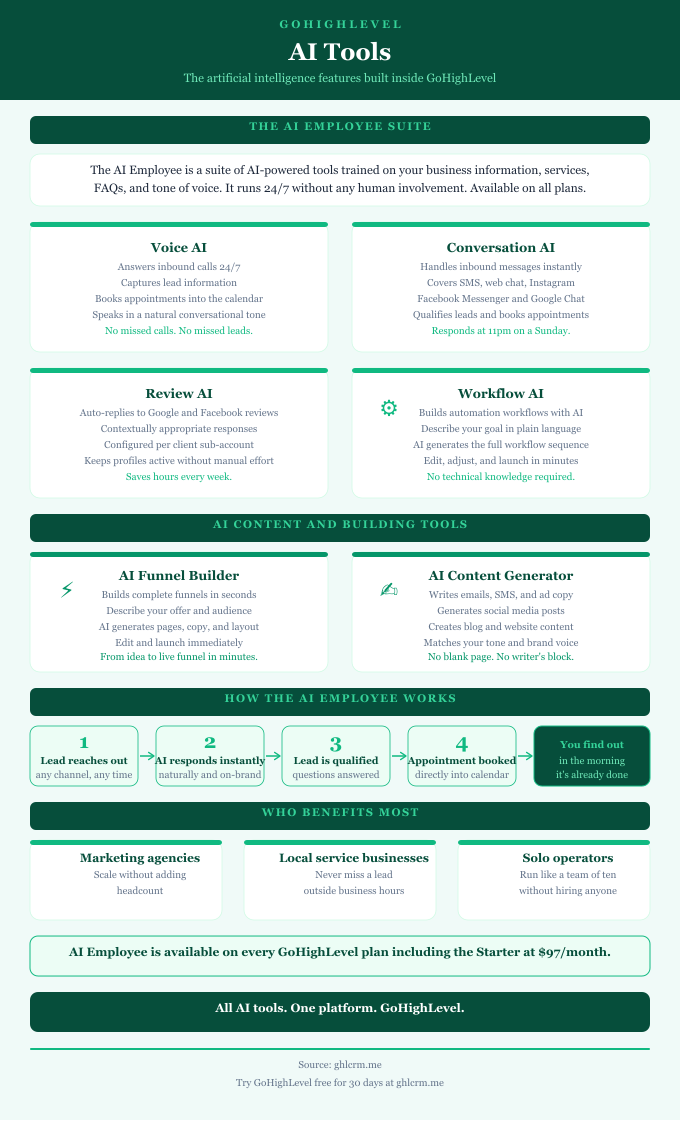
GoHighLevel AI tools infographics detailing the benefits of each features and how the AI employee works around the clock to help generate leads, and close deals.

GoHighLevel AI Tools: 6 Transformative AI Automation Features

GoHighLevel has introduced six powerful AI tools, collectively known as AI Employee, designed to handle everything from customer conversations to sales-funnel creation.

These tools integrate seamlessly with the platform’s existing CRM and automation infrastructure, eliminating the need for multiple subscriptions and the complexity of integrations that plague traditional marketing stacks.

The GoHighLevel AI tools include Reviews AI, Conversation AI, Voice AI, Workflow AI, Funnel AI, and Content AI.

6 Go High Level (GHL) AI Tools

GoHighLevel AI tools infographics detailing the benefits of each features and how the AI employee works around the clock to help generate leads, and close deals.

The GoHighLevel AI employee tools significantly improve how local businesses, service professionals, and marketing agencies operate. Let’s discuss the value of each one.

1. Reviews AI: Automated Reputation Management

Online reviews are now the digital equivalent of word-of-mouth recommendations, directly influencing consumer decisions and local search rankings. Reviews AI helps businesses respond to reviews, manage feedback, and protect reputation with smart, automated replies.

How Reviews AI Works

GoHighLevel’s Reviews AI operates in two distinct modes to accommodate different business needs and comfort levels with automation:

Suggestive Mode provides AI-generated response suggestions that users can review, edit, and approve before publishing. It gives recommendations based on the review content, making it easier to engage with your customers authentically. This mode offers businesses complete control while accelerating the response creation process.

Auto-Pilot Mode takes automation further by responding automatically to reviews based on predetermined criteria. Users can customize automated responses based on star ratings, set the wait time before sending each response, and add a personal touch with review-response footers. This ensures consistent engagement even during off-hours or periods of high volume.

Extra Features

This includes GoHighLevel AI Agents, which are customizable AI personalities you can set up based on the type of review. You can create different personalities that automatically respond to reviews with the right tone, sentiment, and style.

You can set up different agents for positive, neutral, and negative reviews. That way, each type of review gets the right kind of response.

The system supports multiple languages and monitors both Google and Facebook reviews as they come in. The second a review pops up, it’s pulled into your dashboard, and the AI instantly determines whether it’s positive, neutral, or negative.

Why This Matters for Your Business

How fast you respond to reviews actually matters for your Google ranking. Google likes businesses that consistently engage with reviewers, which can help you show up higher in local searches. Reviews AI makes sure every review gets answered, which builds trust with customers while keeping your brand voice consistent.

The pricing is pretty reasonable, too. After your free trial, you’re paying about a penny per review response. Even small businesses can afford professional reputation management at that rate.

2. Conversation AI: Around-the-Clock Multi-Channel Customer Support

These days, customers expect instant responses no matter how they reach out. That’s tough for businesses without dedicated support teams. Conversation AI handles this by giving smart, context-aware responses across text, Facebook, Instagram, and live chat.

What It Does

GoHighLevel Conversation AI lets your business provide real-time 24/7 support across all your channels, with unlimited conversations. You don’t need an OpenAI API key either, which saves you extra costs and headaches managing another account.

The system learns about your business, your products, and how you usually talk to customers. Then it gives relevant, personalized responses. You train it by feeding it your knowledge base, FAQs, and specific ways to handle common questions.

How Businesses Actually Use It

Customer Support: The AI handles boring routine stuff like business hours, pricing, what services you offer, and your policies. Your real staff can focus on complicated issues that need a human touch.

Lead Qualification: Conversation AI helps confirm times with clients, book appointments on your calendar, and handle those first sales questions based on what customers seem interested in.

Booking Appointments: The AI walks prospects through scheduling in a natural way. It checks your availability and confirms bookings without anyone on your team lifting a finger.

Making It Sound Like You

You can customize it to sound like your brand. Set whether it should be professional or friendly. Adjust how long responses should be. Tell it when to pass things to a real person. You can even set working hours so it only talks to people during certain times if you want.

3. Voice AI: Smart Phone Call Handling

Missing phone calls means missing money, especially if you’re in healthcare, real estate, or professional services where people book appointments. GoHighLevel Voice AI works like a receptionist who never sleeps, ensuring every call is handled professionally.

How Voice AI Works

GHL Voice AI makes sure you don’t lose leads by being your virtual receptionist 24/7. It has efficient, human-like conversations that keep customers happy while gathering important information.

The system handles incoming and outgoing calls using natural language processing. Basically, it talks like a real person. People calling in feel understood and valued because the conversation feels natural.

Main Features

Lead Qualification: Voice AI screens calls, asks questions to figure out if they’re serious leads, then either routes them to the right team member or schedules a callback.

Booking Appointments: It checks your calendar, suggests times that work, and confirms bookings just by talking. Makes the whole booking process smooth.

Sales Help: For basic questions about what you offer, how much it costs, or what services you have, Voice AI gives accurate info right away. It keeps leads warm even when your sales team isn’t around.

How It Works with Everything Else

Voice Agents connect with your CRM and automation workflows. Every call gets logged and transcribed, and it can automatically trigger follow-up sequences. This gives you a complete picture of the customer journey while setting up sophisticated campaigns based on what happened on the call.

The analytics let you track how successful calls are, how accurate responses are, how long calls take, and how satisfied customers are. All that data helps you keep improving.

4. Workflow AI: Making Automation Easy

Building good automation workflows usually requires technical expertise and a lot of time. Workflow AI makes it easier by guiding you, suggesting, and adding AI-powered actions that make complicated tasks accessible even if you’re not technical.

How Workflow AI Helps

Workflow AI Assistant walks you through building automations. It helps you troubleshoot, build, and optimize workflows that fit your business goals. You describe what you want in plain English, and the AI suggests the right triggers, conditions, and actions to make it happen.

It gives you real-time suggestions as you build, spots potential mistakes, recommends ways to improve, and ensures you’re following best practices. This cuts down the learning curve big time.

AI Actions Inside Your Workflows

Beyond just helping you build, Workflow AI lets you add sophisticated AI actions right into your automations. You can add AI decision points that look at data, create personalized content, or figure out what to do next based on how customers behave.

For example, a workflow might use AI to review what a customer has bought before and how they’ve interacted with you, then create a personalized email offer tailored to what that person likes and how likely they are to buy.

Using It for Lead Nurturing

Workflow AI uses ChatGPT-4 to create and send messages to leads. It builds personalized follow-up sequences that change based on how people engage. The AI can format data, walk new customers through onboarding with custom instructions, and answer questions throughout automated sequences.

This turns boring static workflow templates into dynamic, responsive systems that adjust to each customer while still running automatically.

5. Funnel AI: Build Sales Funnels Fast

Creating sales funnels that actually convert usually needs design skills, copywriting chops, and a lot of time. Funnel AI speeds this up dramatically. You can generate complete funnel pages in minutes instead of days.

What It Does

With GoHighLevel Funnel AI, you can create great-looking pages in minutes with optimized layouts and content. The system asks you conversational questions about your business, who you’re targeting, and what your campaign is trying to do. Then it generates designs that fit.

You type what you want, and the AI builds the structure, sections, and fills in content to match what you described. For example, ask for a “three-page funnel for an orthodontist with before-and-after photos and a consultation form,” and it produces exactly that.

Copying Designs You Like

Beyond building from scratch, Funnel AI has a cool import feature. Paste in a public URL or upload a screenshot of a design you like. The AI extracts the visual theme and layout and creates a new page in HighLevel that matches that design.

This lets you replicate successful designs from competitors or anywhere you find inspiration while still keeping it original and customizable.

Built-In SEO

The builder automatically fills in meta titles, descriptions, and image alt text with keywords. Every page launches with a solid SEO foundation, so you don’t have to do SEO work after you build it.

6. Content AI: Faster Content Creation

Content creation eats up time like nothing else. You need creativity, strategy, and consistent execution. GoHighLevel Content AI addresses this by generating high-quality written content and images across various marketing channels.

What It Can Generate

Content AI makes blog articles, social media posts, email copy, product descriptions, website text, and ad copy.

You put in keywords, pick the tone (professional to funny), and say how long you want it. The AI generates content that fits your brand, and you can use it right away or tweak it more.

Making Images Too

Content AI doesn’t just do text. It creates images too. This tool is built into funnels, websites, email builders, and your media library.

You can create custom visuals without leaving the platform or paying for separate tools like Midjourney or DALL-E. Makes your creative workflow way smoother.

Where You Can Use It

Content AI is built into GoHighLevel across the platform. You’ll see it in the social planner, blog builder, email composer, and funnel editor. You can generate content right when you need it, which reduces friction.

How Much Time It Saves

Content AI creates content and saves you time on planning, writing, and editing. For agencies managing content for multiple clients, this time savings really adds up. You might cut content production time by 60 to 70%.

You can keep different brand voices for different campaigns while using AI to speed things up. Set tone parameters that match your brand guidelines while changing the style for different audiences.

GoHighLevel AI Pricing and How to Get It

GoHighLevel has flexible pricing for its AI Employee suite that works for businesses at different stages.

Unlimited Plan

If you’re ready to go all-in on AI, the unlimited plan gives you unlimited access to all AI features for $97 per location per month. That includes unlimited Voice AI, Conversation AI, Reviews AI, Content AI, Funnel AI, and Workflow AI.

This flat pricing works great if you use a lot of AI and don’t want to worry about usage charges. Note that SMS and voice call minutes are still billed separately by your phone provider.

Pay-Per-Use Model

If you’d rather pay for what you use or just test specific features, GoHighLevel lets you pay only for what you consume. Works well for smaller businesses or if you’re slowly adding AI capabilities.

Why Agencies Love It

Agencies using GoHighLevel can resell AI Employee access to clients and mark it up to make extra money. The white-label features let you brand the AI tools as your own, which adds value to what you’re selling.

How to Actually Use This Stuff

Getting GoHighLevel’s AI tools working well takes some planning. You can’t just turn everything on and hope for the best.

Start Where It’ll Help Most

Figure out what’s eating up the most time in your business or where slow responses are costing you money. For businesses that book appointments, Voice AI and Conversation AI usually pay off right away.

Train It and Make It Yours

All the AI tools work better when you train and customize them. Spend time building a solid knowledge base, setting the right tone, and creating escalation rules. Better training and instructions mean better AI output.

Keep an Eye on It and Make Improvements

Use the analytics dashboards to see how the AI is performing across all the tools. Look at conversation logs, funnel conversion rates, and how people engage with your content. Keep refining your prompts, adjusting settings, and updating training data based on what you see.

Use the Tools Together

The real magic happens when you combine tools. Conversation AI qualifies a lead, Workflow AI triggers a personalized follow-up sequence, Content AI writes a custom email, and Voice AI makes a follow-up call. All automatically based on how someone first reached out.

GoHighLevel AI: Final Words

GoHighLevel’s AI tools take a complete approach to marketing automation. They solve real business problems with practical solutions anyone can use. These tools don’t replace human creativity and strategy. They amplify what you can already do, letting you operate at a scale that used to require way bigger teams.

The unified platform means you’re not juggling multiple AI subscriptions. The pricing is clear and predictable. For agencies, you can resell this stuff and create new revenue streams. For businesses, the time you save and efficiency you gain make it worth the investment pretty quickly.

GoHighLevel Pros and Cons from An Experienced User

The pros and cons of GoHighLevel are worth understanding clearly before you commit your business to a platform that will touch almost every part of how you operate.

This breakdown comes from five years of daily use working across agencies, local businesses, and service professionals. One where the genuine strengths are obvious, and the real frustrations are equally hard to ignore.

Here is what GoHighLevel actually gets right and where it genuinely falls short.

GoHighLevel Pros and Cons at a Glance

ProsCons
Replaces multiple tools with one platformSteep learning curve for new users
Deep marketing automation capabilitiesCustomer support can be inconsistent
White-label SaaS revenue model for agenciesAI features carry additional usage costs
AI Employee handles 24/7 communicationsCan be overkill for very small operations
Automated review generation on autopilot
Flat pricing that scales with agency growth
Consolidated reporting and dashboards
Purpose-built CRM for active lead management
Unified multi-channel inbox
Built-in course and membership platform
Scheduling connected to the entire platform
Constantly evolving with new features

Pros of GoHighLevel

1. It Genuinely Replaces Multiple Tools

The most immediate and tangible benefit of GoHighLevel is what it makes unnecessary. A typical agency or local business that runs its marketing properly might be paying for a CRM, an email marketing platform, an SMS tool, a funnel builder, a scheduling app, and a review management tool.

That stack costs anywhere between $500 and $1,000 per month before accounting for the time spent managing integrations between platforms that were never designed to talk to each other.

GoHighLevel replaces it all under one roof. More importantly, because everything is native to the same platform, the data flows cleanly between tools without workarounds or sync delays. A lead captured in a funnel shows up in the CRM instantly, triggers an automation, and lands in a pipeline stage, all without a single manual action.

That kind of seamless connectivity is genuinely difficult to replicate with a patchwork stack of separate tools.

2. The Automation Capabilities Are Seriously Deep

GoHighLevel’s workflow builder is one of the most capable automation engines available at this price point.

You can build multi-step sequences that respond to specific contact behaviors and trigger actions across email, SMS, voicemail drops, and social messaging simultaneously; set conditional logic that routes contacts differently based on what they do or do not do; and run entirely different automation tracks for different client sub-accounts on the same platform.

For agencies and service businesses that have previously used tools like ActiveCampaign or Keap, the automation depth in GoHighLevel is comparable and, in some respects, more flexible, given the breadth of channels it covers natively.

3. The White-Label and SaaS Model Is a Genuine Business Opportunity

This is the advantage of GoHighLevel that tends to change how agency owners think about their entire business model. The ability to rebrand the platform as your own proprietary software, present it to clients under your own domain and logo, and charge a monthly subscription for access is not a cosmetic feature. It is a fully functional revenue model.

Agencies that have built out this SaaS layer on top of their service business report generating significant recurring revenue from platform fees alone.

The infrastructure GoHighLevel provides to run this model, including automated client onboarding, Stripe billing integration, and tiered feature packaging, is the kind of thing that would cost a development team months to build independently.

4. The AI Employee Changes What Is Possible for Small Teams

The AI Employee suite, which includes Voice AI for inbound calls, Conversation AI for multi-channel messaging, and automated review responses, represents a meaningful shift in what a small agency or one-person service business can realistically handle.

A solo consultant or a two-person local business can now respond to inbound leads at 11pm on a Sunday, answer common questions intelligently, and book appointments into a live calendar without a human involved.

That capability used to require either a large team or an expensive custom-built solution. GoHighLevel packages it into a platform that costs less per month.

5. Reputation Management Runs on Autopilot

For local service businesses, online reviews are among the most powerful yet neglected growth levers available. GoHighLevel automates the entire review generation process. It sends timely review requests via SMS or email.

After every completed appointment or transaction, directing satisfied customers to Google or Facebook, and tracking responses directly within the platform.

The compounding effect of a consistent, automated review-generation system over 12 to 24 months can dramatically improve a local business’s search visibility and inbound lead volume without additional advertising spend. That is a pro that is easy to understate in a GHL feature list but difficult to overstate in practice.

6. Flat Pricing That Favors Growth

The Agency Unlimited plan charges a flat monthly fee regardless of how many client sub-accounts are created. An agency managing five clients and an agency managing fifty clients pay the same $297. That pricing model is unusual at this capability level and becomes increasingly valuable as a client roster grows.

Most comparable platforms charge per seat, per contact, or per account. The GoHighLevel pricing model removes the anxiety of a rising platform bill as the business scales and makes the per-client unit economics of running an agency considerably cleaner.

7. Everything Is Trackable in One Place

Campaigns, funnels, automations, calls, and conversations all run through the same platform. Agencies find it easy to share live dashboards with clients.

Local business owners can check performance at any time without logging into multiple platforms.

Revenue attribution, pipeline movement, funnel conversion rates, and appointment show rates are all visible in one place.

That consolidated visibility changes how quickly problems get spotted and how confidently decisions get made.

8. The Built-In CRM Is Purpose-Built for Lead Management

Most standalone CRM tools are designed to store contact data and not much else. GoHighLevel’s CRM was built around the assumption that leads need to be actively managed, not just recorded.

Every contact record captures the complete history of that person’s interaction with your business.

Every email opened, link clicked, form submitted, call made, and appointment booked is logged automatically. The visual pipeline gives an instant overview of where every deal stands and what action is needed next.

For local businesses juggling inbound inquiries across multiple channels and agencies managing lead-generation campaigns across multiple clients, that level of visibility into every active relationship is something most CRM tools charge significantly more to provide.

9. Multi-Channel Communication From One Inbox

GoHighLevel consolidates conversations from SMS, email, Facebook Messenger, Instagram, Google Business Messages, and web chat into a single unified inbox.

Instead of checking four different platforms to see if a lead has responded, everything lands in one place.

For a busy service professional managing their own communications, or for an agency team handling client inboxes, the reduction in context-switching alone saves a meaningful amount of time every day. It also means no lead response gets missed because it arrived through a channel that nobody checked that afternoon.

10. Built-In Course and Membership Platform

GoHighLevel includes a native membership and course platform that allows course creators to create and sell online courses, host gated content, and build client portals directly within the platform.

For coaches, consultants, and agencies that want to productize their knowledge without paying separately for tools like Teachable, Kajabi, or Thinkific, this feature removes another line from the monthly subscription list.

The content is hosted within the same ecosystem as the CRM and automation tools, meaning member activity can trigger follow-up sequences, upsell workflows, and engagement campaigns without any external integration.

11. Appointment Scheduling That Connects to Everything

GoHighLevel’s calendar and scheduling feature goes considerably further than a standalone booking tool. A booked appointment does not just create a calendar event. It triggers a confirmation workflow, updates the contact’s pipeline stage, pauses any cold outreach sequences, sends automated reminders before the appointment, and fires a follow-up sequence or review request afterward.

For a dental practice, a law firm, a personal trainer, or a home services contractor, that connected scheduling experience means no-shows drop, follow-through improves, and the post-appointment process happens consistently without anyone on the team managing it manually.

12. Constantly Evolving With New Features

GoHighLevel has a product development pace that most platforms at this price point cannot match. New features ship regularly, the AI toolset continues to expand, and the platform consistently adds integrations and capabilities in response to user feedback.

Cons (Disadvantages) of GoHighLevel

1. The Learning Curve Is Real and Steep

GoHighLevel is not a platform you can set up meaningfully in an afternoon. The depth that makes it powerful also makes it complex to navigate, particularly for users who are new to marketing automation software or CRM systems.

New users frequently report spending their entire 14-day trial period trying to understand the platform rather than actually using it to run campaigns. Without a structured onboarding process or a reliable external resource to learn from, the early experience can be frustrating enough to put people off a platform that would genuinely serve them well once they understand it.

Pairing the platform with structured learning resources from the start makes the onboarding experience significantly more productive and shortens the time it takes to see real results.

2. Customer Support Can Be Inconsistent

Support quality varies. Some tickets get resolved quickly with helpful, knowledgeable responses. Others involve longer wait times or generic replies that do not address the actual issue. The GoHighLevel community on Facebook is often more immediately useful than the official support channel for specific technical questions.

3. AI Features Carry Additional Usage Costs

The AI Employee suite operates on usage-based pricing on top of the base monthly plan. Depending on the volume of calls and messages being handled, these costs can add up.

For agencies packaging AI features into client offerings, the additional cost needs to be carefully factored into client pricing. Understanding the AI pricing structure before building it into a client package protects margins and avoids billing surprises at the end of the month.

4. Can Feel Like Overkill for Very Small Operations

GoHighLevel is built for scale. A solo entrepreneur with a handful of clients and simple requirements may find the platform offers considerably more than they currently need. Simpler, cheaper tools might better serve a very early-stage operation until the business grows to a point where GoHighLevel’s breadth becomes genuinely useful rather than overwhelming.

The platform rewards businesses with sufficient operational volume to take advantage of its automation and multi-client capabilities. Below a certain threshold, the investment in learning and configuring the platform may not pay off as quickly as it would for a more established operation.

Pros and Cons of GoHighLevel: Final Words

The detailed breakdown of GoHighLevel’s pros and cons shows that the platform’s pros outweigh its cons for anyone serious about growing a business without increasing overhead.

Whether you are a digital marketing agency managing multiple clients, a local service business trying to respond faster than the competition, or a consultant who wants a professional operation without hiring a full team, the platform delivers more than it demands.

GoHighLevel Review: Is this CRM Software Worth It?

This GoHighLevel review will walk you through my 5 years of experience using this all-in-one CRM software to set up clients’ marketing campaigns, manage reputation and sales pipelines, and generate revenue.

It would show you the good and the horrible side of this platform. Before we dive into the details, I will answer the most burning question you probably have regarding this platform.

Is GoHighLevel Worth It?

GoHighLevel is worth it for agencies, service professionals, and local businesses looking to market their services effectively, skyrocket sales, and manage customer relationships on a single platform with an affordable monthly subscription. It’s arguably the best solution for white-label marketing agencies that want to generate recurring income from selling branded SaaS without having to create any themselves.

However, some businesses are better off using one of GoHighLevel’s alternatives instead, because the platform won’t do them much good. The software is not worth buying for large companies with complex sales cycles, nor is it a good fit for e-commerce businesses with many products.

My 5 Years Using GoHighLevel: What Works, What Delivers Results, and What Still Frustrates Me

I came across GoHighLevel in 2021 through a Facebook group for agency owners. At the time, I was running a freelance business, managing five clients across a stack of tools that I had convinced myself was working fine.

A guy in the group posted about consolidating his entire operation onto one platform and cutting his software bill by more than half. I was skeptical enough to spend twenty minutes reading the thread and curious enough to sign up for a trial the same evening.

Five years later, GoHighLevel is the operational backbone of everything I do. I have used it to run my own agency, build client systems for local businesses across several industries, and help other agency owners properly set up on the platform.

What follows in this GoHighLevel review is an honest account of the tools I use most, the results they have produced, and the frustrations that have never fully gone away.

The CRM: Where Everything Starts

The CRM was the first tool I got serious about, and it remains the foundation of how I use the platform. Before GoHighLevel, my contact management was embarrassingly fragmented.

GoHighLevel pulled all of that into a single contact record. Every email, SMS, call, form submission, every page visit, all of it is attached to one profile that anyone on the team can open and immediately understand the full history of that relationship.

The pipeline view changed how I thought about lead management entirely. Before, following up depended on someone remembering to do it.

With a visual pipeline where every deal sits in a clearly defined stage and moves automatically based on contact behavior, following up became something the system did rather than something the team had to remember.

The results were immediate. Within the first three months of properly configuring the CRM for one of my local business clients, a residential roofing contractor, their lead response time dropped from an average of four hours to under two minutes.

The honest challenge with the CRM is the initial setup. Getting the pipeline stages right, configuring the custom fields that matter for a specific business, and building the contact record structure that makes sense for how a team actually works takes time.

I have seen agency owners rush this step, end up with a messy CRM that nobody trusts, and blame the platform for a problem that was really a setup issue. The CRM rewards the time you put into properly configuring it.

It does not reward impatience.

Marketing Automation: The Engine Behind Everything

The workflow builder is the GHL feature I have spent the most time inside over the past five years and the one that has produced the most tangible results for clients.

The premise is straightforward. You define what a contact does, and the platform decides what happens next. In practice, the depth of what you can build is considerable.

I have built simple three-step follow-up sequences for a local dental practice that reduced no-shows by a meaningful margin.

The channel coverage is what separates GoHighLevel’s automation from most alternatives. Email, SMS, voicemail drops, Facebook Messenger, Instagram DMs, and Google Business Messages can all be triggered from the same workflow.

The challenge I encounter most consistently with the workflow builder is what I think of as automation debt. Over time, as businesses evolve, workflows get duplicated, modified, and layered on top of each other in ways that become difficult to audit.

The Funnel and Website Builder: Reliable, Not Remarkable

I will be straightforward about this one. The GoHighLevel funnel and website builder is not the most powerful design tool I have used. It is not the most flexible. It is not the one I would recommend to someone whose primary deliverable is a visually sophisticated, design-led website.

What it is is reliable and deeply integrated with everything else on the platform. For performance marketing pages, lead capture funnels, service landing pages, and opt-in forms, it does the job effectively, and the results are captured immediately in the CRM without any integration work.

For a local plumbing business running Google ads, the landing page does not need to be beautiful. It needs to load fast, communicate the offer clearly, and capture the lead’s information without friction. The

GoHighLevel builder handles that use case well, and the fact that every lead from that page flows directly into a pipeline and triggers an automation sequence makes it more practically valuable than a more visually impressive page on a separate platform that requires an integration to pass data anywhere useful.

The results I have seen from GoHighLevel funnels are consistently solid for lead generation purposes. Conversion rates on well-configured opt-in pages are comparable to what I have produced on dedicated funnel platforms.

The honest frustration is with the mobile responsiveness. Pages built in the desktop editor frequently require manual adjustments to display correctly on mobile, and given that the majority of traffic for most local business clients comes from mobile devices, this is not a minor inconvenience.

I now build mobile-first as a default and check every element on a phone before a page goes live. It is an extra step that should not be necessary on a platform at this maturity level.

The AI Employee: The Feature That Changed My Business

I want to be careful not to overstate this because AI features in marketing software attract a lot of hyperbolic claims. But the AI Employee, specifically the combination of Conversation AI and Voice AI, has genuinely changed what is possible for the businesses I work with.

The use case that made the biggest impression on me was a med spa client. They were receiving between fifteen and twenty-five inbound messages per day across SMS, Instagram, and Facebook Messenger. Most came in outside business hours.

The front desk team was spending the first two hours of every morning catching up on the previous evening’s messages, trying to respond to people who had already moved on and booked elsewhere.

We configured Conversation AI trained on the med spa’s service menu, pricing, frequently asked questions, and booking process. Within a week, the AI was handling the majority of initial inbound messages across all three channels, answering questions accurately, and booking appointments directly into the calendar without any human involvement.

The front desk team went from spending two hours every morning on message catch-up to spending twenty minutes reviewing conversations the AI had already resolved. The med spa’s booking rate from social media enquiries increased noticeably in the first month.

The team’s time shifted toward delivering better in-person experiences rather than managing a message backlog.

Voice AI has produced similar results for clients who receive high volumes of inbound calls. A home services contractor who was missing calls while on job sites set up Voice AI to answer every call, handle common questions about services and pricing, and book appointments into the calendar. The number of missed opportunities from unanswered calls dropped to near zero.

The challenge with the AI Employee is the configuration time upfront and the ongoing refinement required. The AI is only as good as the information it is trained on.

A poorly configured AI that gives inaccurate answers or mishandles sensitive customer questions does more damage than no AI at all. I treat the initial AI setup as a significant project rather than a quick feature activation, and I revisit the training data regularly as client businesses evolve.

The usage-based pricing is also worth planning for carefully. For high-volume clients, the monthly AI costs can be meaningful, and those costs need to be factored into client pricing upfront rather than discovered on the first invoice.

Reputation Management: Quietly One of the Most Valuable Tools

The review automation feature does not get talked about as much as the CRM or the workflow builder, but in terms of tangible, visible results for local business clients, it consistently delivers more than almost anything else on the platform.

The setup is straightforward. After a defined trigger, typically a completed appointment or a closed job, the platform automatically sends a review request to the client by SMS or email.

The message is personalized, timed for a moment when the customer’s satisfaction is highest, and directs them to the Google Business Profile or Facebook page with a direct link that removes every possible point of friction.

A plumbing contractor I worked with had eleven Google reviews when we started working together. Eighteen months of automated review requests later, they had over two hundred.

Their Google ranking for local plumbing searches in their area improved dramatically during that period, and inbound call volume from organic search increased to the point where they reduced their paid ad spend without seeing a drop in leads.

That result required almost no ongoing effort after the initial setup. The system ran in the background, sent requests consistently, and compounded over time. No team member had to remember to ask for a review. No customer had to be chased. The automation just worked.

The one consistent limitation I have encountered is with clients who have had a significant number of negative reviews before they came to GoHighLevel. The platform’s review automation generates requests but cannot control where they land. A business with a damaged reputation needs to address the underlying service-quality issues before automation can meaningfully improve the review profile.

The Scheduling Tool: Underrated and Underused

Most people who come to GoHighLevel from a Calendly or Acuity background treat the scheduling tool as a like-for-like replacement and leave it at that. That approach leaves most of its value untouched.

The scheduling tool becomes genuinely powerful when it is treated as a trigger for everything else. A booked appointment is not just a calendar entry.

In a properly configured GoHighLevel account, a booked appointment updates the pipeline stage, fires a confirmation sequence, pauses cold outreach, schedules SMS reminders at specific intervals before the appointment, creates a task for a team member if a pre-call preparation step is needed, and triggers a review request or follow-up sequence after the appointment is marked complete.

That chain of connected actions turns a simple booking into a fully managed client journey that runs without manual input. For a consultant who sees ten clients per week, or a clinic that books forty appointments per day, the operational consistency that connected scheduling provides is significant.

The round-robin feature has been particularly useful for agency clients with sales teams. Leads get distributed automatically across available team members based on configured rules, no manual assignment is required, and the data on which team member is converting leads at what rate is all visible in the same dashboard.

GoHighLevel Challenges That Have Never Fully Gone Away

Five years in, GoHighLevel is still the platform I would recommend to any agency owner or local business serious about their marketing infrastructure. But there are frustrations that have been present from the beginning and have not been fully resolved.

Customer support remains the most consistent disappointment. The quality of support interactions varies enormously. Some issues get resolved quickly and competently. Others involve multiple handoffs, generic responses that do not address the actual problem, and resolution timelines that are too long for a business-critical issue.

I have learned to rely on the GoHighLevel user community and my own accumulated knowledge before raising a support ticket, which works for me, but is not a realistic expectation for a newer user.

Platform updates ship frequently, which reflects well on the development team but creates an ongoing maintenance overhead.

Features move, interfaces change, and automations that were running reliably occasionally behave differently after an update. I now build a monthly review of active client workflows into my routine specifically to catch anything that has been affected by a platform change before a client notices.

The mobile app is functional, but not enough for anyone who needs to manage complex operations from a phone. Basic tasks like checking the inbox, reviewing pipeline stages, and responding to conversations work adequately. Anything more involved requires a desktop.

None of these are reasons to avoid the platform. They are reasons to go in with realistic expectations and a plan for navigating them. I will add a quick overview of GoHighLevel’s pros and cons below.

GoHighLevel Review: Quick Highlight of the Pros and Cons

The Pros

  • Replaces an entire software stack with one platform covering CRM, email, SMS, funnels, scheduling, review management, and AI tools under a single login.
  • The automation engine responds to contact behavior across multiple channels simultaneously, running complex sequences without a developer or large team.
  • Full white-label capability lets agencies rebrand the platform as their own software and charge clients a monthly subscription for access.
  • The AI Employee answers calls, responds to messages, and books appointments around the clock without any human involvement.
  • Flat pricing on the Agency Unlimited plan stays the same whether you are managing five clients or fifty, with no per-seat or per-account charges.
  • The CRM automatically tracks every touchpoint across every contact, giving a complete real-time view of every lead and client relationship in one place.
  • Review generation runs on autopilot after every completed appointment, compounding into better search visibility over time without ongoing manual effort.
  • Every booked appointment triggers confirmations, reminders, pipeline updates, and post-appointment follow-ups automatically without anyone managing it.
  • A unified inbox consolidates SMS, email, Facebook Messenger, Instagram, and Google Business Messages into one place, eliminating constant platform-switching.
  • A built-in course and membership platform removes the need for separate tools like Kajabi or Teachable for coaches and consultants selling digital products.
  • The platform ships new features and AI capabilities regularly, meaning the value of the investment grows rather than stagnates over time.

The Cons

  • The learning curve is steep, and the 14-day trial is rarely enough time to see what the platform is fully capable of.
  • Customer support quality is inconsistent, with response times and resolution quality varying considerably depending on the issue.
  • Voice AI and Conversation AI carry usage-based costs on top of the base plan, which can add up for high-volume users.
  • Frequent platform updates occasionally disrupt active workflows or move features that teams have built internal processes around.
  • For very early-stage businesses with simple requirements, the platform can feel like more than they currently need.

GoHighLevel Review: After Five Years, Here Is Where I Stand

GoHighLevel is not a perfect platform. No platform is. In my opinion, it’s the most complete and most cost-effective marketing and operations infrastructure available for agencies and service businesses at this price point.

The automation depth, AI capabilities, white-label model, and flat pricing structure create a combination that nothing else in the market currently matches.

The businesses that get the most out of it are the ones that invest in learning it properly, configure it thoughtfully, and treat it as the operational foundation of their business rather than just another tool in the stack. Five years in, that is still my honest assessment, and it has not changed.

11 Benefits of GoHighLevel that Actually Matter

The benefits of GoHighLevel go beyond saving money on software. It helps capture leads and automatically follow up. The platform also helps you book appointments and generate 5-star reviews from customers without you lifting a finger.

Agencies can rebrand and resell it as their own product. Local businesses stop losing clients to faster competitors. Everything runs from one place.

In this article, I will discuss all the core GoHighLevel benefits for marketing agencies, service professionals, and local businesses.

11 Benefits of GoHighLevel for Agencies and Service Businesses

1. One Login Replaces an Entire Software Stack

GoHighLevel combines CRM, email automation, SMS campaigns, funnel builder, calendar scheduling, reputation management, and reporting into one place under one login.

The practical impact is not just financial. When everything is connected natively, things that used to require a Zapier workaround just work.

A lead captured in a funnel shows up in the CRM instantly. A booked appointment updates the pipeline automatically. There is no sync delay, no broken integration, no missing data. That reliability changes how an agency operates day to day in ways that are hard to fully appreciate until you have experienced the alternative.

2. You Can Brand and Resell the Entire Platform

Most software companies sell you a tool. GoHighLevel lets you sell the tool yourself.

The white-label capability allows agencies to put their own name, logo, colors, and domain on the entire platform. Clients never see GoHighLevel. They see your agency’s branded software, log in through your custom domain, and interact with a system that looks like something your team built from scratch.

That repositioning is commercially significant. Agencies that have leaned into this model charge clients a monthly platform fee on top of their service retainer, often ranging from $97 to $500 per month, depending on what features they include. Some agencies at scale are generating more revenue from platform subscriptions than from their services.

It is essentially the infrastructure for running a software business without a development team. That is not a small thing to offer at a flat monthly rate.

3. Leads Stop Falling Through the Cracks

This GoHighLevel (GHL) benefit alone has saved countless businesses from losing leads to faster competitors. A lead that comes in on a Friday afternoon no longer depends on someone remembering to follow up by Monday. The platform picks it up instantly, sends the first message within seconds, and keeps the conversation going automatically until the prospect responds or books.

GoHighLevel’s CRM is built around the assumption that humans forget things, and systems should not. Every contact record captures the full history of that person’s interaction with your business: every email opened, every page visited, every form submitted, every call made. Nothing disappears.

The pipeline view turns lead management into something visual and immediate. Deals move through stages automatically as contacts take action. A prospect who books a call gets moved to the right stage without anyone manually updating a spreadsheet. A contact who goes silent triggers a re-engagement sequence without anyone having to remember to check.

4. Automation That Actually Responds to What People Do

Most email automation tools are essentially fancy schedulers. You set up a sequence, people get emails on a timer, and the tool does not particularly care what anyone does in between.

GoHighLevel’s workflow builder works differently. It responds to behavior. A prospect who clicks a specific link gets tagged and moved into a different sequence. Someone who views a pricing page but does not book gets a follow-up SMS within the hour. A contact who books an appointment has all cold outreach paused automatically until after the meeting.

None of this requires a team member to monitor it. The workflows run around the clock, making decisions based on what contacts are actually doing rather than just how much time has passed since they signed up.

For agencies and service businesses trying to scale without proportionally increasing headcount, this kind of behavioral automation is one of the most direct levers available. The system does the following up. The team handles the conversations that actually need a human.

5. Build Funnels and Websites Without a Separate Subscription

ClickFunnels, Leadpages, Unbounce, and a basic WordPress setup all solve some version of the same problem: you need a place to send traffic that converts. GoHighLevel solves that same problem without requiring an additional subscription or a separate login.

The drag-and-drop builder handles landing pages, multi-step funnels, opt-in forms, order pages, upsell sequences, and full websites. It is not the most design-flexible tool on the market, but for the kinds of performance-focused pages most agencies are building for clients, it does the job cleanly.

The real value is not the builder itself. It is the fact that everything captured through those pages lands directly in the same CRM, fires the same automations, and shows up in the same reports. There is no gap between where the lead came from and where it goes next.

That seamlessness removes an entire category of problems that plague agencies running their marketing infrastructure across five different platforms.

6. Scheduling That Is Wired Into Everything Else

Standalone scheduling tools like Calendly do one thing reasonably well and then stop. A booked appointment shows up in a calendar and, if you set up the integration correctly, maybe in a CRM field somewhere.

In GoHighLevel, a booked appointment is not just a calendar event. It is a trigger. It updates the pipeline stage. It fires a confirmation workflow. It pauses any active cold outreach sequences. It sends reminders at configured intervals before the meeting. After the meeting, it can trigger a follow-up sequence or a review request automatically.

The calendar is wired into the broader operational logic of the platform rather than sitting in isolation. That changes what a booked appointment actually means for an agency. Instead of a date in a calendar, it becomes a milestone in a fully automated client journey.

7. An AI Employee That Works Around the Clock

The AI Employee is a huge benefit of GoHighLevel that tends to change how people think about the software. It is not a chatbot in the traditional sense. It is a suite of AI-powered tools trained on a specific business’s information, tone, services, and booking process, operating across every channel that business uses to communicate.

Voice AI answers inbound phone calls. It handles common questions, captures lead information, and books appointments directly into the calendar in a natural, conversational way. For any business that has ever lost a lead simply because the phone went unanswered at the wrong moment, this closes a gap that no amount of after-the-fact automation can fix.

Conversation AI manages inbound messages across SMS, web chat, Facebook Messenger, Instagram, and Google Business Messages. A lead who sends a message at 10 pm on a Saturday does not wait until Monday morning.

They get an immediate, intelligent response that moves the conversation forward and, in many cases, books the appointment before a human ever gets involved.

For agencies, the GoHighLevel AI Employee is separately configurable for each client sub-account. Every client gets their own trained AI that knows their business, speaks in their voice, and handles their customers.

It runs in the background without adding anything to the agency’s workload. That is a genuinely difficult value proposition for a client to walk away from.

8. Reputation Management on Autopilot

Online reviews are among the highest-impact, lowest-effort marketing activities available to any local business, and among the most reliably neglected. Most business owners know they should be asking for reviews. Almost none of them do it consistently.

GoHighLevel removes the human element from the equation. After an appointment is completed, a job is finished, or any positive customer interaction occurs, the platform automatically sends a review request at exactly the right moment via SMS or email. It directs satisfied customers to Google or Facebook and tracks who responds.

For local service businesses, the compounding effect of a consistent review generation system is significant. More reviews mean better visibility in local search and Google’s AI-powered results.

More visibility means more inbound leads without additional ad spend. GoHighLevel runs this process silently in the background for every client, producing results that appear in a monthly report without anyone on the agency team having to do anything to make them happen.

9. Reports That Write Themselves

Assembling a client performance report used to mean opening five platforms, pulling screenshots of dashboards, copying numbers into a slide deck, and spending two hours on a document most clients look at for ninety seconds before asking if the leads are good.

Because every campaign, funnel, automation, and communication runs through GoHighLevel, all of the reporting data lives in the same place. Funnel conversion rates, email open rates, appointment show rates, pipeline movement, and revenue attribution are all visible in a single dashboard that can be shared directly with clients in real time.

Clients who want to check in on performance can do so without sending an email. Agencies managing a large client roster recover meaningful hours every month simply by not having to manually compile reports anymore. That time compounds across a year into something operationally significant.

10. A Pricing Model That Does Not Punish Growth

Most SaaS platforms are structured to charge you more as you grow. More contacts, more seats, more accounts, more features all translate to a higher monthly bill. That pricing model creates a quiet tension between agency growth and platform cost that gets uncomfortable at scale.

GoHighLevel’s Agency Unlimited plan charges a flat monthly fee regardless of how many client sub-accounts sit inside it. An agency with eight clients and an agency with eighty clients pay the same amount. The platform cost does not rise as the roster grows.

When you factor in the tools GoHighLevel replaces, the economics are difficult to argue with. CRM, email platform, SMS tool, funnel builder, scheduling software, and review management software collectively cost several times the GHL monthly fee when purchased separately. The consolidation savings alone tend to justify the switch before any additional revenue from white-label reselling is taken into account.

11. A Platform That Gets More Valuable Over Time

GoHighLevel is not a tool you adopt and then replace when you outgrow it. The workflows, automations, and client systems built inside the platform accumulate value over time. A sophisticated lead nurture sequence built in year one is still running and producing results in year three. A client sub-account with a year of contact history and a tuned automation library is a more valuable asset than one that was set up last week.

There is a real learning curve, and this is one of the platform’s major cons. GoHighLevel has enough depth that getting the most out of it requires genuine investment.

Agencies that treat it as a quick fix tend to get limited results. Agencies that invest in learning the platform properly, through resources like Ghlcrm.me or established practitioners in the field, build something that compounds.

The result is an agency operation that runs on fewer tools, with lower overhead, less dependency on individual team members, and more systematic, predictable client results. That is what the platform is ultimately for.

Who Gets the Most Value Out of GoHighLevel

GoHighLevel delivers the most value to digital marketing agencies, freelance consultants, local service businesses, and coaches who are currently managing client operations across multiple disconnected platforms.

If your current setup involves four or more separate tools that do not communicate well with each other, the case for consolidating onto GHL is worth examining seriously. If you are a large enterprise with custom CRM requirements and a dedicated development team, or a web designer whose primary deliverable is visually sophisticated custom websites, the platform is probably not your best fit.

For everyone else building lead generation, client communication, and marketing automation workflows, GoHighLevel covers the territory better than any comparable alternative at the price point.

GoHighLevel (GHL) Benefits: Final Words

GoHighLevel is immensely beneficial to agencies, local businesses, and service professionals who commit to it. The feature set is wide, the automation runs deep, the AI Employee handles client communications at all hours, and the white-label model creates revenue possibilities that most tools simply do not offer.

For those serious about scaling without adding proportional complexity to their operations, it is one of the more consequential decisions available to make.

GoHighLevel Unlimited vs Pro: $297 and $497 Plans Compared

GoHighLevel Unlimited vs Pro plan comparison comes down to whether you want to resell the platform as your own software. The $200 monthly difference between these plans buys you SaaS Mode, automated client billing, white-label mobile app, and advanced rebilling & markup capabilities.

Both plans include unlimited sub-accounts and all core features, so the decision depends entirely on your business model.

The button below lets you sign up for the extended free trial of the Unlimited plan and, if you wish, upgrade to the Pro plan from your dashboard. However, you can sign up for the free trial of the SaaS Pro plan directly by clicking this link.

GoHighLevel Unlimited vs Pro Comparison

Pricing Breakdown: $297 & 497

The Unlimited plan costs $297 per month or $2,970 annually, saving you roughly $594 per year. The Agency Pro plan (also called SaaS Pro) runs $497 monthly or $4,968 annually, saving about $994 when paid yearly.

That’s a $200 monthly gap, or $2,400 annually. The question is whether the additional SaaS capabilities justify this cost for your specific situation.

SaaS Mode: The Game-Changer

This is the biggest difference between the GoHighLevel Unlimited and Pro plans. SaaS Mode is available only on the Pro plan and transforms how you operate your business.

With SaaS Mode enabled, you can create up to 20 different pricing tiers for clients. Maybe you offer a Basic plan at $97, Professional at $197, and Premium at $397 monthly. Each tier includes different features you control through the SaaS Configurator.

When clients sign up through your custom sales page, Stripe automatically processes the payment, creates their sub-account, provisions their features based on the plan they selected, and sends login credentials. Everything happens without manual intervention.

Your clients pay you directly at whatever price you set. You pay GoHighLevel the $497 base fee plus usage costs. The profit potential is significant. With just 10 clients paying $197 each, that’s $1,970 in monthly recurring revenue. Subtract your $497 platform cost, and you’re profiting over $1,400 before accounting for usage fees.

The Unlimited plan doesn’t include SaaS Mode. You can manage unlimited clients and deliver services, but you can’t package and resell the platform itself as a software subscription. Clients pay you for services, not for access to software.

Automated Client Billing

The Pro plan integrates Stripe directly for automated subscription billing. When someone subscribes to one of your pricing tiers, Stripe handles recurring charges, failed payment recovery, plan upgrades, downgrades, and cancellations automatically.

The Unlimited plan requires you to bill clients manually through your own invoicing system. You might use QuickBooks, FreshBooks, or send PayPal invoices monthly. This works fine, but adds administrative overhead and room for payment delays or missed invoices.

For agencies managing 10+ clients, automated billing saves hours each month and ensures consistent cash flow. Failed payments are retried automatically, so you don’t have to chase clients down.

White-Label Mobile App

Both plans include white-label capabilities, but they differ in scope.

The Unlimited plan gives you the white-label desktop app. You customize it with your logo, domain, and branding so clients see your company name when they log in through their desktop or web browser.

The Pro plan adds the white-label mobile app. Your clients download a fully branded iOS and Android app from the App Store and Google Play displaying your company name, logo, and colors. They never see GoHighLevel mentioned anywhere.

The mobile app requires additional setup fees and quarterly hosting charges beyond your base subscription, but for agencies serving clients who need mobile access to manage leads, respond to conversations, and check reports on the go, this feature provides tremendous value.

If your clients primarily access the platform through desktops, the Unlimited plan’s desktop white-labeling is sufficient. But if mobile access matters to your target market, the Pro plan becomes necessary.

Advanced Rebilling and Markup Controls

Both plans allow you to bill clients for usage costs, but the Pro plan offers more sophisticated controls.

Usage-based services such as SMS, phone calls, emails, and AI features incur pay-as-you-go charges. SMS costs approximately $0.0079 per segment, outbound calls cost $0.018 per minute, inbound calls run $0.0085 per minute, and email sending costs $0.675 per 1,000 messages.

On the Unlimited plan, you can rebill these costs to clients, but you handle the markup calculations and invoicing manually. You track what each client used, calculate your markup, and bill them separately.

The Pro plan automates this entire process. You set your markup multipliers (1x to 10x) in the system, and it automatically calculates what to charge each client. The charges appear on their monthly invoice alongside their subscription fee. If a text costs you $0.008, and you set a 3x markup, the client gets charged $0.024 automatically.

This automation matters significantly when managing many clients with varying usage patterns. The system tracks everything, applies your markups, and generates accurate billing without spreadsheets or manual calculations.

API Access Differences

Both Unlimited and Pro plans include API access, but Pro provides advanced API capabilities.

The Unlimited plan offers basic API access. You can create sub-accounts programmatically, load snapshots, manage users, and integrate with external tools. This works well for standard agency operations and custom integrations.

The Pro plan expands API functionality with additional endpoints and capabilities designed for agencies operating at scale or building complex custom solutions. If you’re developing proprietary tools on top of GoHighLevel or need deeper programmatic control, Pro delivers what Unlimited can’t.

For most agencies, the Unlimited plan’s basic API access handles everything they need. Advanced API capabilities matter primarily to technical agencies building sophisticated custom systems.

Features Both the Unlimited & Agency Pro Plans Share

Before assuming Pro is automatically better, understand that both GoHighLevel Unlimited and Pro plans include identical core functionality:

  • Unlimited sub-accounts for managing as many clients or locations as you need without hitting caps.
  • Complete CRM with unlimited contacts, smart lists, tagging, custom fields, and conversation history across all channels.
  • Multi-channel communication through unified inbox handling SMS, email, Facebook Messenger, Instagram DMs, Google Business Messages, and WhatsApp.
  • LC Phone system for calls, texts, and voicemail drops directly from the platform.
  • Calendar features with unlimited calendar types, automated booking, reminders, payment collection, and Google/Outlook sync.
  • Funnel and website builder with drag-and-drop interface, templates, unlimited pages, and forms.
  • Email and SMS marketing with campaign builder, automation sequences, templates, and analytics.
  • Workflow automation using visual builder with triggers, conditional logic, and multi-step sequences.
  • Pipeline management with custom pipelines, stages, automation, and deal tracking.
  • Social media tools for scheduling posts and monitoring mentions across multiple platforms.
  • Reputation management with automated review requests and response management.
  • Membership sites with course builder, drip content, quizzes, and certificates.
  • AI features including AI Employee for voice responses, review replies, and content generation.
  • Team management with unlimited users and customizable permissions.
  • White-label desktop app with custom branding and domain.

The core platform power is identical. You’re not getting a stripped-down version on Unlimited. The difference is purely in how you monetize and scale your business.

Who Should Choose Agency Unlimited?

The Unlimited plan makes sense when:

You’re providing services, not selling software. If clients pay you for campaign management, funnel building, or marketing consulting rather than software subscriptions, Unlimited delivers everything you need.

Your clients don’t need mobile app access. Desktop and web browser access is sufficient for their needs, so paying extra for the mobile app doesn’t add value.

You’re comfortable handling billing manually. Creating invoices through your existing accounting system isn’t a burden, and you don’t mind the administrative overhead.

You haven’t validated your SaaS offering yet. You’re still figuring out your positioning, pricing, and whether clients will actually pay for software subscriptions rather than just services.

Budget matters significantly. Saving $200 monthly ($2,400 annually) is meaningful to your current financial situation, and you’d rather reinvest that money into marketing or team growth.

You’re managing fewer than 10 clients. At this scale, manual billing and basic rebilling don’t create significant administrative burden.

Many successful agencies run profitably on the Unlimited plan for years. Don’t overpay for SaaS features you won’t use.

Who Should Choose Agency Pro?

The Agency Pro plan becomes necessary when:

You want to sell software subscriptions and position yourself as a SaaS company rather than just a services agency.

Automated billing matters because you’re managing many clients and don’t want to spend hours creating invoices and chasing payments.

Your clients demand mobile access to manage their business on the go, and a fully branded mobile app strengthens your value proposition.

You want to maximize rebilling profits through automated markup controls that calculate and charge usage fees without manual intervention.

You’re ready to scale quickly with automated onboarding that creates client accounts without manual setup work.

Your positioning requires it. You’re selling “your proprietary platform” to clients, and having every touchpoint fully branded (including mobile) makes that claim believable.

The Pro plan transforms your business model from service provider to software company. For agencies ready to make that shift, the additional $200 monthly pays for itself quickly through recurring subscription revenue and automated rebilling profits.

Usage Costs Apply Regardless

Both plans charge usage fees beyond the base subscription. This affects your total cost of operation.

SMS, phone calls, emails, A2P 10DLC registration, WordPress hosting, and AI features generate pay-as-you-go charges based on actual usage. These costs scale with how actively you and your clients use communication features.

The difference is that Pro plan users can automate rebilling with markups to turn usage costs into profit centers, while Unlimited users must handle rebilling manually or absorb costs themselves.

Budget for usage costs when calculating your total platform investment. Agencies sending thousands of texts and making hundreds of calls monthly should factor these expenses into their pricing strategy.

Making the Switch Later

You can upgrade from Unlimited to Pro at any time in your account settings. The transition is seamless, with all sub-accounts, contacts, funnels, workflows, and data migrating automatically.

The upgrade takes effect immediately, and you pay the proportional adjustment for the remainder of your billing cycle. If you’re halfway through the month on Unlimited and upgrade to Pro, you’ll pay roughly $100 to cover the difference until your next renewal.

Downgrading from Pro to Unlimited also works, though it typically takes effect at your next billing cycle. You keep Pro features until renewal, then SaaS Mode and the mobile app become unavailable.

This flexibility means you can start with Unlimited to learn the platform and validate your business model, then upgrade to Pro when you’re ready to launch your software offering. Don’t overpay before you’ve proven the concept.

The Trial Period Strategy

Both plans offer 14-day free trials through GoHighLevel’s main website; my affiliate link provides an extended 30-day trial.

My recommendation: try the Pro plan even if you think Unlimited might be enough. This lets you explore SaaS Mode, test automated billing, and understand the mobile app experience. You can always downgrade to Unlimited after your trial if Pro feels premature.

Use the trial period to build out your pricing tiers, set up a test sales funnel, configure rebilling markups, and see how automated onboarding works. This hands-on experience clarifies whether the Pro features justify the extra cost for your specific situation.

GoHighLevel Unlimited vs Pro: Final Verdict

The GoHighLevel Unlimited vs Pro plan comparison isn’t about one plan being objectively better. It’s about matching your current business model and growth plans to the right features.

If you’re delivering services and managing client marketing operations, Unlimited at $297 monthly provides everything you need. The unlimited sub-accounts, white-label desktop app, and basic rebilling support successful agency operations without paying for unnecessary SaaS features.

If you’re ready to sell software subscriptions, automate client billing, offer branded mobile access, and maximize rebilling profits, Pro at $497 monthly becomes essential. The SaaS Mode capabilities transform your business model and create recurring revenue streams that service-only agencies can’t match.

GoHighLevel for Property Management: Complete 2026 Guide

GoHighLevel helps property managers organize tenant communication, maintenance tracking, lease management, and lead nurturing into one platform.

If you’re managing rental properties, whether it’s a handful of single-family homes or a 200-unit apartment complex, you know the communication never stops.

Tenants text at midnight about broken AC units. Prospects call during showings to ask whether pets are allowed. Lease renewals need to be coordinated months in advance. Without proper systems, it becomes complete chaos.

Here’s how using GoHighLevel for property management transforms operations while actually cutting costs compared to other platforms.

Why Property Managers Need GoHighLevel for Better Systems

Property management involves constant communication. Prospective tenants inquire about units, current tenants submit maintenance requests, lease renewals need coordination, rent reminders require sending, and property showings demand scheduling.

Most property managers piece together solutions using separate tools for each function.

Email for general communication, text messages on personal phones, spreadsheets for maintenance tracking, Google Calendar for showings, and a basic CRM for leads.

Nothing communicates with each other, information gets lost, and you’re constantly switching between platforms.

GoHighLevel brings everything into one centralized system designed for businesses that need systematic communication and process automation.

Lead Capture and Prospective Tenant Management

Empty units cost you money every day they sit vacant. Fast response to inquiries and systematic follow-up dramatically reduces vacancy periods.

Automated Inquiry Response

When someone fills out a contact form on your property website or calls your listing number, GoHighLevel captures their information instantly. Within seconds, they receive an automated text: “Thanks for your interest in [Property Name]! We’d love to show you the unit. When works best for you?”

This immediate response beats competitors who might not get back to prospects until tomorrow. Speed matters tremendously in rental markets where qualified tenants are evaluating multiple properties simultaneously.

Lead Nurturing Sequences

Not every prospect is ready to commit immediately. Build automated drip campaigns that keep your property top-of-mind without manual effort.

Send property details and photos via email immediately after initial contact. Follow up three days later with neighborhood information and amenities. A week later, share tenant testimonials and community features. Two weeks out, offer a limited-time move-in special.

These sequences run automatically, nurturing leads until they’re ready to schedule a showing or submit an application.

Pipeline Tracking

Create custom pipelines that track where each prospective tenant is in your rental process: New Inquiry → Information Sent → Showing Scheduled → Application Received → Background Check → Approved → Lease Signed.

Visualize all prospects at once and see exactly who needs follow-up. Nobody falls through the cracks because they’re stuck in “Information Sent” for two weeks without advancing.

Automated Showing Scheduling

Coordinating property viewings traditionally requires back-and-forth texting or calling to find mutually available times. GoHighLevel’s calendar system eliminates this.

Set your availability for showings once. Prospective tenants receive a booking link, see your open time slots, and schedule themselves directly. Confirmation messages go out automatically via text and email with the property address, showing time, and contact information.

Automated reminders are sent 24 hours before and 1 hour before the showing, dramatically reducing no-shows. When someone cancels, the time slot immediately reopens for other prospects to book.

Tenant Communication Management

The Conversations inbox consolidates all tenant communication into one unified feed.

Text messages, emails, Facebook messages, and phone calls all appear in the same thread attached to each tenant’s contact record. When a tenant texts about a maintenance issue, emails about a lease renewal, and then calls with a follow-up question, you see the entire conversation history in one place.

For property management companies with multiple team members, everyone can access the same information in real time. Your maintenance coordinator sees the text conversation your leasing agent had with the tenant yesterday. No more “let me check my email to see what you sent” situations.

The mobile app keeps you connected while away from the office. Respond to tenant inquiries, coordinate maintenance, and manage communications from your phone with full access to conversation history and contact details.

Maintenance Request Automation

Maintenance requests need systematic tracking to prevent things from being forgotten and ensure tenant satisfaction.

Request Submission

Create a simple form where tenants submit maintenance requests. Include fields for issue type, urgency level, preferred contact method, and detailed description with photo uploads.

When submitted, the request automatically creates a task assigned to your maintenance team. The tenant receives instant confirmation: “We received your maintenance request for [issue]. Our team will contact you within 24 hours to schedule service.”

Status Updates

Build workflows that keep tenants informed throughout the repair process. When maintenance is scheduled, an automated text sends the appointment details. When the technician is on their way, another notification goes out. After completion, a final message confirms the work is done and requests feedback.

This systematic communication prevents the constant “what’s the status?” calls and texts while keeping tenants satisfied with your responsiveness.

Follow-Up Surveys

After completing maintenance, automatically send a brief satisfaction survey. This follow-up survey helps you monitor service quality, identify recurring issues, and catch problems before they escalate into complaints.

Lease Renewal Management

Lease renewals require months of coordination to prevent vacancies when tenants leave without notice.

Set up automated workflows that trigger 90 days before lease expiration. The tenant receives a friendly reminder that their lease ends soon, along with renewal options and any rate adjustments.

If they don’t respond within two weeks, another follow-up goes out. Four weeks before expiration, the message becomes more urgent. Six weeks before expiration, if still no response, the system notifies your leasing team to call personally.

This systematic approach prevents the situation where you discover a tenant is leaving only 30 days out, leaving insufficient time to market the unit and find a replacement.

For tenants who renew, automated workflows guide them through the renewal process, send updated lease documents, collect signatures electronically, and process any deposit or fee adjustments.

Rent Collection and Payment Reminders

Late rent payments create cash flow problems and administrative headaches. Automated reminders dramatically improve on-time payment rates.

Five days before rent is due, tenants receive a friendly reminder via text and email with payment instructions and portal links. On the due date, another reminder goes out. Three days after the due date, overdue tenants get a more urgent message.

Integration with Stripe enables online rent collection. Tenants pay through secure payment links sent via text or email, eliminating checks, money orders, and in-person payments. Automatic receipts are generated immediately after successful payments.

For tenants who consistently pay late, you can tag them and adjust their reminder schedule to start earlier or send more frequent nudges.

Review and Reputation Management

Online reviews influence prospective tenants’ decisions about where to live. Properties with numerous positive reviews fill vacancies faster and command higher rents.

After a tenant moves in and settles for 30-60 days, automatically send a review request. “How’s your experience at [Property Name] so far? We’d love to hear your feedback!” Include a direct link to your Google Business Profile or apartment review sites.

The system can filter based on satisfaction. First, ask tenants to rate their experience privately. Happy tenants (4-5 stars) get directed to leave public reviews. Unhappy tenants (1-3 stars) provide feedback privately so you can address issues before they become public complaints.

Consistent review requests systematically build your property’s online reputation, rather than relying on occasional satisfied tenants to leave reviews voluntarily.

Marketing Automation for Vacancies

When units become available, you need to fill them quickly. GoHighLevel automates your vacancy marketing.

Multi-Channel Campaigns

Create campaigns that promote available units across email, SMS, and social media simultaneously. Past prospects who didn’t rent previously receive notifications about new availability.

Your email list gets property details and virtual tour links. Social media posts go out automatically with photos and booking links.

Landing Pages for Properties

Build dedicated landing pages for each property or unit type. Include photo galleries, amenities lists, neighborhood information, floor plans, and pricing. Embed lead capture forms that feed prospects directly into your CRM with automated follow-up sequences.

These pages can be used in paid advertising campaigns on Facebook, Google, and apartment listing sites, ensuring that all traffic is captured and systematically nurtured.

Retargeting Sequences

Prospects who viewed your property page but didn’t book a showing are added to retargeting workflows. Follow up with additional property details, special offers, or flexible lease terms to encourage them to schedule a visit.

Reporting and Analytics

Understanding your property management metrics helps you optimize operations and prove value to property owners.

GoHighLevel’s dashboard tracks key performance indicators, including lead response time, showing-to-application conversion rates, maintenance request resolution time, lease renewal rates, and rent collection percentages.

Custom reports can be scheduled to send automatically to property owners weekly or monthly, demonstrating your proactive management and strong results.

Integration with Property Management Software

GoHighLevel doesn’t replace specialized property management software for accounting, rent roll management, or detailed financial reporting. Instead, it complements these systems by handling marketing, communication, and tenant relationship management.

Using Zapier or an API integration, you can connect GoHighLevel to property management platforms such as Buildium, AppFolio, or Rent Manager.

When a lease is signed in your property management system, the tenant is automatically added to GoHighLevel for communication management.

When maintenance requests come through GoHighLevel, they sync to your property management software for tracking.

This integration creates a comprehensive ecosystem where each platform handles what it does best.

Setting Up GoHighLevel for Property Management Success

You can either use a ready-made GoHighLevel snapshot for property management or follow this process:

Core Configuration

Connect your phone number for SMS, set up your email domain, and import existing tenant and prospect contacts. Create your basic pipeline stages and calendar for property showings.

Build Automation

Create your top three workflows: new-inquiry follow-up, showing reminders, and maintenance-request handling. Test each thoroughly with dummy contacts before activating for real tenants.

Marketing Assets

Build landing pages for your properties, create email and SMS templates for common communications, and set up your review request workflow.

Team Training

Train your leasing agents, maintenance coordinators, and property managers on using the platform. Show them how to access conversations, manage tasks, and update contact information.

The Investment Analysis

Property management margins are tight. Every efficiency gain directly improves profitability.

At $97 monthly for the Starter plan (suitable for smaller portfolios) or $297 for Unlimited (for larger operations), GoHighLevel costs less than most property managers waste monthly on vacancy periods caused by slow response times.

If faster lead response and systematic follow-up reduce your average vacancy by even 7 days, the revenue recaptured from that extra week of rent likely pays for the platform multiple times over.

GoHighLevel for Property Management: Final Words

The trial period provides enough time to test GoHighLevel for property management with actual workflows. Import a dozen tenants and prospects, build one automation workflow, create a property landing page, and use the system for real communication.

Don’t just click around exploring features. Actually manage properties through it to determine if it fits operations.

Most property managers who commit to learning the platform report it as one of their best operational investments because time savings and improved tenant satisfaction justify costs within the first month.

For property management professionals ready to modernize operations, consolidate communication, and automate repetitive tasks, GoHighLevel for property managers offers compelling solutions worth serious evaluation.

GoHighLevel for Service Businesses in 2026

GoHighLevel for service businesses combines lead capture, customer communication, appointment scheduling, and review management into one platform designed specifically for companies that need practical, working solutions.

If you’re running a plumbing company, HVAC business, cleaning service, landscaping operation, or any local service business, you’re probably juggling too many disconnected tools right now.

Let me show you exactly how GoHighLevel solves the specific problems service businesses face every day.

How to Use GoHighLevel for Service Business

Implementing GoHighLevel for service businesses successfully requires a strategic approach that matches your actual workflow. Here’s the practical implementation process:

Step 1: Connect Your Essential Integrations

Sign up for a GoHighLevel account, connect your payment processor (Stripe or PayPal), enable Google Calendar for appointment syncing, and link your Google Business Profile for review management. These three integrations form the foundation of your service business operations.

Step 2: Set Up Your Service Calendar

Configure your availability, buffer times between jobs, and service areas. Create different calendar types for different services if needed (emergency calls vs. regular appointments). Enable payment collection at booking to reduce no-shows.

Step 3: Build Your Lead Capture System

Set up forms on your website that feed directly into GoHighLevel. Create a simple landing page for each major service you offer. Connect any advertising platforms you use so leads flow automatically into your CRM.

Step 4: Configure Your Pipeline

Create pipeline stages that match your actual sales process. Most service businesses use something like: New Lead → Quote Sent → Approved → Scheduled → Completed → Paid. Customize this to fit how you actually work.

Step 5: Automate Follow-Up Sequences

Build workflows for new lead follow-up (immediate response text, follow-up email, call reminder for your team), appointment reminders (24 hours before, 1 hour before), and post-service review requests (2-3 days after completion).

Step 6: Train Your Team

Show your dispatchers how to use the calendar and pipeline. Teach technicians how to use the mobile app for schedules and marking jobs complete. Ensure everyone understands how to access customer information and communication history.

Step 7: Test Everything

Before going fully live, run test bookings, trigger test workflows, and verify that payments process correctly. Catch issues in testing rather than with real customers.

Step 8: Monitor and Optimize

After launching, watch your metrics. How many leads convert? What’s your no-show rate? How many reviews are you getting? Adjust your workflows based on actual results.

Best GoHighLevel Features for Service Business

1. Lead Capture That Actually Works

Service businesses need leads constantly. Whether you’re running Google ads, Facebook campaigns, or just getting referrals, every lead needs to land somewhere and get followed up on quickly.

GoHighLevel automatically captures leads through multiple channels. Someone fills out a form on your website? They’re instantly in your system with all their information organized.

Someone clicks a Facebook ad and submits their details? That lead appears in your CRM immediately, with tags showing they came from Facebook.

The missed call text-back feature alone is worth the subscription cost. When someone calls your business, and you can’t answer because you’re on a job site, they automatically receive a text message saying something like “Sorry, we missed your call. How can we help?”

This simple automation prevents lost leads. When you’re busy running jobs, it’s easy to see a missed call and think, “I’ll call them back later,” then completely forget. The automated text-back catches these people immediately while they’re still thinking about hiring someone.

2. Appointment Scheduling Without the Phone Tag

For service businesses, booking appointments efficiently makes or breaks your revenue. GoHighLevel’s calendar system eliminates the back-and-forth of trying to find available times.

You set your availability once. Customers see your open time slots and book themselves directly. They receive instant confirmation via text and email. Automated reminders go out 24 hours before and one hour before the appointment.

The system handles buffer times between jobs automatically, preventing overbooks. If you need 30 minutes travel time between jobs, that’s built into your calendar so customers can’t book back-to-back appointments that are physically impossible to fulfill.

For businesses with multiple technicians, round-robin scheduling distributes appointments evenly across your team. New bookings automatically go to whoever has the next available slot, preventing some techs from being overloaded while others sit idle.

Payment collection happens at booking if you want it. Require a deposit to reduce no-shows, or charge the full amount upfront for smaller jobs. The payment integration with Stripe makes this seamless.

The result? My clients running service businesses report 60-70% reductions in no-shows after implementing automated reminders and upfront deposits.

3. Unified Communication Across All Channels

Your customers text, call, email, and message through Facebook. Managing all these conversations separately creates chaos.

GoHighLevel consolidates every communication channel into one inbox. Text messages, emails, Facebook Messenger, Instagram DMs, Google Business Profile messages, and WhatsApp all appear in the same feed attached to the customer’s contact record.

This means your dispatcher can see the entire conversation history regardless of how the customer reached out. If someone texted yesterday, emailed this morning, and just called, all three interactions show up together. No more “let me check our email to see what you said” situations.

For businesses with multiple team members, everyone sees the same information in real-time. Your office staff, technicians in the field, and owners all have access to current customer conversations. Nobody is working with outdated information or missing critical details.

4. Automated Review Requests That Build Your Reputation

Online reviews directly impact how much business you get. When potential customers search for service providers, they choose businesses with more positive reviews.

Getting reviews consistently requires systematic follow-up, which most busy service businesses forget to do. GoHighLevel automates this completely.

After a job is marked complete in your system, an automated workflow waits an appropriate time (usually 1-3 days), then sends a text and email asking for a review. The message includes a direct link to your Google Business Profile or Facebook page.

The workflow can filter based on customer satisfaction. You can create a two-step process in which customers first rate their experience via a private form. If they’re happy (4-5 stars), they get directed to leave a public review.

If they’re unhappy (1-3 stars), their feedback comes to you privately so you can address the issue before it becomes a public negative review.

One HVAC company I work with went from 47 Google reviews to 201 reviews in six months just by implementing automated review requests. More reviews meant better local SEO rankings, which brought in more organic leads, creating a compounding growth effect.

5. Pipeline Management for Job Tracking

Service businesses need visibility into where each job stands. Is it a new lead that needs a quote? Is the quote sent and waiting for approval? Is it scheduled? Is it completed?

GoHighLevel’s pipeline feature gives you a visual board showing every job organized by stage. You create custom pipelines that match your actual workflow. Maybe yours looks like: New Lead → Quote Requested → Quote Sent → Approved → Scheduled → In Progress → Completed → Paid.

Each job appears as a card you can drag between stages as it progresses. Click on any card to see full customer details, communication history, quoted amount, scheduled date, and notes from your team.

Automation moves jobs through stages based on triggers. When a customer approves a quote, they automatically advance to “Approved” and a task gets created to schedule them. When an appointment is marked complete, they move to “Completed” and the review request workflow triggers.

For businesses managing dozens or hundreds of jobs simultaneously, this visibility prevents things from falling through cracks. You can see at a glance which quotes are overdue for follow-up, which jobs are scheduled for tomorrow, and how much revenue is in your pipeline.

6. Text-to-Pay for Easy Payment Collection

Getting paid quickly matters for cash flow. Text-to-Pay lets you request payment through a simple text message.

You’re finishing a job and the customer asks for an invoice. Instead of saying “I’ll send it when I get back to the office,” you open the customer’s conversation in the GoHighLevel mobile app, click the payment icon, select the service and amount, and send. They receive a text with a payment link, click it, enter their card information, and pay in 30 seconds.

The payment syncs to their contact record automatically, an invoice gets created for your records, and you both receive confirmation. The entire process from job completion to payment collected takes less than two minutes.

This eliminates the days or weeks of waiting for checks, tracking down clients who “forgot” to pay, or dealing with complicated invoicing systems.

7. Mobile Access for Field Technicians

Service businesses operate in the field, not behind desks. GoHighLevel’s mobile app gives your technicians everything they need while working.

They can view their schedule, see customer details and service history before arriving, mark tasks complete, send messages to customers, and even request reviews on the spot while still at the customer’s location.

The mobile app syncs in real-time with your main system, so updates happen instantly. When a tech marks a job complete, your dispatcher sees it immediately and can schedule the next job for that time slot.

8. Pre-Built Templates for Service Industries

You don’t need to build everything from scratch. GoHighLevel provides industry-specific Snapshots (complete templates) for common service businesses like cleaning companies, HVAC contractors, plumbers, electricians, landscapers, and general contractors.

GoHighLevel snapshots include pre-configured pipelines, automation workflows, email templates, SMS sequences, booking calendars, and landing pages designed specifically for that industry. Load a snapshot into your account, customize it with your branding and details, and you have a complete marketing and operational system ready to use.

9. Integration with Google Local Service Ads

For home service businesses, Google Local Service Ads (LSA) appear at the very top of search results, above both paid ads and organic listings. These ads show a green “Google Guaranteed” badge and display your reviews, hours, and service areas prominently.

GoHighLevel integrates with LSA through the Reserve with Google feature. When potential customers contact you through your LSA listing, those leads flow directly into GoHighLevel. Even better, customers can book appointments directly from your ad without calling, and those bookings sync to your calendar automatically.

The integration supports Home Services, Real Estate, and Legal Services categories in the United States. This connection ensures you never miss a high-intent lead coming from Google’s premium ad placements.

Conclusion

Service businesses succeed by delivering excellent work, not by becoming technology experts. GoHighLevel handles the technology side so you can focus on what you’re actually good at.

The platform captures more leads, prevents them from falling through cracks, automates follow-up so you never forget, makes booking effortless for customers, reduces no-shows dramatically, requests reviews systematically, and keeps everyone on your team informed in real-time.

For $97 monthly, you replace multiple expensive tools while gaining automation that most service businesses can’t afford to build themselves. The time savings alone typically covers the subscription cost within the first week.

If you’re still managing your service business with spreadsheets, sticky notes, and memory, you’re competing against businesses using systems like this. The gap widens every day.